


Participating Frequently
January 31, 2023
Question

artboard resize display error

  • January 31, 2023
  • 7 replies
  • 1083 views

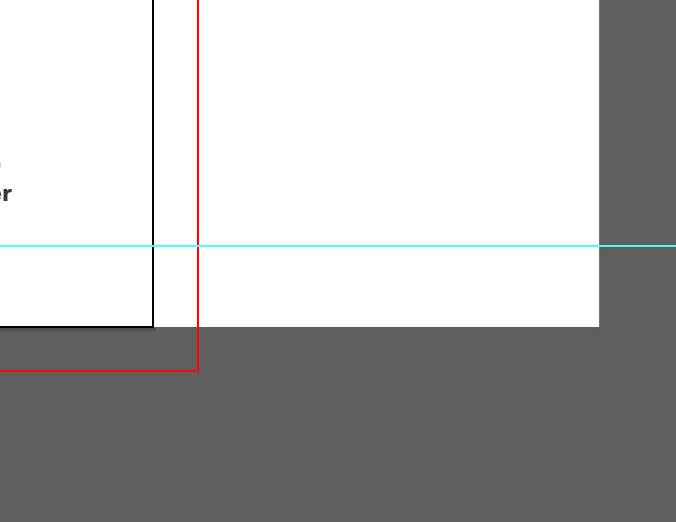
when i resize my artboad in illustrator cc (smaller for example from 450 to 420mm) it does it but the old artboard boundaries are still visible, and won’t go away. it’s weird and annoying. adobe needs to fix this problem.
This topic has been closed for replies.

7 replies

Participating Frequently
February 3, 2023

ok, this may be an indication as to the root of the problem (this is aimed at the adobe staff & their programmers). in the problem file one of the objects on the art board shows very strange x values (-4675mm instead of 25mm) and although i reset the zero point the value remains. the only fix that i have been able to implement is after the restart opening a new file, copying all the elements over and distributing them to their appropriate layers.

Ton Frederiks
Adobe Expert
February 1, 2023

Did you check in the Artboards panel if you have multiple artboards on top of each other?

Participating Frequently
February 3, 2023

yes. look people i have been using illustrator professionally and academically for at least 20 years. i rarely make really fancy stuff but have done so in the past. most of the time things work well (except for the mathematical inaccuracies on the positioning of objects: three places after the decimal things get very shaky). the documents in question are simple flat art on three layers, and like others which i have built hundreds of times (and resized) in the past. this phenomenon is new, and i am there is sone sort of programming or preference or whatever bug at the root of it.

Kurt Gold
Adobe Expert
January 31, 2023

Just guessing, but are you perhaps talking about the red boundary in your screenshot?


If so, this may be just the bleed marker / guide. Have you already checked that?


Participating Frequently
February 1, 2023

the red bleed marker corresponds to the new resized artboard and is correct.

it is the area to the right that remains and is weird.

i just made a new document and resized the art board and it worked. strange.

Monika Gause
Adobe Expert
February 1, 2023

There is probably an object on that artoard. Objects don't get adjusted automatically.

Met1
Brainiac
January 31, 2023

Did you try a prefs reset?

Have you restarted your computer?

This happens on all docs, old and new?

Participating Frequently
February 1, 2023

reset prefs, restarted illustrator. still there.

it just started with new documents, and didn’t in the past.

Participating Frequently
January 31, 2023

what you see to the left is the size of the artboard previous to the resize.

Monika Gause
Adobe Expert
January 31, 2023

The left side? Rather looks like the right side.

It would help to see the whole picture. Before and after. And the leyers panel. Opened, so the contents of layers are visible.

Monika Gause
Adobe Expert
January 31, 2023

Did you resize the artboard or did you resize an object on the artboard?

Participating Frequently
January 31, 2023

i resized the artboard.

Participating Frequently
January 31, 2023

Hi,

we need more information to help you. Which version of Adobe Illustrator are you using? Which OS are you running the software on? Thank you

Participating Frequently
January 31, 2023

it is adobe illustraor version 2021 (25.4.1), on mac os catalina 10.15.7