


Batch export PDF/PNG with custom file names (csv variable library)
Hi there,
I'm still fairly new to Illustrator, so hope someone can help me out.
What I want to achieve:
I want to automate some tasks and thus, be able to import a .csv spreadsheet as a variable library that creates x no. of datasets with different headlines, images and a source/text.
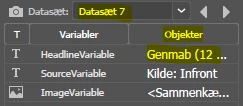
I want to be able to batch export these as both pdf and png (png = zoom 300%, clipped to arboard) as individual files (2 for each dataset) with a custom name for each dataset based on some variable. See the example below where I have imported the variable library. If I can export as pdf and png with name = HeadlineVariable (object name) for each dataset - that would be ideal:
All exports can go to the same folder. It is fine if this is the same folder each time, say called "export" in some specific path. However, ideally I would want 2 subfolders in "export" called "pdf" and "png" - but not necessary.
Where I am currently:
I can import my csv sheet and see my different datasets which are all showing correctly as I cycle through them.
However, I do not know how to batch export these with a custom name for each. Seems like it will only let me name them as the dataset name, or filename + number, etc.
Normally I would achieve something like this using recorded actions, however, I don't know how to do this using datasets with a custom name for each as explained above:

Not sure if I need a script. If so, I have never used scripts before and would like some help setting this up.
Thanks,
Rasmus
 AdChoices