


Spirited_happiness5D41
Known Participant
August 9, 2019
Answered

Best Way to do Perpendicular Lines on Slanted/Angled Lines?

  • August 9, 2019
  • 3 replies
  • 21608 views

After some searching on this topic it seems this comes up: Is there a shortcut to draw a 45 or 90 degree angle from a drawn line on an angle?

Seems like there is only a paid option, looks like a subscription, called SubScribe v2...

Does Adobe illustrator have a built in perpendicular line tool to draw from an anchor point on a slanted line?
This topic has been closed for replies.
Correct answer jane-e

Hi

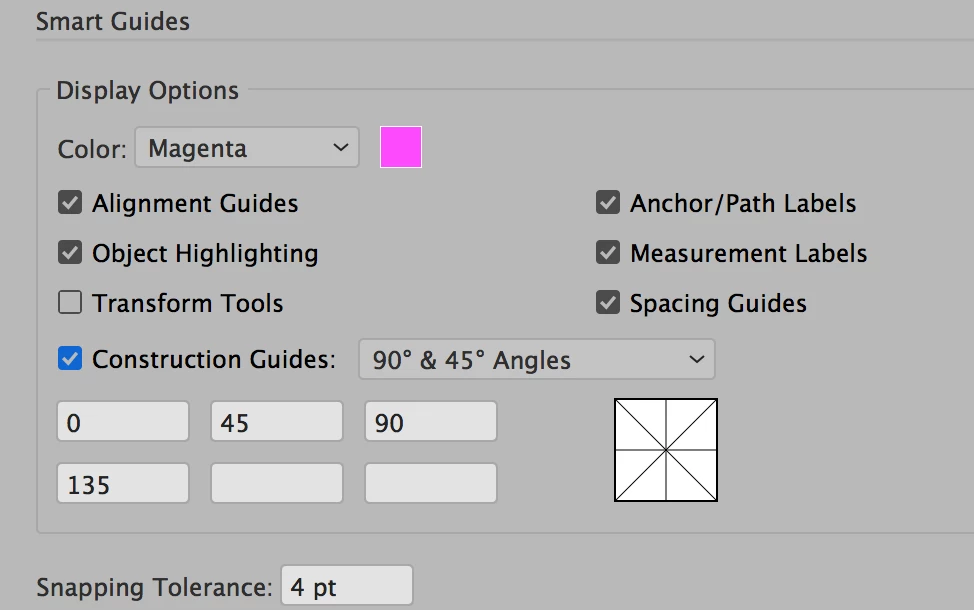
Go to Preferences > Smart Guides and check (tick) Construction Guides. Keep 90° & 45° from the dropdown, or choose something else, or type in your own angles. You have six boxes you can use, so if you want 17°, just type it in.

To draw anchor point to anchor point, make sure Snap to Point is enable in the View menu. Deselect first (or hide the bounding box).

~ Jane

3 replies

Monika Gause
Community Expert
Community Expert
August 10, 2019

SubScribe is not a subscription. You pay once (until it gets a major upgrade)

As for perpencicular lines: Try a pattern brush.

barbara_a7746676
Community Expert
Community Expert
August 10, 2019

If you only want angles of 45 degrees, you can hold down the Shift key white dragging with the Line tool.

jane-e
Community Expert
jane-eCommunity ExpertCorrect answer
Community Expert
August 9, 2019

Hi

Go to Preferences > Smart Guides and check (tick) Construction Guides. Keep 90° & 45° from the dropdown, or choose something else, or type in your own angles. You have six boxes you can use, so if you want 17°, just type it in.

To draw anchor point to anchor point, make sure Snap to Point is enable in the View menu. Deselect first (or hide the bounding box).

~ Jane

Spirited_happiness5D41
Known Participant
August 10, 2019

Perfect!

jane-e
Community Expert
Community Expert
August 10, 2019

AdobeBrah24  wrote

Perfect!

You’re welcome!