

Mirta Sander
Known Participant
January 10, 2019
Question

Bitmap color model?

  • January 10, 2019
  • 3 replies
  • 5109 views

Hi. I have a small question.

I need to export some artboard to bmp file with spec: bitmap 16 colors with format .bmp

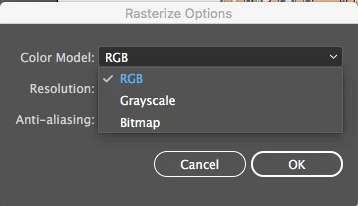
So can i export as bmp and then what i need to set for 16 colors? RGB OR Bitmap?
Thanks.

Mirta

    This topic has been closed for replies.

    3 replies

    Myra Ferguson
    Community Expert
    January 10, 2019

    I'm on Windows, so I do see that dialog. I am looking at the current version, not CS6, though. Even at that, I can only get you so far in Illustrator. If you select RGB, your lowest bit depth option is 16 bit; however, 16 colors is 4 bit. If you do a Save for Web (Legacy)... to create a GIF, you can set the colors to 16 and adjust the Color Reduction Algorithm and Dithering to make it look as close to the original as possible.

    At this point, I haven't found a way to get you from the GIF to the 4 bit BMP in Illustrator. You might see if there's a GIF to BMP converter online that will use the Color Table created in Illustrator.

    Community Expert
    January 10, 2019

    Can you set it to 16 bit in the BMP export dialogue?

    Monika Gause
    Community Expert
    January 10, 2019

    That screenshot is Photoshop. Illustrator does not offer this.

    Community Expert
    January 10, 2019

    I hope I know what software I am using, Monika

    Monika Gause
    Community Expert
    January 10, 2019

    Try doing that in Photoshop. You have to assign a limited color palette.

    Mirta Sander
    Known Participant
    January 10, 2019

    Hi Monika.

    I have only Illustrator CS6 (and InDesign CS6). No Photoshop, sorry.

    So i need to do only in Illustrator.

    What is the difference RGB and Bitmap Color model?

    Remember that the color model of Bitmap is 16 colors in the color table, confirm?

    Thanks.

    Monika Gause
    Community Expert
    January 10, 2019

    You can't assign a limited color palette to a BMP image in Illustrator. You need an image editing application for that. If you don't have Photoshop, try GIMP.