

Answered
Can't change color after using Image Trace
I have just used Image Trace to trace a logo.
After it was traced I clicked expand.
Now I still can't change the outline or fill colors of that logo.
I am using Illustrator CS6. Help please!

I have just used Image Trace to trace a logo.
After it was traced I clicked expand.
Now I still can't change the outline or fill colors of that logo.
I am using Illustrator CS6. Help please!
I've ungrouped it but it didn't make a difference. Still the only way to select it is with the layer palette. Using the selection tool does nothing. It is all going to be black. It was a compound path, so I tried "uncompounding" it. Now I can't seem to select anything, even using the palette. Argggh. (thanks for helping, any other suggestions are appreciated).
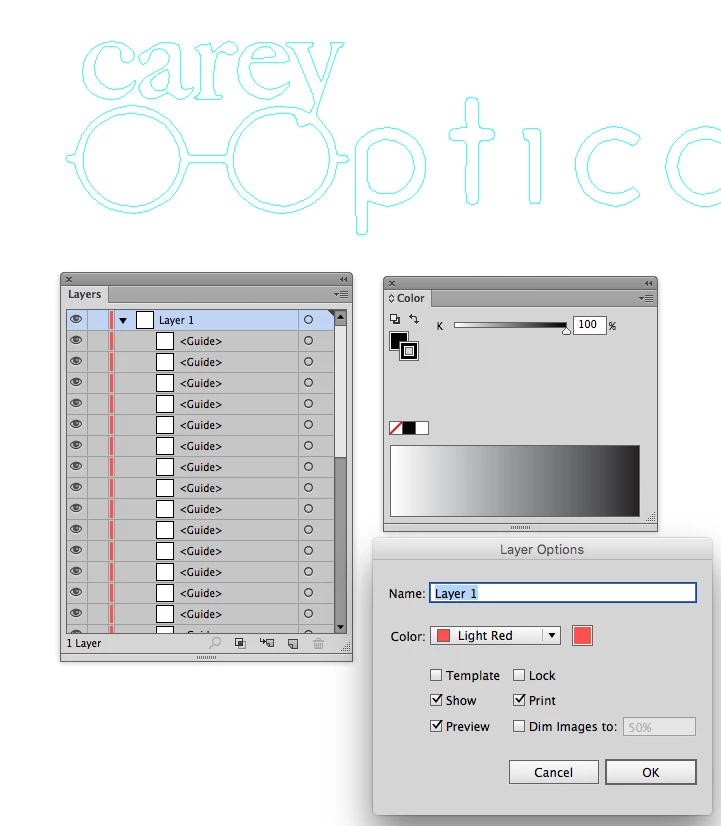
Right now they are guides, as it says in the Layers panel. That's why you can't color them now.
Go View > Guides and Release the selected Guides to paths.
Cmd + 5 is the shortcut to make guides, FYI.
Already have an account? Login
Enter your E-mail address. We'll send you an e-mail with instructions to reset your password.
 AdChoices