Inspiring
April 29, 2024
Answered

Can't change the color or other attributes on grouped objects.

  • April 29, 2024
  • 6 replies
  • 3271 views

I used to be able to click on a group and change the attributes of every object within the group at the same time. Now I can't. I don't know what changed or how to change it back. It's creating a great deal of extra work for me.

Correct answer giln3556509

I FINALLY FOUND IT!! Jesus H - this problem has been giving me a headache for months... figured it out.
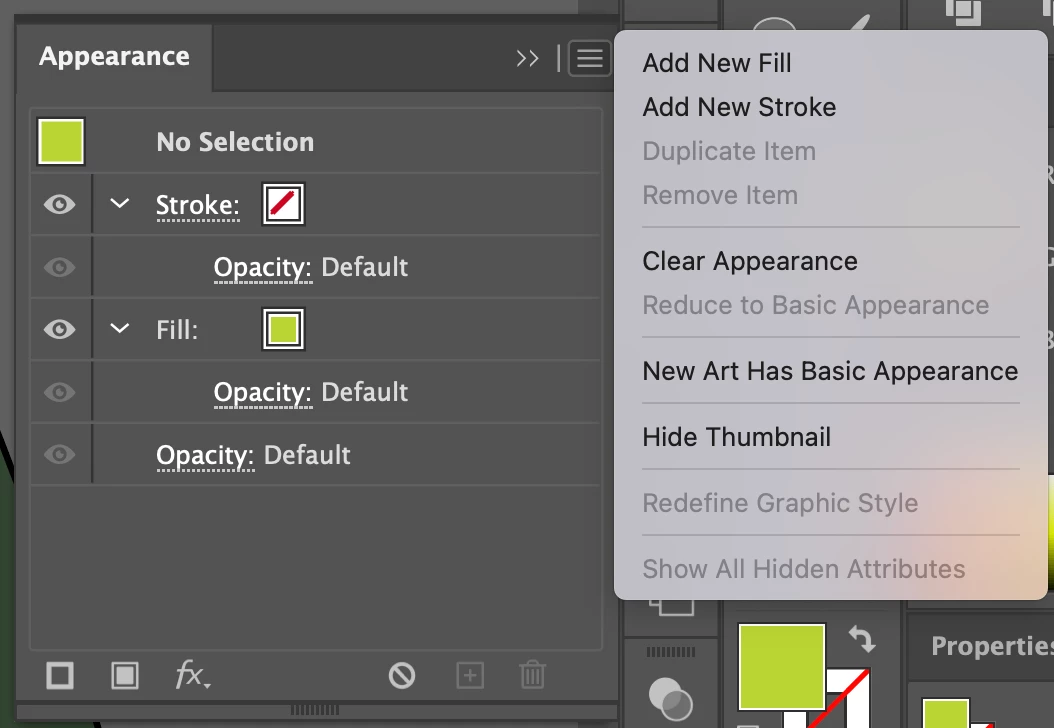
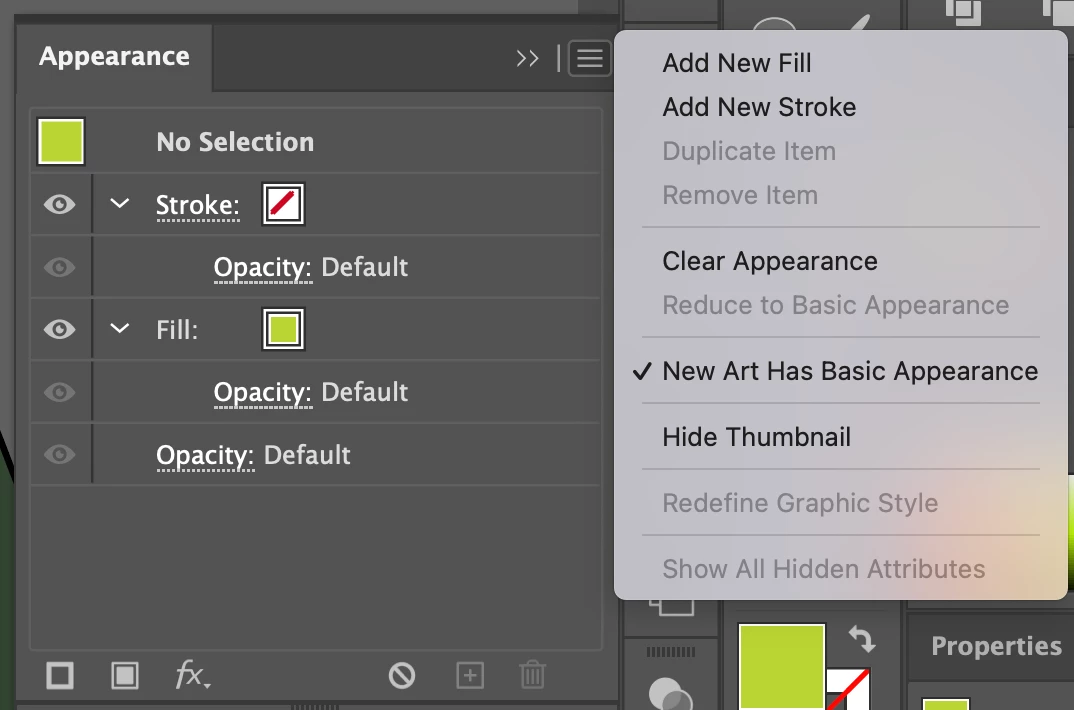
Go to the Appearance tool box - click on the three bars - uncheck the New Art Has Basic Appearance. Life seems to be good again. Praise the lord... Spread the word and let me know if it doesn't work for you. Eyedropper back in action. I'm in tears. 🙌
 

I


6 replies

giln3556509
giln3556509Correct answer
New Participant
February 28, 2025

I FINALLY FOUND IT!! Jesus H - this problem has been giving me a headache for months... figured it out.
Go to the Appearance tool box - click on the three bars - uncheck the New Art Has Basic Appearance. Life seems to be good again. Praise the lord... Spread the word and let me know if it doesn't work for you. Eyedropper back in action. I'm in tears. 🙌


I


New Participant
August 29, 2024

Thank you for posting this. I've been infuriated with this change since it was implemented. I was able to find a workaround on another help thread and wanted to share, in case you never got your answer. If you toggle off Eyedropper Options > Appearance, it will stop applying colors/strokes/etc. to the group and restore back to applying just to individual objects. It even seems to reestore the functionality for non-eyedropper methods (like clicking on a new swatch or manually updating stroke weight). Hope this helps!

Monika Gause
Community Expert
August 29, 2024

The behvaviour of the eyedropper tool has not been changed at least since version CS3

You can watch the screenrecordings here: https://youtu.be/JPXXGqch4BY 

Known Participant
May 21, 2024

Same problem here! I can't use eyedropper or manually change color without ungrouping items (including outlined text -- which is a huge problem because there are so many characters).

Monika Gause
Community Expert
May 21, 2024

Check your appearance panel. If you cannot decode it, please post a screenshot.

Monika Gause
Community Expert
April 30, 2024

The video is extremely blurry, but it's not in isolation mode.

Monika Gause
Community Expert
April 29, 2024

There's nothing in your video.


THis video is about layers. But the same applies to groups: https://youtu.be/YZooJyG2UT4

MEILI5FDEAuthor
Inspiring
April 30, 2024

Thank you for that guide. Unfortunately, it's not working for me like it is on the video. Again, it seems to be a problem with the groups. I've attached a different video in the OP showing how it refuses to change the style when an entire group is selected, even when every item in the group has the same style. It is adding the style somewhere on the objects, like in the video, but there is no extra layer in the appearance panel.

Monika Gause
Community Expert
April 30, 2024

How does your object look in the Appearance panel?

thatsmauri
Community Expert
April 29, 2024

I think you might wanna check your attached video. All I see is a screen cap of "Better Call Saul" there... 😄

MEILI5FDEAuthor
Inspiring
April 30, 2024

Damn screen recorder. 😅