


agatab5527235
Participating Frequently
February 10, 2023
Answered

Can't move illustrator window on mac ventura

  • February 10, 2023
  • 17 replies
  • 15246 views

Hi,

I can't move my illustrator window, whenever i click on top bar to move it it shows window of a programe that is underneath it on my desktop. I reinstalled illustrator but it helped for like a second and then it happened again. 

I've updated my mac to ventura and I think it has sth to do with it. Anyone with similar issue?

(video in the attachment)
 

Correct answer Anshul_Saini

Hello All,


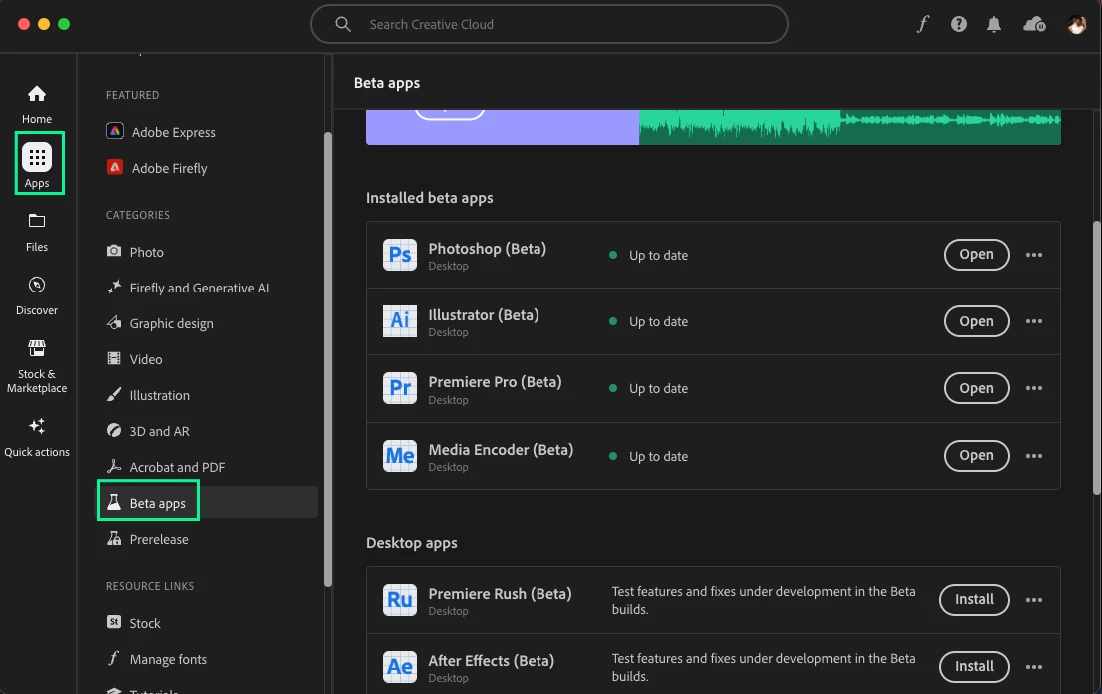
Thank you for your patience with this issue. We've been actively working on a possible fix, and we've just released the latest Beta build (version 28.1.87). Could you please give it a try and let us know if the problem is resolved with this version? Your feedback will help us ensure a smoother experience for you. Thanks for your understanding and cooperation!


Best,

Anshul Saini


#Marking it correct to highlight & notify you all.

17 replies

Known Participant
March 29, 2025

Everyone, give it a try!

  1. Uninstall Illustrator (or Photoshop)
  2. Delete the preferences file in the library (see here)
  3. Install Illustrator (or Photoshop)


This solved my problem.

Participating Frequently
April 1, 2025

It didn't work for me. I uninstalled it. Updated my mac to latest version and installed the latest Illustrator again yesterday.

It still does the same thing...just a waste of time.

Known Participant
April 1, 2025

The problem seems to have been an old preferences file.

scottg10052481
Participating Frequently
January 3, 2025

Not sure why Adobe think this problem has been rectified, nothing has changed, please respond with a fix?

Participating Frequently
January 13, 2025

I finally fixed the problem:

In Illustartor "Settings" go to "Devises" (the last on the list) and uncheck the "Enable Wacom"

You have to quit Illustrator after that for the change to be applied.

It seems to have fixed this issue for me.

scottg10052481
Participating Frequently
January 14, 2025

Thanks for posting, just tried this and no change my end. Sadly Adobe are not interested in fixing anything.

lynney26645481
New Participant
January 3, 2024

Under "window" check "application frame"

Participating Frequently
January 2, 2025

Did anyone find a fix for this issue?

richardw59677702
Participating Frequently
January 3, 2025

Unfortunately not. Both Illustrator and Photoshop have been doing this for two years now and Adobe have marked this thread as having an answer so I don't think they are actively trying to solve the issue. I'm now seriously considering jumping to Affinity as I find this issue so annoying to work with on a daily basis.

Anshul_Saini
Community Manager
Anshul_SainiCommunity ManagerCorrect answer
Community Manager
November 7, 2023

Hello All,


Thank you for your patience with this issue. We've been actively working on a possible fix, and we've just released the latest Beta build (version 28.1.87). Could you please give it a try and let us know if the problem is resolved with this version? Your feedback will help us ensure a smoother experience for you. Thanks for your understanding and cooperation!


Best,

Anshul Saini


#Marking it correct to highlight & notify you all.

Inspiring
November 7, 2023

Hey @Anshul_Saini ,


thanks for your support. I can say that my issue hasn´t been solved with this version. Same behaviour as in the screencap above. As soon as I combine floating windows together, something gets buggy and it simply clicks through it.


Sorry 😞 

Anshul_Saini
Community Manager
Community Manager
November 7, 2023

Thank you for checking @ercee89857529, and I appreciate your feedback. It's important for us to know your experience. Could you please share a screenshot of the About Illustrator dialog to confirm that you are indeed running the Beta version 28.1.87? This will help us ensure we're addressing the issue with the correct version. Your assistance is highly valuable in resolving this matter.


Best,

Anshul Saini

Inspiring
November 6, 2023

Hey guys - since we recently updated on Ventura aswell, I am having a very similar issue on my side here. I have two monitors. The main tools and the canvas are on one monitor and a lot of windows customly organized on the second one. I can´t select a layer on the second screen. It always clicks "through" the application to the window or desktop behind. 
Maybe this is some saved layout issue? Because when I switch back to the regular layout and undock e.g. the layer window and pull it to the second screen, It seems to work. 

Maybe worth giving this a shot?

The Prerelease is not working anymore at my side. So I could not test it there.

Inspiring
November 6, 2023

Okay - interestingly I was able to recreate the issue, as soon as I combined two windows to one floating. The layers then were not selectable anymore - but just for some of them. This is so crazy.

Community Manager
November 6, 2023

Hello @richardw59677702,

Sorry to hear about this experience. Would you mind sharing some more details, like the exact version of the OS/Illustrator, system config (CPU/GPU/Memory), and a screen recording of the problem (https://adobe.ly/3MtZZCo), so we can investigate this further?


Looking forward to hearing from you.


Thanks,

Anubhav

Known Participant
October 9, 2023

I can'\t move Illustrator or Photoshop on my Windows desktop. Windows 10

scottg10052481
Participating Frequently
September 1, 2023

I still have this problem on my macOS 13.5.1 with Illustrator 27.8.1. Is there a work around?


Anshul_Saini
Community Manager
Community Manager
September 27, 2023

Hello All,


I understand that many of you are experiencing an annoying issue with Illustrator on your MacBooks, where the application window moves behind everything when you attempt to move it. I appreciate your patience and the information you've shared about this problem.


To further investigate and potentially address this issue, it would be helpful to gather some additional details:

  • Can each of you please confirm your macOS version? This will help determine if the issue is specific to certain macOS versions.

  • Did this problem start occurring after updating to macOS Ventura, or were you experiencing it in macOS Monterey as well?

  • As a potential workaround, a couple of users have reported success by changing their workspace to "layout." Have any of you tried this solution, and if so, has it resolved the problem for you as well?

This issue seems to be happening with corrupted user profiles & preferences. As for one user, there is no issue after running the app under a new admin user of macOS Ventura.


Additionally, for those of you who are still experiencing this issue, I recommend considering the possibility of updating to the latest macOS version, macOS Sonoma, if it's available for your device. Sometimes, macOS updates can clean up any profile corruption of preferences.


Your feedback and responses to these questions will help us better understand the scope of the problem and assist you further in finding a solution. Thank you for your cooperation, and I'm here to provide assistance as needed.


Best regards,

Anshul Saini

Participating Frequently
October 10, 2023

Hi @richardw59677702 @agatab5527235 @scottg10052481,


Thank you for providing additional information about your macOS versions and the behavior of Illustrator's window movement issue. I appreciate your cooperation in helping us understand this problem better.


It's clear that this issue is specific to macOS Ventura and has started occurring after upgrading to that version. I also appreciate the confirmation that changing the workspace to "Layout" seems to work as a temporary workaround.


As a next step, I would like to suggest a couple of actions to further investigate this issue:

  • Update to macOS Sonoma (if available): If any of you have the opportunity to update your macOS to the latest version, macOS Sonoma, it would be helpful to check if the issue persists on the new macOS version.

  • Try a New Admin User Account: As mentioned earlier, this issue appears to be related to corrupted user profiles or preferences. If any of you can create a new admin user account on your Macs running Ventura and test Illustrator under that new admin account, it could provide valuable information. If the problem does not occur in the new admin account, it may indicate that the issue is specific to your current user profile. I know @agatab5527235 has tried and worked for him. Just want to reconfirm with Richard & Scott.


I understand that these steps may require some effort, but they can help pinpoint the root cause of the issue and provide a clearer path to a solution.


Thank you for your patience and cooperation in resolving this matter. Please feel free to reach out if you have any more questions or if there are any further developments.


Best regards,

Anshul Saini


I'm on OS Ventura 13.4. I tried Illustrator prerelease as well. Problem persisted. Changing workspace to Layout solves the issue but I don't like working with this workspace.

New Participant
July 27, 2023

Hi, I have had exactly the same issue which is so frustrating. I spend a few hours on the phone to Apple who could not help. I think it is a Ventura / illustrator 27 problem. I've downgraded to 26.5.3 and now it seem to get over the problem. I tested 27.0 and the problem is the same. The only option seems to be 26.5.3. Hope this helps 

Community Manager
July 17, 2023

Hello everyone,


Thanks for your patience. Our team has made some improvements to alleviate this problem in the latest Pre-Release of Illustrator. Would you mind trying the Pre Release version of Illustrator 27.8 to check if it helps resolve this problem?

To install the Pre-Release version, kindly try the following steps:
> Go to https://www.adobeprerelease.com/
> Sign in with your Adobe ID
> Navigate to Available Programs and click on Join for Illustrator CC
> Open Creative Cloud and press the (Cmd + Option + R) and choose relaunch.
> After relaunching, go to Apps and choose Prerelease from the Left Pane and install Illustrator (Prerelease)


Looking forward to hearing from you.


Thanks,

Anubhav

Participating Frequently
July 18, 2023

Hi Anubhav,


I downloaded the 27.8 and it does the exact same thing. As usual, it works fine for the first few minutes but then, when I try to move my Illustrator window, or when I click anywhere on the artboard, my Illustrator window moves behind other open window (i.e. Chrome, finder wiondow, etc.). Then at some point it works fine again for a minute or two and the same thing happens again. Very anoying.

agatab5527235
Participating Frequently
July 19, 2023

It's exactly the same for me, works in the beginning but once I start jumping through windows (as I usually do) it happens again.

benoitm76536519
New Participant
June 12, 2023

The same thing happen with my illustrator.....:(


Anshul_Saini
Community Manager
Community Manager
June 22, 2023

Hi @benoitm76536519 @Acme Creative @Helen Pummell,


I can understand how frustrating it can be when you're unable to move the Illustrator window properly on your Mac. To further investigate and provide you with the appropriate solution, could you please share the Apple System Report (SPX file) with us? You can generate the report by following the instructions here: [https://support.apple.com/en-gb/guide/system-information/welcome/mac#:~:text=Save%20a%20system%20report%3A%20Choose%20File%20%3E%20Save].


Additionally, could you let us know if you're using a multi-monitor setup? If so, please provide us with the resolution and make/model of the monitor you're experiencing the issue with.


In the meantime, I recommend updating Illustrator to the latest version, v27.6.1, and macOS to version 13.4.1. This may help resolve the issue. If the problem persists, you can try renaming the UXP & CEP folders from the following locations and running the application in an admin user account to see if that makes any difference:

  • Rename the CEP & UXP folder to CEP.old & UXP.old from the following locations:
    /Library/Application Support/Adobe
    ~/Library/Application Support/Adobe
  • If that doesn't help either, uninstall the application using the CC Cleaner tool and reinstall from the Creative Cloud Desktop app if not done previously.


Note: Location starting with this "~" sign indicates the User Library, which is hidden. So, you need to copy & paste the exact path in spotlight search or from Finder Menu > Go > Go to Folder > Paste the location in the dialog box like this:


This information will help us investigate the issue further and provide you with the appropriate solution.


Best,

Anshul Saini