


Can't paste into new document

Copy link to clipboard
Copied
I'm trying to move some artwork from one Illustrator file to another. I select the artwork and choose Copy, then go to the second document, and the option to Paste is grayed out (I use key commands, but the result is the same). It doesn't matter if I choose a group of layers, or just a single path.
"Paste Remember Layers" is checked. Both documents use the same color space. Illustrator CC current.



Explore related tutorials & articles
 14
Replies
14
14
Replies
14


Copy link to clipboard
Copied
Are you using any clipboard management utilities?
Copy link to clipboard
Copied
KrisHunt Nope, just regular old copy/paste.


Copy link to clipboard
Copied
Which system, which version?
Any third party plugins?
Which other applications are running on your system. Please name all.
What exactly are you copying?
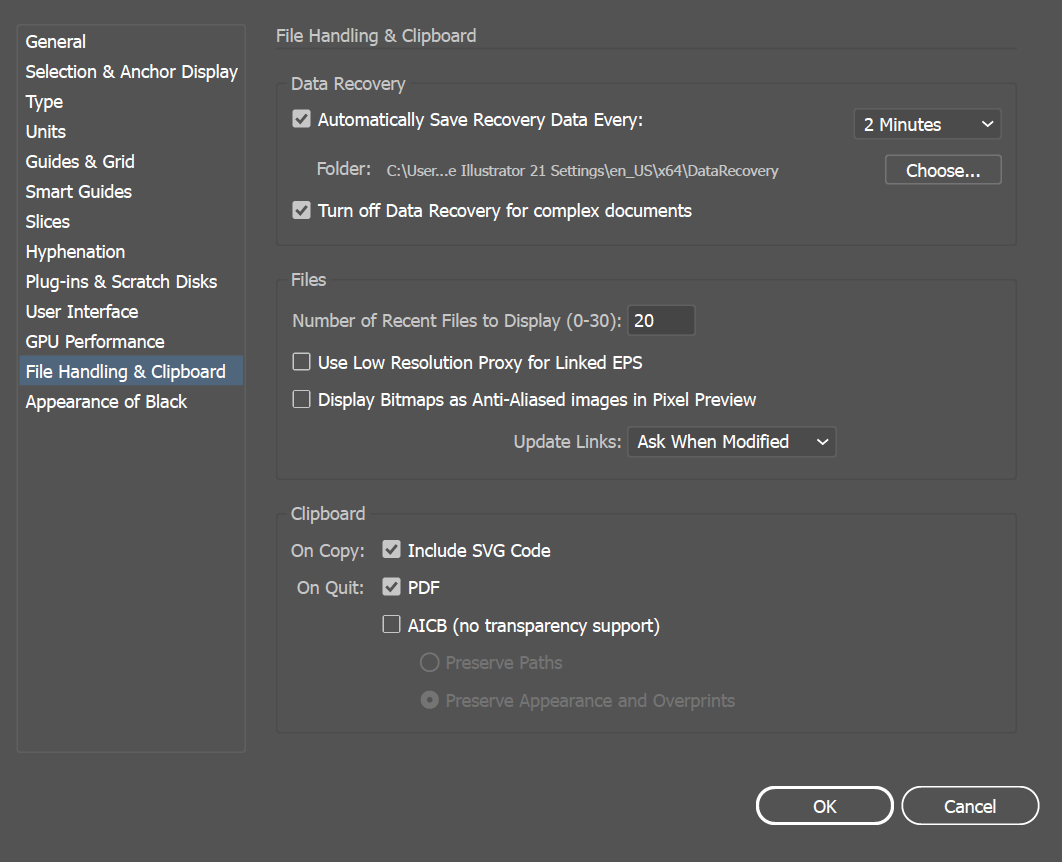
How is Preferences > Clipboard handling set up?
Copy link to clipboard
Copied
@ Monika Gause
Which system, which version?
Windows 10 Pro Version 1703 OS Build 15063.608
Illustrator CC 21.1.0 64-bit
Any third party plugins?
No Illustrator plugins installed
Which other applications are running on your system. Please name all.
The problem happens when only Illustrator is running. But initially I was running Illustrator and Chrome.
What exactly are you copying?
Not sure how to answer this. Just paths. Some compound, some not. Fonts all converted to outlines. Pretty basic stuff.
How is Preferences > Clipboard handling set up?

Copy link to clipboard
Copied
Have you tried not selecting ANY layer or object before pasting? Make sure all layers are unlocked. "Paste Remembers Layers" will us existing layers with the right name or create new layers with the correct name.
Copy link to clipboard
Copied
rcraigheadUnselecting everything in the target document gives me the same results. Also I checked for locked layers, and nothing is locked in either document.
Copy link to clipboard
Copied
Have you tried pasting into a brand new document? Or is that what you're doing?
Copy link to clipboard
Copied
rcraighead Yep, I've tried a brand new document.
Copy link to clipboard
Copied
I have noticed that if I force quit Illustrator and re-open it, I have one chance to copy/paste these paths from one recovered document to the other recovered document.
Copy link to clipboard
Copied
Can you try without Chrome being launched?
Copy link to clipboard
Copied
@ Monika Gause
>> Can you try without Chrome being launched?
Yes, I've tried it after a fresh restart with only Illustrator being opened.
Copy link to clipboard
Copied
Please do again check if your clipboard is not enhanced by either the system or some utilitties.

Copy link to clipboard
Copied
Your description leads me to assume exactly one paste is allowed after that something gets corrupted, but each force quit removes that corruption and allows you one paste, is that correct? Did you try using file >>paste rather than Ctrl V.
Are you running Chrome, because you internet explorer was acting strange? Windows still runs explorer in the background, you may want to delete your cookies/cache files from the privacy tab in internet explorer. Check your task manager for anything out of the ordinary running.
Copy link to clipboard
Copied
Your description leads me to assume exactly one paste is allowed after that something gets corrupted, but each force quit removes that corruption and allows you one paste, is that correct? Did you try using file >>paste rather than Ctrl V.
That sounds sensible. I can't use File/Paste because it is grayed out and not selectable. As a matter of fact, I just realized I can't paste the selection into the same document. As if it's not being stored in the clipboard at all.
Are you running Chrome, because you internet explorer was acting strange?
I don't use Internet Explorer, so a problem with Explorer's cache seems unlikely.


Get ready! An upgraded Adobe Community experience is coming in January.
Learn more
 AdChoices