


- Inicio
- Illustrator
- Hilos de conversación
- Can't Resize in Illustrator even though Bounding B...
- Can't Resize in Illustrator even though Bounding B...

Copiar vínculo al Portapapeles
Copiado
Hello! Hoping someone can help as this is frustrating and I can't for the life of me get any answer from anywhere that does not involve the bounding box.
I am unable to resize objects and text in illustrator despite the anchor points being visible and the bounding box being turned on. This normally happens by accidentally hitting an unknown hotkey (Not sure which one...). My mouse has a different icon on it when this happens that I do not recognize (photo below).
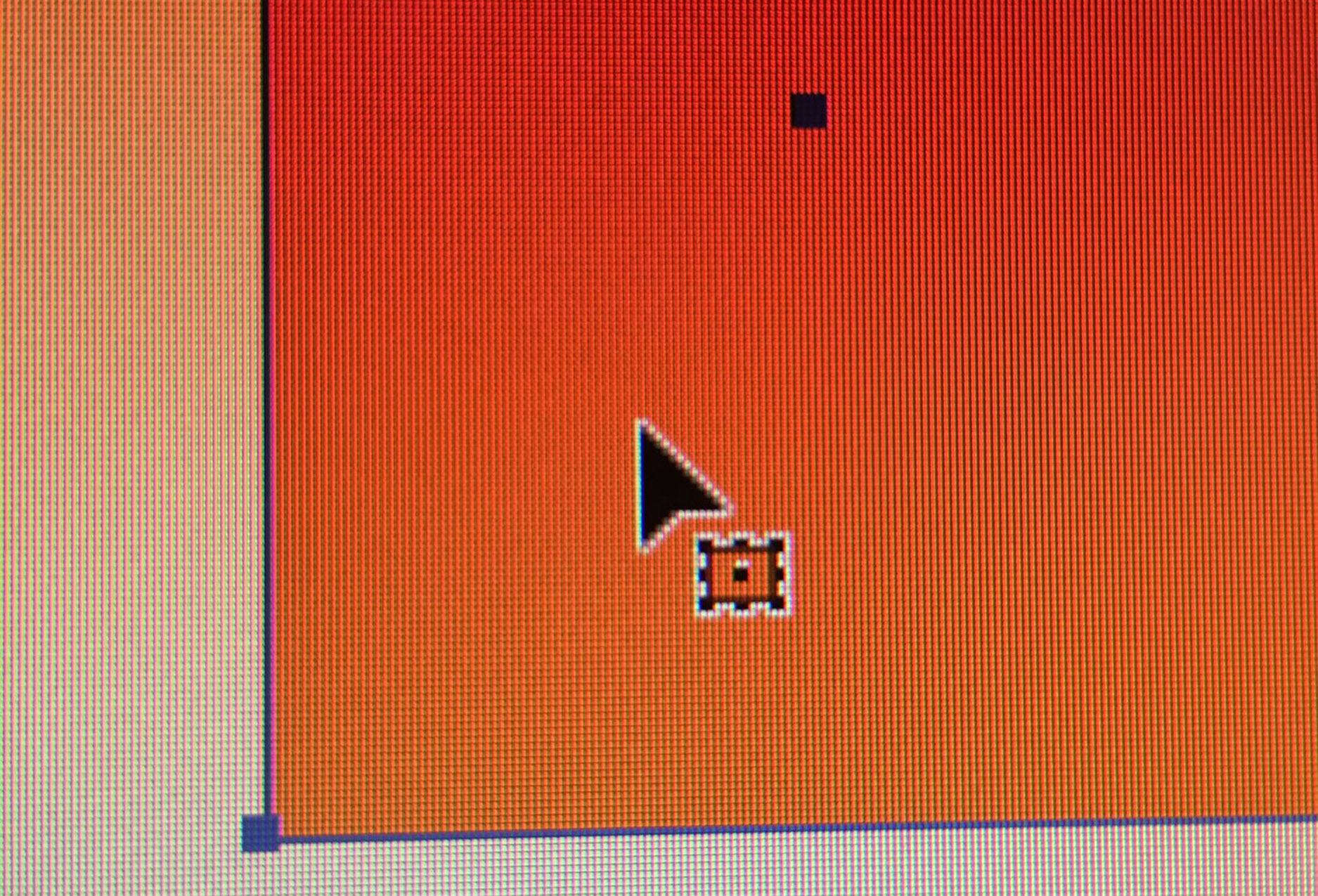
Program version: 2018 CC Illustrator (Newest Update as of May 31, 2018)
Please help... uninstalling does not work and this is really slowing down my workflow.


 5 respuestas correctas


The icon you're seeing is that of the Free Transform Tool and the anchor points appear as if the Bounding Box is not activated. Turn on the Bounding Box under the View Menu and select the object with the regular selection tool (black arrow). You should then be able to scale and rotate the object using this selection tool.


The Selection tool has the same icon as the Free transform tool.
But I agree, turn on the Bounding Box: Shift Cmb B (or Shift Ctrl B on Win).

That's not the bounding box. You need to do View > Show bounding box.
@eonix schrieb:
I have the correct mouse and also the bounding box I can increase the size of the rectangle shape but not decrease it.
That is I am able to increase the height and width of the rectangle shape. I am also able to decrease the width of the rectangle shape but I am not able to decrease the height of the shape.
In your case it's probably that "Scaler corners" is turned off in the transform panel.

FOr anybody still having trouble, i did all of these solutions and nothing worked. I made a rectangle then with the regular selection tool i pressed control and dragged the corners to make it a cureved ractangle. THEN when i pressed show bounding box, it actually popped up, it would not work for a regular rectangle. after that it worked for whatever shape i made

Examinar y buscar tutoriales y artículos relacionados
 57
réplicas
57
57
réplicas
57

Copiar vínculo al Portapapeles
Copiado
There are 2 pages of replies. To spare everyone the need to read through all of them, please tell us what you already tried.
Also: which version and system is it?

Copiar vínculo al Portapapeles
Copiado
THANKS MONIKA

Copiar vínculo al Portapapeles
Copiado
A combination of what clarissaj and bobbending wrote helped me. Thanks all.
Copiar vínculo al Portapapeles
Copiado
Very helpful thank you! I was having the same issue and this worked - check 'scale corners'.

Copiar vínculo al Portapapeles
Copiado
For anyone reading this, the reason 'Scale Corners' worked for this person was because their rounded corners were at the maximum radius for the shape they had selected. It would not be possible to resize the shape while maintaining the corner radius.

Copiar vínculo al Portapapeles
Copiado
THANK YOU SO MUCH AFTER 4 YEARS I WAS DOING MY DESIGN CLASS HW AND THIS SAVED MY LIFE THANK YOU SO MUCH I LOVE YOU
Copiar vínculo al Portapapeles
Copiado
FOr anybody still having trouble, i did all of these solutions and nothing worked. I made a rectangle then with the regular selection tool i pressed control and dragged the corners to make it a cureved ractangle. THEN when i pressed show bounding box, it actually popped up, it would not work for a regular rectangle. after that it worked for whatever shape i made

Copiar vínculo al Portapapeles
Copiado
So random but it worked!! Thank you!!

Copiar vínculo al Portapapeles
Copiado
you are a life saver!!!!! Thanks a million!!

Copiar vínculo al Portapapeles
Copiado
saved my life!

Copiar vínculo al Portapapeles
Copiado
Great sir it worked perfectly and now im able to work .
A BIG THANK YOU FOR YOUR CONTRIBUTION YOU'RE THE LEGENDS GUYS

Copiar vínculo al Portapapeles
Copiado


Copiar vínculo al Portapapeles
Copiado
Currently haveing the same issue. I have tried the "Show bounding box" option as well and nothing is working. I can scale a single shape I have drawn, but once I group it, or try to scale group text, it won't let me.

Copiar vínculo al Portapapeles
Copiado
If you're having problems adjusting the width/size of a block of text and it's distorting the text when you resize the container, the block needs to be converted to a 'Type Area'. Select the block of text with bounding box displayed then go to the 'Type' menu in the top bar, then down to 'Convert to type area'.
Now when you resize the text block, the text will re-flow.

Copiar vínculo al Portapapeles
Copiado
....and this is the one that worked. Thanks.

Copiar vínculo al Portapapeles
Copiado
Thank you so much sir
Problem solved

Copiar vínculo al Portapapeles
Copiado
I was having a similar issue, regardless of how big the artboard was, Illustrator refused to resize the selected objects. Eventually, I realised that guides were unlocked so it was selecting the guides as well as the object making the selection too large. I cleared guides and that solved the problem for me.

Copiar vínculo al Portapapeles
Copiado
problem solved. Thank you
Copiar vínculo al Portapapeles
Copiado
OMG Thanks SO much! I had to do some stuff on it for my class and i had to make it the PERFECT size or it didnt work! I had to try OVER AND OVER to get it to work. I was SO confused! THANKS SO MUCH! (the bounding box worked!!!)

Copiar vínculo al Portapapeles
Copiado
I made the above changes and it wasn't until I CLOSED the program and restarted it that it worked and I could resize objects.

Copiar vínculo al Portapapeles
Copiado
OMG!! This was sooooo fustrating for those who had the bounding box on and still couldn't scale
YOU NEED TO RESET AI PREFERENCES IN ADOBE ILLUSTRATOR!
https://www.youtube.com/watch?v=nIYtk10G4HU
USE THIS VIDEO! IT WORKED FOR ME! 🙂


Copiar vínculo al Portapapeles
Copiado
Thank you! Trying that now.

Copiar vínculo al Portapapeles
Copiado
Yes - resetting preferences and restarting fixed this issue for me in Illustrator 26.0.1 - very frustrating.
Copiar vínculo al Portapapeles
Copiado
I was having the same issue! Thank you to all those who have the answers for us still learning in fine tunings of things as we go.
Copiar vínculo al Portapapeles
Copiado
thank you so much I got the same problem and this solved it


Encuentra más inspiración, eventos y recursos en la nueva comunidad de Adobe
Explorar ahora
 AdChoices