


Brainiac
February 3, 2021
Answered

Can't save file 'this file cannot be found' error

  • February 3, 2021
  • 52 replies
  • 119357 views

Hi There,


I've been working on a file for a cople of days that's on my desktop. Today I opened the file, made some edits and hit CMD + S and saw this error...
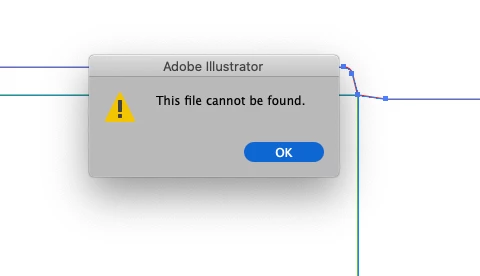
 

Things I've tried...

  1. Copying the art into a new document and saving
  2. Saving the new document to different disks (all local, no servers)
  3. Creating a blank document with nothing in it and saving


Bascially, I can't save anything - has anyone else seen this?

Cheers

Ben

Correct answer maryannr44378043

I had the same issue and instead of double clicking the document, I dragged it down to the Illustrator icon in my Dock and it opened up just fine. I hope I don't have that issue again though. 

52 replies

Known Participant
December 5, 2023

Just another way Adobe sucks, and I can't IMAGINE what they're doing with all the money we pay them every month for the privilege of using insanely bugged software that they never fix. Same issues for years and years and years and years. Constantly running into walls that make meeting deadlines a complete nightmare. 

maryannr44378043
maryannr44378043Correct answer
New Participant
October 29, 2023

I had the same issue and instead of double clicking the document, I dragged it down to the Illustrator icon in my Dock and it opened up just fine. I hope I don't have that issue again though. 

New Participant
August 15, 2023

For me, its because windows controlled folder access blocking the access to required folder path. To cope with it, you need to allow the app access.

Go to windows security > Virus & Threat protection > Ransomware protection > and under controlled folder access, click Allow an app through Controlled folder access

Then add illustrator and adobe services to allowed app list

New Participant
June 28, 2023

Just had the same issue. Luckily I hadn't done too much work by the time I wanted to save. Tried other things on this thread but ended up giving up and closing illustrator without saving. When I reopened it I tried saving a new document and it was back to normal.

aleahmach1
New Participant
June 27, 2023

18 business card files open, one lousy change needs made on all and I get this error.  All file types, all files.  After reading EnzoLH's post I thought, no way.  However, this was the simplest and safest way to try first.  I switched just 1 of the 18 files from CMYK to RGB, then back again.  It worked!  I was able to save the files as-if that error never happened.  Yeah, I don't get it either!  Oviously a bug on Adobe's end, after an update.  Yeah, I don't get it either!

Monika Gause
Adobe Expert
June 27, 2023

@aleahmach1  schrieb:

I switched just 1 of the 18 files from CMYK to RGB, then back again. 


Business cards?

Did you check your colors afterwards? Because that step converted the blacks.

aleahmach1
New Participant
June 28, 2023

I did go back and check each file afterwards, all remained CMYK.  After I finished I did close the program and reboot.  No errors after that on other files I was working on.  Weirdest glitch.

New Participant
June 23, 2023

I tried the accepted solutions and none of them worked for me. Then I opened the creative cloud app. There was an update prompt, after I selected "update" illustrator was able to save again, didn't need to quit.

Participating Frequently
June 12, 2023

I think I've figured out.... Adobe just plain sucks.

New Participant
April 7, 2023

I turned off the VPN of my pc security software then it worked.

Participating Frequently
April 14, 2023

I don't think this is the correct answer, because I generally don't work with VPN on and still had this problem.

Monika Gause
Adobe Expert
April 14, 2023
quote

I don't think this is the correct answer, because I generally don't work with VPN on and still had this problem.


By @Marcin Wik


This thread has several correct answers since there are several causes for the issue. Individual for people.

New Participant
March 16, 2023

I tried,

save as type: SVG(*.SVG), then open it on Illustrator then save as type: Adobe Illustrator (*.AI) 

worked for me.

Monika Gause
Adobe Expert
March 16, 2023
quote

I tried,

save as type: SVG(*.SVG), then open it on Illustrator then save as type: Adobe Illustrator (*.AI) 

worked for me.


By @shashiwardhan28904376l8bt


This might ruin the editability of your file completely. https://www.youtube.com/watch?v=sYmoZw8TgWE

New Participant
March 14, 2023

What worked for me:
- Copy the full artboard

- Pasting on XD as a backup

- Restarting AI

- Pasting again on the same place and saving.


The error ocurred after I left Illustrator open for several hours and then came back to it.