

Spewpa
New Participant
July 13, 2017
Answered

Can't select pressure as an option when creating brush

  • July 13, 2017
  • 6 replies
  • 50723 views

The brush option is greyed out and I can't select it

This topic has been closed for replies.
Correct answer aranl60712300

hi the problem has been resolved.

Im using a Mac Sierra 10.12.6 with a Wacom Intuos pen CTL-480 on Illustrator CC.

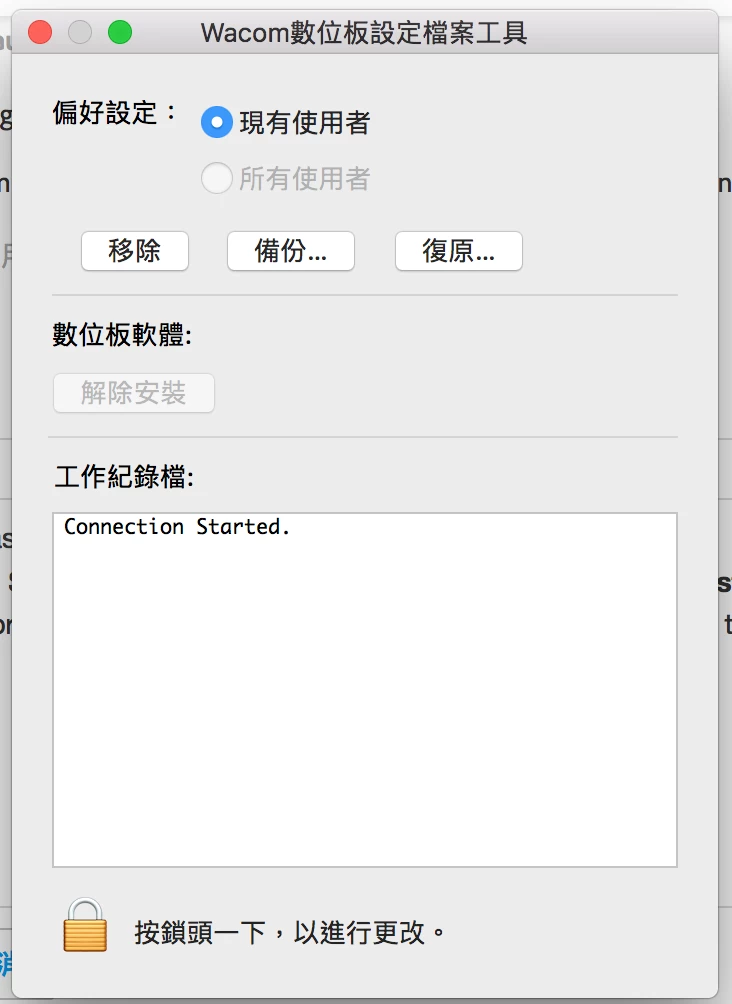
Previously the pressure option was greyed out, so I re-installed (upgrade) the Wacom Drive to the newest available, and then I went to (I think it's called) Wacom Utility and removed all users. And I restarted the computer and the greyed out problem was gone.
6 replies

Participating Frequently
June 26, 2022

As of June 26, 2022 I have the exact same issue and it is not the first time. This has been happening from time to time over the last few years with different versions of Illustrator and MacOs’s. Uninstalling and reinstalling the lastest driver DID help however, just remember that you have to reboot Adobe Illustrator as well for it to load the new drivers. I would prefer for the issue to never arise again however.


aranl60712300
aranl60712300Correct answer
New Participant
February 10, 2018

hi the problem has been resolved.

Im using a Mac Sierra 10.12.6 with a Wacom Intuos pen CTL-480 on Illustrator CC.

Previously the pressure option was greyed out, so I re-installed (upgrade) the Wacom Drive to the newest available, and then I went to (I think it's called) Wacom Utility and removed all users. And I restarted the computer and the greyed out problem was gone.

New Participant
December 11, 2019

Hi - This didn't work for me. 

Using Adobe Illustrator 24.0.1 Intuos Pro tablet, Wacom Driver 6.3.37-3 Mac OS Mojave - latest version. 

New Participant
December 11, 2019

Well guess what - I just uninstalled the wacom driver and re-installed to driver 6.3.37-2 and it now works!!

aranl60712300
New Participant
February 9, 2018

I have same problem too, pen pressure is greyed out.

Monika Gause
Community Expert
February 9, 2018

aranl60712300  schrieb

I have same problem too, pen pressure is greyed out.

Do you have a graphic tablet?

Which one?

aranl60712300
New Participant
February 9, 2018

I'm using a Wacom Intuos pen CTL-480.

The strange thing is the other work that I created last week and had a custom brush can use pen pressure.

But the new files can't.

I've tried re-installing the Wacom Program (upgrading to the newest), but it still doesn't work.

josephm1381
New Participant
November 4, 2017

I have a similar issure. I am using a Fujitsu Q702 windows tablet pc, and I just installed Illustrator C6 and I go to use artistic calligraphic brush and it does not give me pressure as a size option. What drivers do I need?

Ray Yorkshire
Participating Frequently
November 5, 2017

The drivers from fujitsu.

People  with the  pressure problem sometimes add a Wacom tablet driver to their computer, even though they don't have that device.

As this sometimes wakes up the pressure settings in Illustrator...

But its a long shot.

Drivers | Wacom

josephm1381
New Participant
November 5, 2017

I tried that, I have an Intuos 4 and I installed the drivers for that and nothing. The pressure sensitivity works for Autodesk sketchbook, but not in illustrator.

Monika Gause
Community Expert
July 13, 2017

Is it a Wacom tablet?

In that case: try a different version of the driver. Sometimes upgrading helps, and sometimes downgrading.

Is it a different brand?

In that case: try and install a Wacom driver on top of whatever driver is already there.

Not: this is a hack. It may or may not work.

In case it works: please do post which model of tablet you have and which Wacom driver you installed. This will help others. Thank you.

michelew83603738
Community Expert
July 13, 2017

What kind of brush are you trying to create? Is the brush option or the pressure option greyed out? Not all brushes offer pressure sensitivity.

Spewpa
SpewpaAuthor
New Participant
July 13, 2017

Calligraphic

michelew83603738
Community Expert
July 13, 2017

Then it should work. So then you may have to reinstall your Wacom tablet drivers - is it a Wacom? You may have to delete preferences and/Wacom drivers. I have heard this happens most with Window machines. If you reinstall the drivers in a MAC, you just restart and should be fine. If you reinstall on a Windows, you need to open the device manager with Illustrator still open, the Wacom plugged in and disable the tablet device - DO NOT UNINSTALL IT - you may want to use it later. Then you can set the pressure sensitivities and then go back and enable the Wacom again. This has been an ongoing problem.