


Participant
June 22, 2020
Question

Can't use 'arrow keys' in custom keyboard shortcuts

  • June 22, 2020
  • 2 replies
  • 1095 views

I'm trying to change my keyboard shortcuts in illustrator to match another design tool.

Essentially using 'Cmd+Opt+Arrow Up' as a keyboard shortcut for 'Move Forward'.

When I try to do that, I get the error 'The key pressed cannot be used as a shortcut'.


I'm assuming this is the arrow keys? Is there a way to enable them? Just curious why they would be omitted from creating shortcuts?
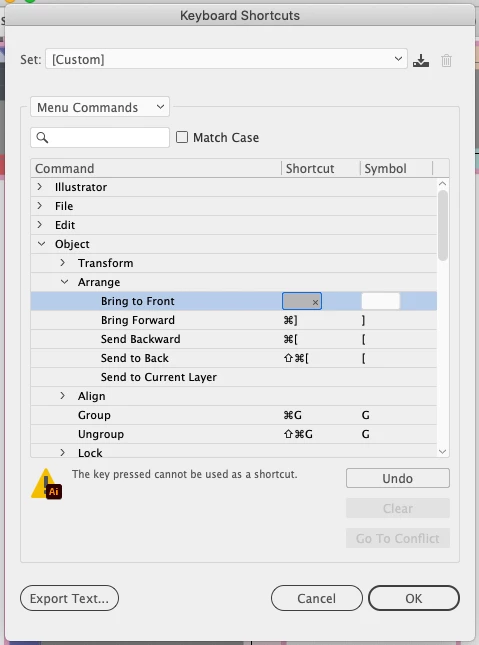


This topic has been closed for replies.

2 replies

Kurt Gold
Community Expert
Community Expert
June 22, 2020

In Illustrator, it is kind of a bad tradition that many possible keyboard combinations are not allowed for some unknown reasons.


For example, I think it is still not possible to assign something like "Alt/Option + "another key" to a specific command. You are then forced to add the Cmd/Ctr key to get the shortcut.


In my eyes it is a weakness.

_Aaron_9278756
Known Participant
November 8, 2023

Total weakness. Wish they would have a mushroom retreat with the InDesign team (which does allow arrow keys in shortcuts) and open their minds to helping their users.

Community Manager
December 15, 2023

Hello @_aaron_8195664,

Thanks for reaching out. I understand that this feature is important to you, and I apologize for its unavailability at this time. Would you mind creating a UserVoice for this feature request (https://adobe.ly/3uZdSTj) and adding your comments there? Doing this will help us prioritize this request, and you will be notified of any updates.

Feel free to reach out if you have more questions or need assistance. We'd be happy to help.


Thanks,
Anubhav

Monika Gause
Community Expert
Community Expert
June 22, 2020

Some keys are just not allowed.

You could try if you can use third party shortcut tool to implement it that way. But those might interfere in undesirable ways in other areas.