



Challenge: How do you make this shape?? (Filling shapes with stripes)
Hi Illustrators! I have run into a seriously vexing problem, and I wonder if anyone out there can help me. I am trying to recreate a bitmap image in Illustrator, and the original file contains these lines.
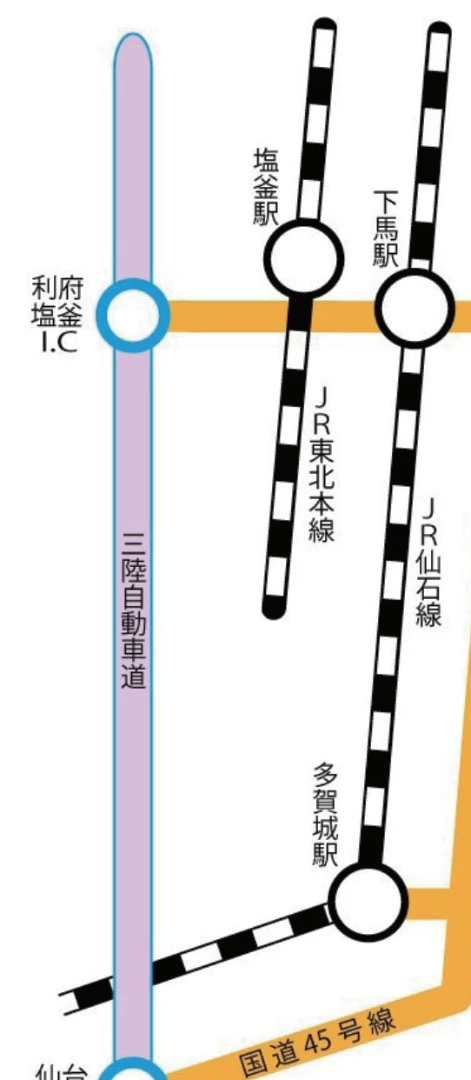
How would you go about recreating these things in Illustrator? My thought was to first use the Rounded Rectangle Tool, to draw the line itself. Next it's simple enough to put a stroke around it, but the ultimate trick is the fill! How would you go about filling the inside of a shape so it's striped like a candy cane?
I tried filling it with a pattern in my swatches, so it came out like this (mine's that little one that doesn't look quite right):
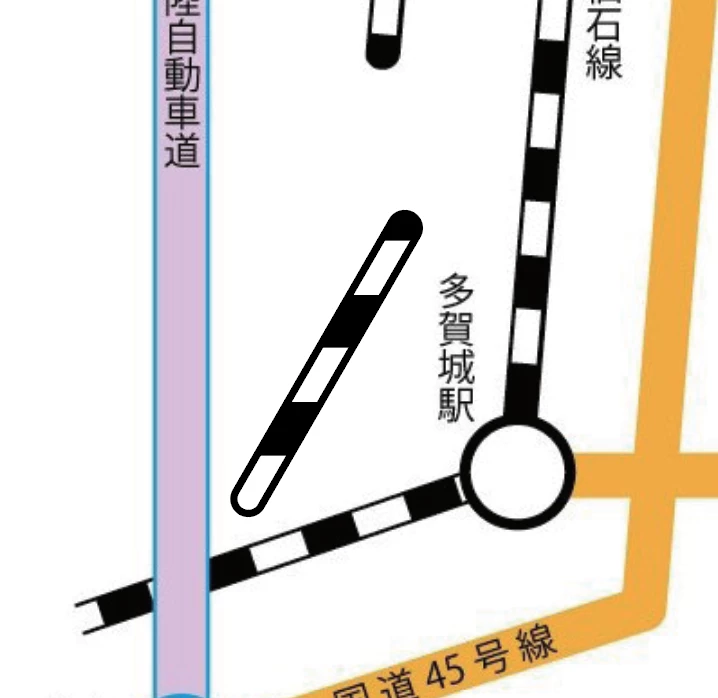
Close, but you'll notice that the stripe pattern isn't following the direction of the line; it's maintaining the original direction of the stripes pattern I had in my swatches, because of course it would; that's the nature of a fill.
So, what am I missing here? How would you make this?? Any advice? I keep wracking my brains over this, and all I'm coming up with is a headache. I welcome any and all suggestions! Thanks so much, everyone!
 AdChoices