


Inspiring
March 3, 2023
Answered

• Change text size of a button (created via Javascript)

  • March 3, 2023
  • 1 reply
  • 3167 views

Hello -


I was wondering how I could change the texte size of a button.

I tried already sveral "things" but nothing seems to work.

// PALETTE
// =======
var myPalette = new Window("palette");
    myPalette.text = "DC TOOLS";
    myPalette.orientation = "column";
    myPalette.alignChildren = ["center","top"];
    myPalette.spacing = 5;
    myPalette.margins = 5;

var button1 = myPalette.add("button", undefined, "3D", {name: "button1"});
    button1.graphics.font = ScriptUI.newFont ("Helvetica", "Bold", 30);   // <— From p78 https://www.daube.ch/docu/fm-documentation/ExtendScript/ScriptUI_for_Dummies-%5BPeterKahrel%5D.pdf
// button1.pointSize = 30;			—>  Doesn't work, at least doesn't change anything
// button2.text.font.size = "30pt";		—>  Doesn't work, at least doesn't change anything
// button2.text.characterAttributes.size = 30;	—>  Doesn't work, at least doesn't change anything
   button2.alignment = ["left","top"];

myPalette.frameLocation = [ 1850, 70 ];
myPalette.show();
This topic has been closed for replies.
Correct answer CarlosCanto

Hello again femkeblanco -


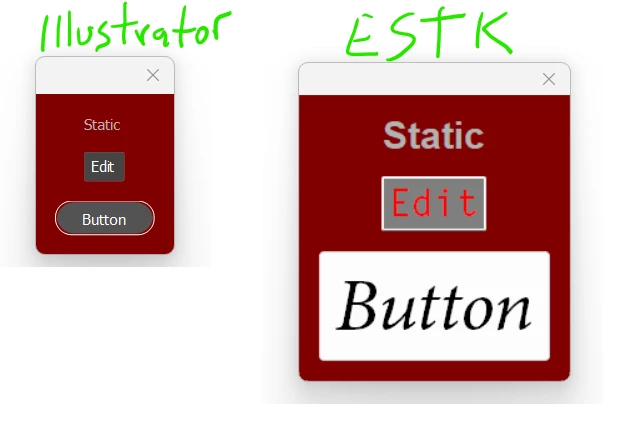
Strangely enough it looks exactly the same (cfr. screenshot).

I work on Mac PRO, OS Catalina (last available update), Illustrator 2022 (last update).


Hi Dimitri, I can confirm there's a problem with it. The below code works fine in the ESTK but it does nothing when run in Illustrator.

b.graphics.font = ScriptUI.newFont ("Minion Pro", "Italic", 60);

1 reply

femkeblanco
Brainiac
March 3, 2023

I don't understand the question.  Why not just use another ScriptUI.newFont() with a another font size?

Inspiring
March 3, 2023

Hello -


Isn't what I have done here (or at least tried to do)?

button1.graphics.font = ScriptUI.newFont ("Helvetica", "Bold", 30);
femkeblanco
Brainiac
March 6, 2023

Hey Carlos -

Hey femkeblanco -


Thanks for your reply…

Nope, even with that line of code it doesn't change anything.

I tried "Verdana", "Tahoma", "Courier", …

Nothing changed


What about this

var font = "dialog";  // default font
var size1 = "30";
var size2 = "60";
var w = new Window("dialog");
var button1 = w.add("button", undefined, "button1");
button1.graphics.font = font + ":" + size1;
var button2 = w.add("button", undefined, "button2");
button2.graphics.font = font + ":" + size2;
w.show();