


changeFillGradients option for .resize() method on a PathItem seems to do nothing?
I'm playing around with the .resize() method in an Illustrator script and the "changeFillGradients" option seems not to do anything.
For reference: https://illustrator-scripting-guide.readthedocs.io/jsobjref/PathItem/#pathitem-resize
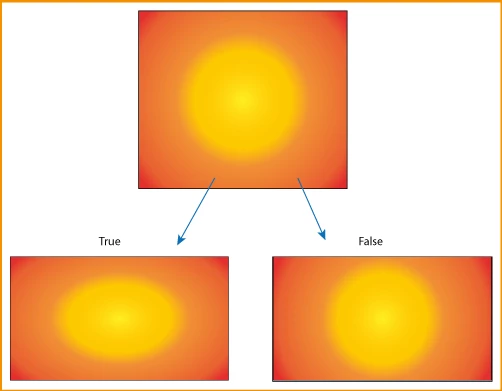
I'm expecting the gradient fill of the object to scale or remain the same based on my input but it just scales with the object whether or not the changeFillGradients option is true or false. For example:
This code:
object.resize(
	200,
	200,
	true, //changePositions,
	true, //changeFillPatterns,
	true, //changeFillGradients,
	true, //changeStrokePattern,
	true //changeLineWidths,
)
Acts exactly the same as:
object.resize(
	200,
	200,
	true, //changePositions,
	true, //changeFillPatterns,
	false, //changeFillGradients,
	true, //changeStrokePattern,
	true //changeLineWidths,
)
Everything else behaves as expected. The object scales, pattern fills scale, line widths scale, but gradient fills don't. Anybody have any idea what's going on here?
EDIT: This same issue seems to be present for the .translate() method. Maybe I'm just missing how this option is supposed to be used for the .translate() and resize() methods. It works just how I expect it to on the .rotate() method...
 AdChoices