


ABkc4here
Inspiring
October 15, 2019
Question

Changing the start point of a variable width profile
  • October 15, 2019
  • 4 replies
  • 4295 views

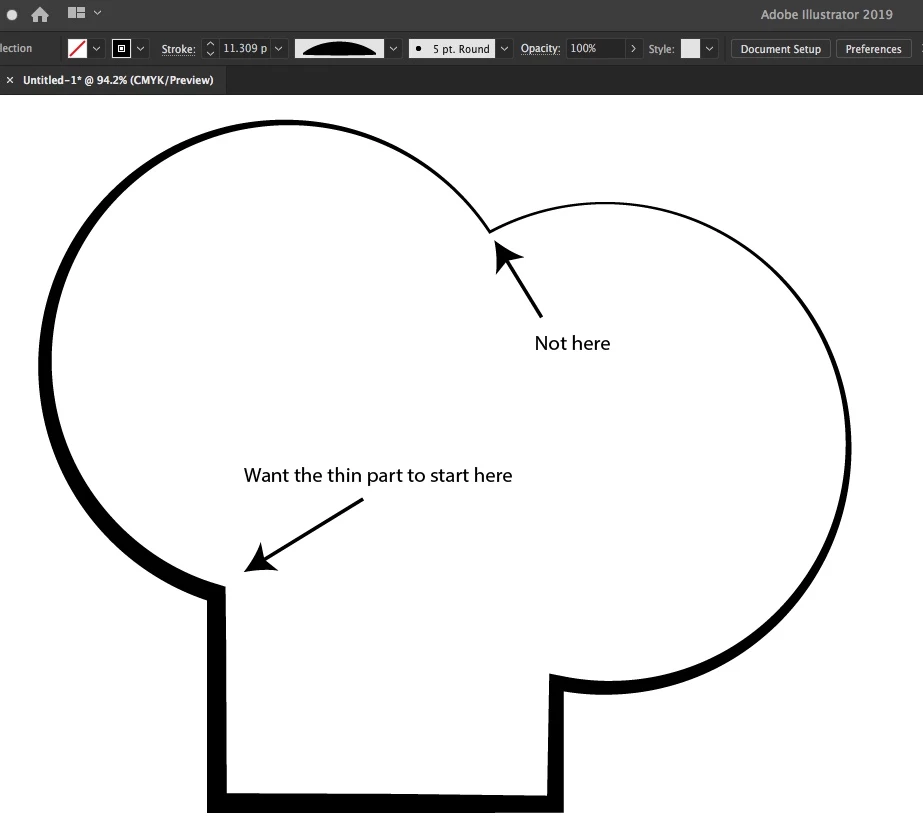
I'm trying to figure out how to change the start position of a preset variable with profile, like the example image. Flipping the profile horizontally or vertically (the only choices I could find) will not do it. 



For clarity:

I want to rotate the profile along the path. Not use the width tool to change the preset (what's the point of the preset if you have to do that?) and not create then cut random points along the path. 


Thanks!


4 replies

Myra Ferguson
Community Expert
October 15, 2019

There's a plugin, Vectorscribe from Astute Graphics, that can reposition anchor points.

ABkc4here
ABkc4hereAuthor
Inspiring
October 16, 2019
That is fancy and seems to fit the bill. Shame it's not available within the program. Thank you!
Ton Frederiks
Community Expert
October 15, 2019

That looks like a feature request.

https://illustrator.uservoice.com

ABkc4here
ABkc4hereAuthor
Inspiring
October 16, 2019
Thanks for the link. I have posted the request!
Ton Frederiks
Community Expert
October 15, 2019

Just modify the Width profile on that path.

ABkc4here
ABkc4hereAuthor
Inspiring
October 15, 2019
That would defeat the purpose of using a preset. I just want to be able to what MikeGondek suggested without cutting a perfectly sound closed path, or even better randomly choose where the start and stop happen.
Mike_Gondek10189183
Community Expert
October 15, 2019


Cut path at the anchor point


ABkc4here
ABkc4hereAuthor
Inspiring
October 15, 2019
And that's the only way? Meaning, if i wanted the thin part to start in between to anchors, I'd have to first make the new point then cut the path?
Myra Ferguson
Community Expert
October 15, 2019
You could use the Width Tool (Shift + W) to adjust the width manually