


New Participant
February 25, 2022
Answered

Copy part of trasformed layer

  • February 25, 2022
  • 1 reply
  • 234 views

Hi all,
I'm new to AI and need a bit of help please... I have made a label for a certain packaging (1lbs) and somehow duplicated it to print 8 copies on one A4 page. I can't remember but I think I used transform. Now, some months later, I wish to make the label slightly bigger for a bigger (2lbs) packaging. When I copy & paste the text artwork to a new document, I get 8 copies and I only want one. I hope this makes sense!?  Any advice will be very much appreciated thanks!

Johan
This topic has been closed for replies.
Correct answer CarlosCanto

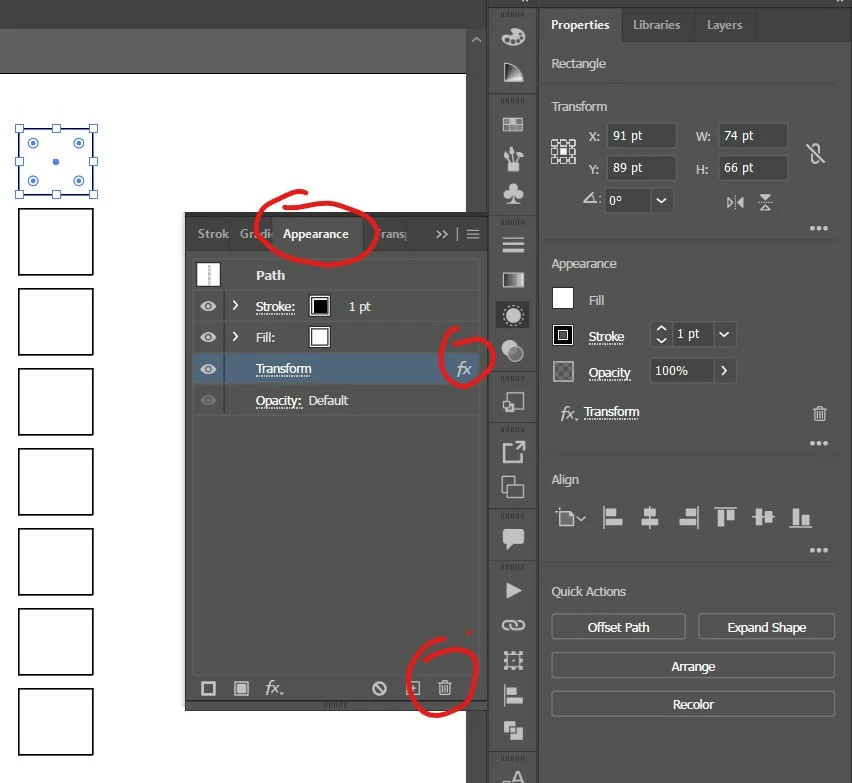
select your item, open the Appearance Panel, select the Transform Effect and click on the Trash Bin button. 


1 reply

CarlosCanto
CarlosCantoCorrect answer
Community Expert
February 25, 2022

select your item, open the Appearance Panel, select the Transform Effect and click on the Trash Bin button. 


New Participant
February 25, 2022

Much appreciated my friend! I've been struggling for hours to find a solution! 😉