


Participating Frequently
July 7, 2010
Answered

CS5 "Not enough scratch memory available" error when there's plenty of it.

  • July 7, 2010
  • 3 replies
  • 41879 views

Illustrator CS5 throws this error:

---------------------------
Adobe Save For Web AI Error
---------------------------
Could not complete this operation. There is not enough scratch memory available.
---------------------------
OK  
---------------------------

when trying to save for web. The content has a lot of linked images, around 1000x1000 px each, used with clipping masks, drop shadows and glows at 300dpi.

I realize that this might be hard to flatten for JPEG and I'd be fine with long processing times (which I get) but out of memory?.. Here's my config:

Illustrator CS5

Windows 7 x64 Ultimate

Intel Core i7 920

6GB RAM

Total pagefile size: 24GB.

Primary scratch disk - 155GB free.

Secondary scratch disk - 544GB free.

Those are all gigabytes, not megabytes, no mistake. There's NO WAY that there's not enough scratch memory available.

And this is how the process looks:
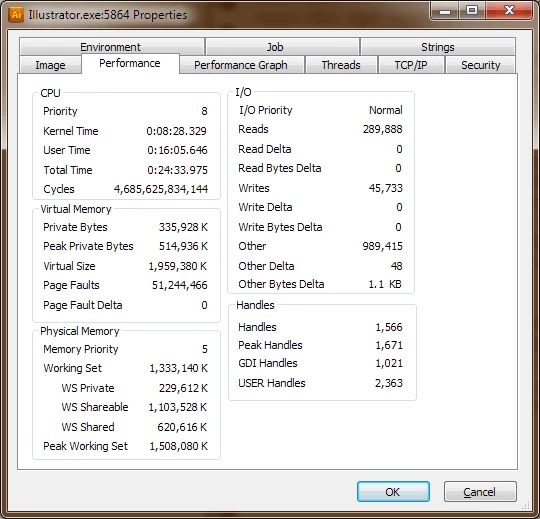
Physical memory usage at this point is 62%, Commit charge - 15%.

Currently, I can work around this by making a screenshot of "Original" tab in Save for Web dialogue when it's there - because sometimes it's just a pink-filled window.

So, Adobe, any suggestions, please?

    This topic has been closed for replies.
    Correct answer Mylenium
    There's NO WAY that there's not enough scratch memory available.

    There is, if it cannot create a temp file, which indeed is tied to the limitations for 32bit apps and in Save for Web cannot exceed 2GB, if I remember correctly. That's what it's telling you and this has absolutely nothing to do with your system swap file. A possible solution may be to manually flatten the file before exporting, but as pointed out by others, your workflow is not particulalrly sensible and effective to begin with and certainly doesn't fall withing what Save for Web was designed for in the first place. Saving PDFs may be much less troublesome. Also simply consider using Bridge to create derivatives of the actual AI files for review.

    Mylenium

    3 replies

    Participant
    July 3, 2013

    Solved: Clear temporary files ( Type %temp% in run and hit enter)

    Mylenium
    MyleniumCorrect answer
    Legend
    July 8, 2010
    There's NO WAY that there's not enough scratch memory available.

    There is, if it cannot create a temp file, which indeed is tied to the limitations for 32bit apps and in Save for Web cannot exceed 2GB, if I remember correctly. That's what it's telling you and this has absolutely nothing to do with your system swap file. A possible solution may be to manually flatten the file before exporting, but as pointed out by others, your workflow is not particulalrly sensible and effective to begin with and certainly doesn't fall withing what Save for Web was designed for in the first place. Saving PDFs may be much less troublesome. Also simply consider using Bridge to create derivatives of the actual AI files for review.

    Mylenium

    Participating Frequently
    July 8, 2010

    Thank you.

    This is why I wonder why there's still no 64-bit Illustrator.

    As for my workflow, I lowered raster effect resolution to 240 and it's no longer gives me an error, at least it hasn't been for now. Maybe 300dpi was pushing it just over the limit.

    I really do prefer Save for Web because in this file I currently have 4 artboards and SfW allows me to save selected artboard into JPEG. Saving in PDF or just exporting in JPEG would require cropping before it's usable.

    Anyway, thanks for confirming. Understanding the root cause of the issue definitely helps. I just wish Illustrator team would get into 2010 and make 64-bit version already.

    Participating Frequently
    July 3, 2013

    CS6 supports 64-bit.

    Inspiring
    July 7, 2010

    Sorry from what but you are wrong 24 GB file page size is immense for AI from what you describe I would think AI could not even open the file.

    You're shooting for save for the web and exactly why do you need 300ppi images.

    I would say Illustrator is working as design and if one considered you have very limited resources to work on such a huge file it would expected.

    You simply do not have enough resources you need a very large and powerful RAID 0 for a scratch.

    Participant
    July 7, 2010

    I had the same issue with Photoshop CS3 working on a 300MB file.

    My solution was to work with CS instead - no memory problems.

    Participating Frequently
    July 8, 2010

    This one here is around 40Mb.