

Inspiring
November 20, 2013
Answered

Custom Angled Triangles Question

  • November 20, 2013
  • 3 replies
  • 6368 views

I'm quite suprised that powerful Illustrator does not have any easy solution for creating custom angled triangles. Is there anybody help me to create a custom angle triangle script ?

Thank you,

Best Regards.

Correct answer Sergey Osokin

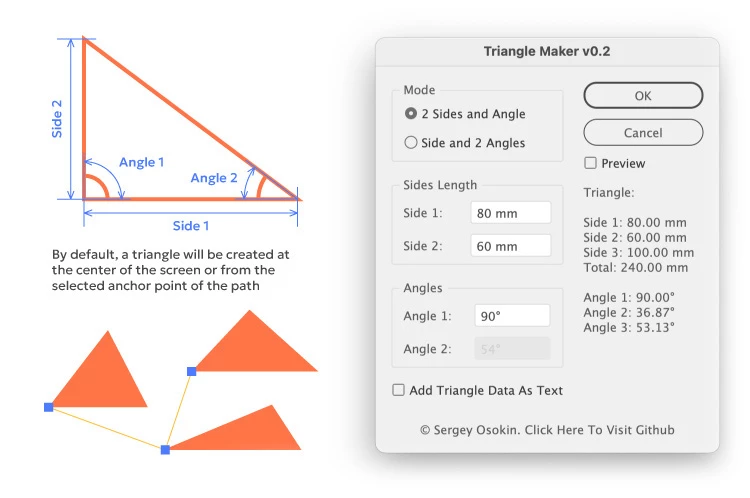
Inspired by Carlos' ideas, I combined the two scripts into one — TriangleMaker. It now has a triangle settings dialog and previews.
3 replies

Sergey Osokin
Sergey OsokinCorrect answer
Inspiring
April 2, 2025

Inspired by Carlos' ideas, I combined the two scripts into one — TriangleMaker. It now has a triangle settings dialog and previews.

Ton Frederiks
Community Expert
April 2, 2025

Thank you! Love it, I like the Preview and the text option! Maybe in the future a Convert to Shape option (although it is easy to do yourself)

Sergey Osokin
Inspiring
April 2, 2025

It's easy to do this yourself, but it's also easy to include this command in a script. But why make a custom triangle a dynamic shape?

bnjmngrn
New Participant
March 6, 2025

I've been looking for a solution for this myself recently – I need to create triangles with specific angles for some conical cutter templates – I know I can do it with transform/rotate options, but would be great to have an inbuilt option on the polygon tool, or a new 'triangle' tool where you can specify inner angles!? 

Community Manager
March 6, 2025

Hello @bnjmngrn,

I understand that this functionality is important to you. Would you mind creating a UserVoice for this feature request (https://adobe.ly/41HBKZG) and adding your comments there? Doing this will help us prioritize this request, and you will be notified of any updates.


Also, try the suggestions shared in this tutorial (https://adobe.ly/4he1ocZ) and share your observations.

Feel free to reach out if you have more questions or need assistance. We'd be happy to help.


Anubhav

CarlosCanto
Community Expert
November 20, 2013

please elaborate, do you want to provide let's say 2 angles and build a triangle?

Inspiring
November 20, 2013

Yes exactly, I have noticed that there is no such script around the net. I don't have any Illustrator Scripting experience, I can only modify script with the help of scripting dictionaries:)

I have found an example in Adobe Illustrator Scripting Guide;

Basically I want two input box for degree and script should automatically creates a triangle. ( In fact it would be great if we would enter the values of edges (a,b) )

// Create 45 Degree Triangle

var doc = app.activeDocument;

var sel = doc.selection;

dw  = doc.width;

dh = doc.height;

wc= dw /2;

hc = dh *-0.5;

if ( app.documents.length > 0 ) {

var triangleGroup = app.activeDocument.groupItems.add();

// Create a triangle and add text, the new art is created inside the group

var trianglePath = triangleGroup.pathItems.add();

trianglePath.setEntirePath( Array( Array(0, 100), Array(100, 0),

Array(0,0) ) );

trianglePath.closed = true;

trianglePath.stroked = true;

trianglePath.filled =true;

trianglePath.strokeWidth = 3;

trianglePath.position = Array(wc,hc);

}

Would you please help me, I would be really grateful:)))

Inspiring
November 20, 2013

Hımm, ok you right, It's ok then but how:))) All I want is to create a triangle which I can enter custom values, I guess It would be very useful for lots of people. Is it possible to continue and modify with the script below?

// Create 45 Degree Triangle

var doc = app.activeDocument;

var sel = doc.selection;

dw  = doc.width;

dh = doc.height;

wc= dw /2;

hc = dh *-0.5;

if ( app.documents.length > 0 ) {

var triangleGroup = app.activeDocument.groupItems.add();

// Create a triangle and add text, the new art is created inside the group

var trianglePath = triangleGroup.pathItems.add();

trianglePath.setEntirePath( Array( Array(0, 100), Array(100, 0),

Array(0,0) ) );

trianglePath.closed = true;

trianglePath.stroked = true;

trianglePath.filled =true;

trianglePath.strokeWidth = 3;

trianglePath.position = Array(wc,hc);

}


And also as you have written (a,b,c) (side, side, angle) we can do vice versa like angle,angle,side. I tried it on calculator you have sent me.