


Participating Frequently
March 30, 2022
Answered

Data Merge in Illustrator: Is it possible to assign a variable to multiple objects?

  • March 30, 2022
  • 1 reply
  • 3689 views

I'm getting familiar with the data merge and variable functions in Illustrator and I'm trying to save some time in the long run.

For context, in my file I have 2 separate text boxes. They have different text styles but they will have the exact same information. I have multiple instances of this where information is repeated and I was wondering if it's possible to assign one variable to multiple objects. Is there a script or workaround for this? Or do I have to basically repeat the variable and the data on my spreadsheet for this to work? Is it the same problem for images as well?


Thanks in advance!
Correct answer m1b

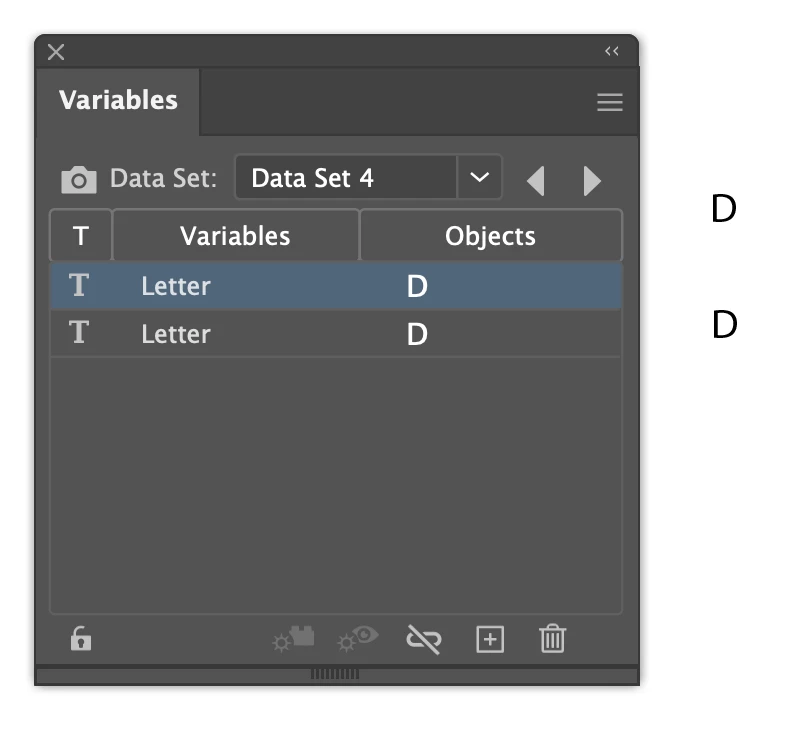
Hi @CarlosCanto, you are right, but doesn't Illustrator just make another variable that points to the same field in the data file if you bind it twice? I set up a simple test and I seemed to be able to do what @Shelilah needs.


1. import a data file (mine is just one field called "Letter" with text "A" to "F" on separate lines under it)

2. bind a variable to, in my case, a point text item "A"

3. bind the same variable to a different point text item (if it is already has text "A" you won't get a warning)

    At this point Illustrator adds a new variable so it isn't the same variable as you rightly say.

4. scroll through the datasets (ie the "records"—or lines—of the csv data file): for me Illustrator populates both text frames with the same field from the data file. "A" "A", then "B" "B", etc.

Am I missing something? I admit I don't know much about data merge.

- Mark

1 reply

CarlosCanto
Community Expert
Community Expert
March 31, 2022

No, binding two text frames (or images) to the same variable is not possible.

m1b
Community Expert
m1bCommunity ExpertCorrect answer
Community Expert
March 31, 2022

Hi @CarlosCanto, you are right, but doesn't Illustrator just make another variable that points to the same field in the data file if you bind it twice? I set up a simple test and I seemed to be able to do what @Shelilah needs.


1. import a data file (mine is just one field called "Letter" with text "A" to "F" on separate lines under it)

2. bind a variable to, in my case, a point text item "A"

3. bind the same variable to a different point text item (if it is already has text "A" you won't get a warning)

    At this point Illustrator adds a new variable so it isn't the same variable as you rightly say.

4. scroll through the datasets (ie the "records"—or lines—of the csv data file): for me Illustrator populates both text frames with the same field from the data file. "A" "A", then "B" "B", etc.

Am I missing something? I admit I don't know much about data merge.

- Mark

CarlosCanto
Community Expert
Community Expert
March 31, 2022

Mark, you are absolutely right!


I was binding each text frame to the same variable separately without success. But selecting both text frames and making them Dynamic does bind each frame to the same variable (two instances of it) as you pointed out.


👍👍