

August 16, 2021
Answered

distort diamond pattern

  • August 16, 2021
  • 2 replies
  • 393 views

I'm trying to make this effect in a diamond pattern I have but have no idea how to procede from here (attached). I'm a very new user. Thank you for any responces.

This topic has been closed for replies.
Correct answer Ton Frederiks

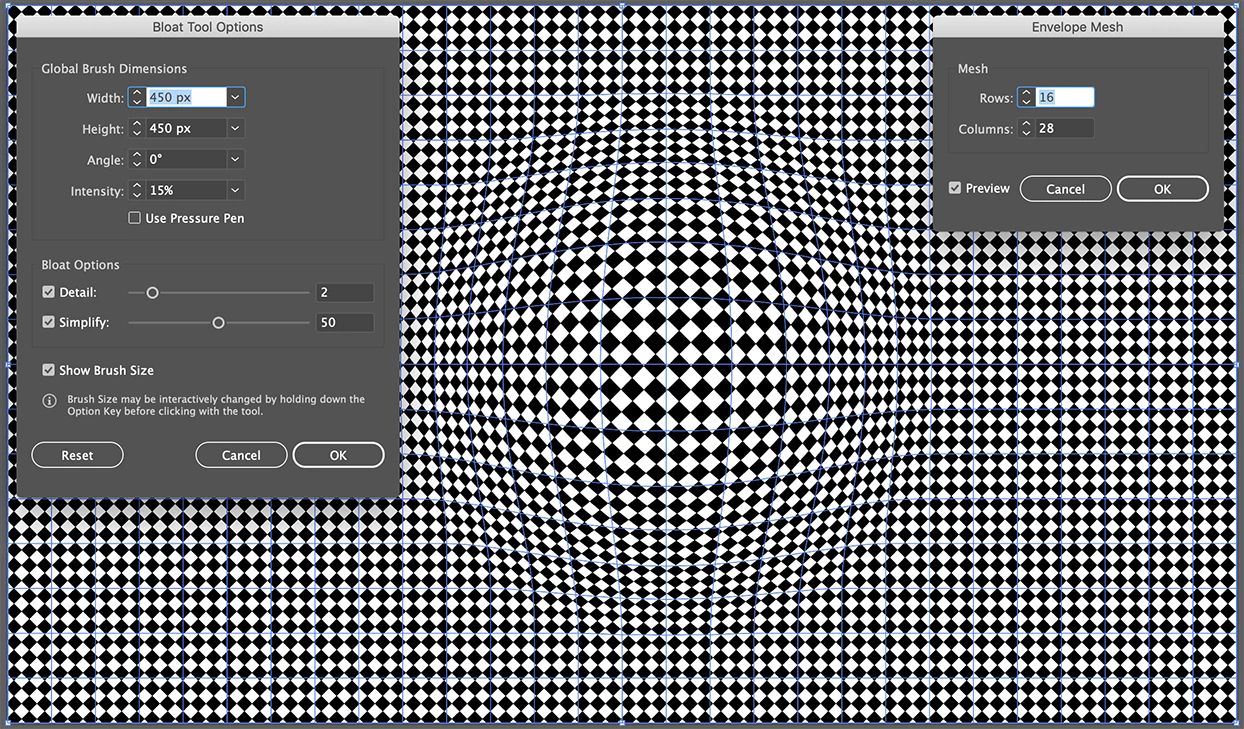
Like Monika suggested, an envelope distort with mesh and the Bloath tool can do the trick.

Don't forget to set the Distort Pattern Fills option in the Envelope options.
 

2 replies

Ton Frederiks
Ton FrederiksCorrect answer
Community Expert
August 16, 2021

Like Monika suggested, an envelope distort with mesh and the Bloath tool can do the trick.

Don't forget to set the Distort Pattern Fills option in the Envelope options.


August 17, 2021

That's perfect thank you. Just have to adjust all of those setting until it look right but I'm getting there.

Ton Frederiks
Community Expert
August 17, 2021

Good to hear that helped.

Monika Gause
Community Expert
August 16, 2021

Your best bet is to apply an envelope mesh that first does nothing at all. Object > Envelope >> Apply Mesh grid (define grid lines)

Then use Liquify on that gid. (Liquify tools are in a hidden group with the Width tool)
