- Home
- Illustrator
- Discussions
- Re: Document contains incompatible objects
- Re: Document contains incompatible objects
Document contains incompatible objects

Copy link to clipboard
Copied
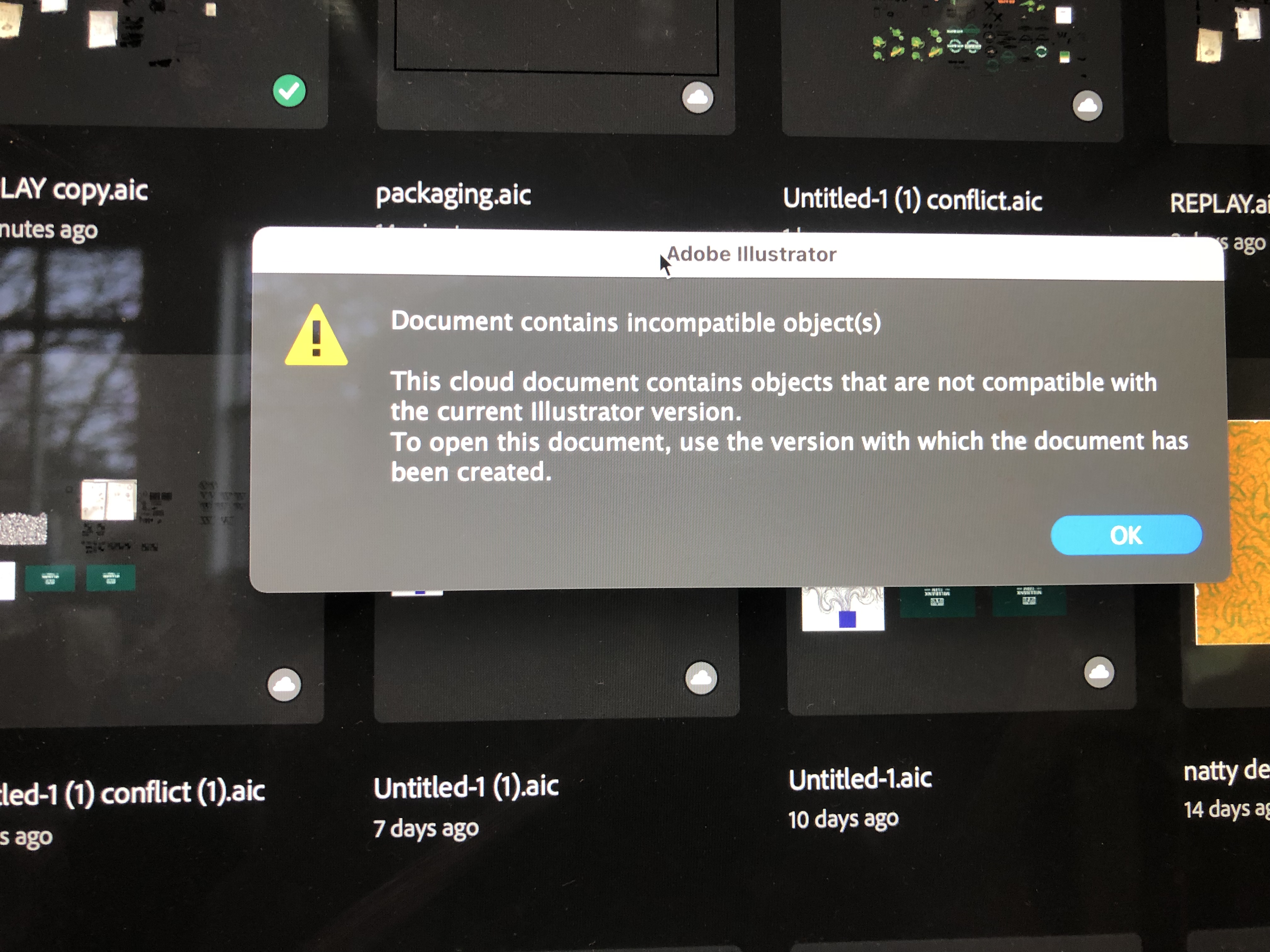
- My illustrator won't open a cloud file and I can't download it. The message comes up saying this cloud document contains objects that are not compatible with the current illustrator version.
Does anyone know how to access this type of document ?? Really need help it's got important uni work on 😞


 2 Pinned Replies


We are sorry to hear about this. The product team needs some information to further investigate the issue:
- Collect logs with the help of the Log Collector tool (Ensure the Adobe application is not running before running the Log Collector tool)
The log file is generated by the log collector tool . You can find it on your Desktop, most likely with the extension "..ZXP". You can upload it to Creative Cloud, Google Drive, or any similar service and share the download link

Hi @Cason5FA7,
Thank you for reaching out. Would you mind resharing the link with public access? I will then forward this to the product team for investigation. Also, would you mind sharing a few details:
-
When did you first get this error, day & time?
- In which version of Ai did you create or open the file?
- Are you able to download or open the previous file from the version history (https://adobe.ly/3xpLaME)?
- Collect logs with the help of the Log Collector tool and upload it on Google Drive/Dro

Explore related tutorials & articles
 69
Replies
69
69
Replies
69


Copy link to clipboard
Copied
https://assets.adobe.com/id/urn:aaid:sc:VA6C2:03dadb61-52d3-45bb-babf-c912f9882815?view=difile
Hi Anshul,
I am having the same problem, I am using illustrator version 27.1.1
Copy link to clipboard
Copied
Hi @Dan27661544bey4,
Thanks for reaching out. This file is opening without any error at my end. I am sharing the Ai file here (change extension from PDF to Ai).
Let us know if the issue persists while opening the file at your end.
Thanks,
Anshul Saini

Copy link to clipboard
Copied
Hi I am having same problem with a file on my Ai cloud saying:
" this cloud document contains objects that are not compatible with the current illustrator version."
Can I get help please?


Copy link to clipboard
Copied
Hi I am having same problem with a file on my Ai cloud saying:
" this cloud document contains objects that are not compatible with the current illustrator version."
Can I get help please?
By @Zqueedoo2765570073cy

And you are opening an AI file that has been created on which version exactly? On which device and which version are you opening it? If from desktop to iPad: then yes, there are functions that are not supported on the iPad. The file should open though. Does it?
Copy link to clipboard
Copied
All I can figure is when I shut down my computer maybe Ai did an automatic update to a new version. It is completely in the cloud. I am not trying to open it on a different device/only in my cloud. It won't open and it won't let me download it to save it elsewhere.
Copy link to clipboard
Copied
So which version do you have installed now?
ANd all of this happened on the same device? You created, edited and now open the file on the same device? Which is your desktop computer? Can you please describe step by step what happened to that file and where you edited it? What is in the file (I'm not interested in the contents, but the functionality, so what tools and functions did you use to create it)?
Copy link to clipboard
Copied
Sorry for the trouble you are facing with the cloud document. Would you mind sharing the cloud document with us here or via Private message with me? We will try to recover it.
Looking forward to it.
Thanks,
Anshul Saini
Copy link to clipboard
Copied
That would be awesome if you could help me recover the file.
I would prefer to PM the link to the document because it's original artwork. I am not sure how to PM you on this site though.
Copy link to clipboard
Copied
Just figured it out. Sent to you. Appreciate anything you can do to help recover it. Thanks for trying.
Copy link to clipboard
Copied
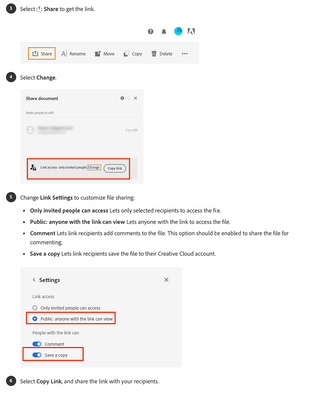
Thanks for sharing the document, @Zqueedoo2765570073cy, but we are unable to access it. Please ensure "anyone with the link can view" and "Save a copy" is checked.
Thanks,
Anshul
Copy link to clipboard
Copied
Ok working on it
Copy link to clipboard
Copied
I just wanted to know how things are going on your end. Is the issue resolved, or are you still facing the issue?
If yes, please share the link again. We are still unable to access the link you shared earlier.
Kindly update the discussion if you still need assistance with it. We'd be happy to help.
Thanks,
Anshul Saini

Copy link to clipboard
Copied
Hello please could you help me, I'm having the same issue
Copy link to clipboard
Copied
@Michaela352278961aay schrieb:
Hello please could you help me, I'm having the same issue
Does any of the posts in this thread solve your issue?
If not, please create a new thread and describe your situation.

Copy link to clipboard
Copied
Dear Anshul,
I have the same problem and I've sent you a DM with the link to the file that contains this error. Can you please help me? It contains all my graduation drawings that I need for my report due in 2 weeks. Thank you in advance.
Kind regards,
Sarah

Copy link to clipboard
Copied
Copy link to clipboard
Copied
I'm sorry to hear that. I understand that you've tried reinstalling an old version, but it still displays the "Document contains incompatible objects" error message.
I've sent the file to our product team for further investigation. I'll get back to you as soon as I have a response from them.
Best,
Anshul Saini
Copy link to clipboard
Copied
Alright thank you. I'll be waiting
Copy link to clipboard
Copied
Thank you for your patience, @Francis25981162ap6j. The product team has successfully recovered the file. However, they have requested logs (https://helpx.adobe.com/creative-cloud/kb/cc-log-collector.html) and need a few more details like:
- The Exact version of OS & Ai you are using.
- Are you using any third-party plugins? If yes, please share their name & version no.
- Can you provide some background on the events that led up to this situation?
Furthermore, I have sent you a direct message to acquire some confidential information.
File Link: https://shared-assets.adobe.com/link/479aa40b-4250-4c17-7efe-b9a4409b0f71
Looking forward to your response.
Best,
Anshul Saini
Copy link to clipboard
Copied
Alright thanks. For the little details needed:
- OS version: 22H2 and AI version: (27.5)
- No plugins
- Everything was working fine, then the app freezed. Nothing was working, I tried closing the app throught the taskbar but to no avail. However, I restarted the computer, launched AI and tried opening the file. That was when that pop up appeared.
Copy link to clipboard
Copied
Thank you for the prompt response, @Francis25981162ap6j. Would you mind sharing the log file generated by the log collector tool? You can find it on your Desktop, most likely with the extension "..ZXP".
Thanks,
Anshul
Copy link to clipboard
Copied
the file exceed the max file size. Any suggestion on how to get it to you?
Copy link to clipboard
Copied
@Francis25981162ap6j You can upload it on Creative Cloud, Google Drive, or any similar service and share the download link with me via DM.
Thanks,
Anshul Saini
Copy link to clipboard
Copied
I was able to open the AI file you sent. It is working great. Thank you very
Copy link to clipboard
Copied
Glad to hear that. Would you mind sending the logs? You can upload it to Creative Cloud, Google Drive, or any similar service and share the download link with me via DM or here. This would really help the team to take the investigation further and prevent similar incidents from occurring in the future.
Thanks,
Anshul Saini


Get ready! An upgraded Adobe Community experience is coming in January.
Learn more
 AdChoices