


New Participant
April 15, 2024
Question

Dots matrix
  • April 15, 2024
  • 1 reply
  • 438 views


Hi, I need help with the dots matrix.
I mean something like on the windshield of a car. But I need to define the dimensions of the dots and their position. When I use the pattern brush, the dots are distorted in the radius or corner.
Does illustrator have a module for this or how can I create these dots?

For a better idea, I am sending a photo in the attachment.


thank you

This topic has been closed for replies.

1 reply

Monika Gause
Community Expert
April 15, 2024

How about this: You make a pattern brush with those dots, in different colors.

Then you apply that brush and expand the appearance.

Then you select each colored row, first scale them to 0%

Then make them into circles again in the exact size you need.

https://youtu.be/ezqaY_ioEw8


Now I only need an idea for that outer wavy line.

New Participant
April 16, 2024

Thank you for your advice.
I tried it and everithing looks good but it is a laborous.
But for this case is a perfect.

Is there another way to create it?
I don't know how I can use it for corners or other types of dots.

Example other type of dots: in attachment

Picture 1: Create by me
Picture 2: This is what I want to achieve
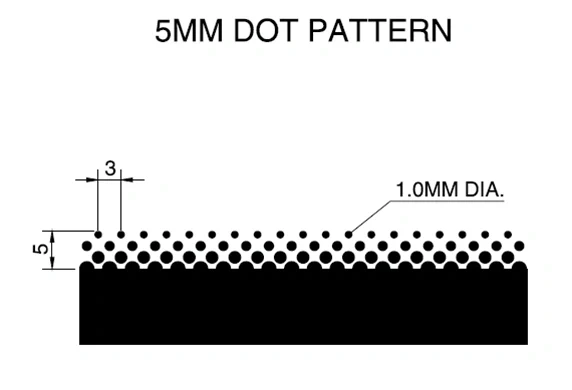
Picture 3: Dimensions of the dots

Ton Frederiks
Community Expert
April 16, 2024

If you are very patient, you might try this approach.

A gradient across a stroke, rasterize and color halftone effect. You can finetune the size of the dots with the greys in the gradient and the pixel radius in the color halftone effect.