New Participant
February 27, 2021
Answered

Easy way to create random squiggly lines

  • February 27, 2021
  • 1 reply
  • 1282 views

Hi everyone! I am trying to recreate the figure attached. Creating the circles is obvious and immediate; however, I'm stuck at creating the squiggly lines attached to them. I'd like for all of them to have the same length and for each to be squiggled randomly differently. Is there a way to do that easily? Thanks in advance for any help you can provide!
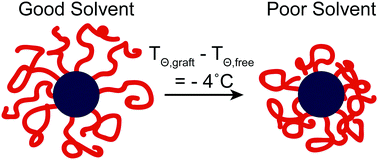
 

Conformational change and suppression of the Θ-temperature for solutions of  polymer-grafted nanoparticles - Soft Matter (RSC Publishing)

This topic has been closed for replies.
Correct answer Monika Gause

The Roughen, Scribble, Tweak effects resp cmbinations of them could work for this.


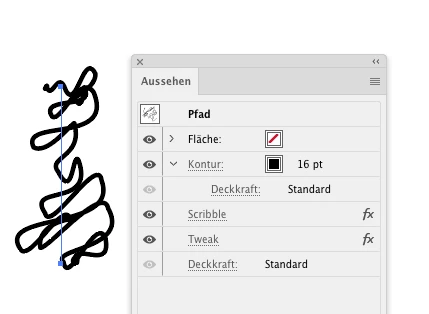
This is Scrible and Tweak (note the fat stroke and the order of fx in the appearance panel)


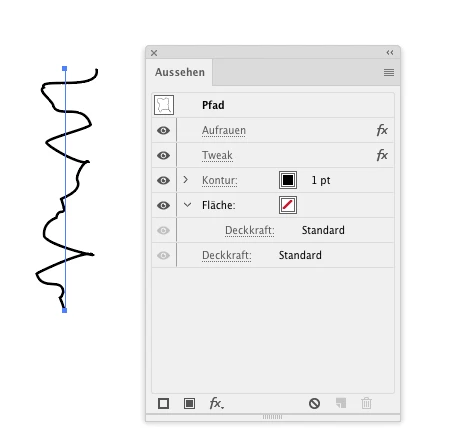
This is Roughen and tweak:


They all are random, so you could apply this via graphic styles

1 reply

Monika Gause
Monika GauseCorrect answer
Adobe Expert
February 27, 2021

The Roughen, Scribble, Tweak effects resp cmbinations of them could work for this.


This is Scrible and Tweak (note the fat stroke and the order of fx in the appearance panel)


This is Roughen and tweak:


They all are random, so you could apply this via graphic styles

New Participant
February 28, 2021

Wonderful! It worked! Thanks for the help! 😀

Monika Gause
Adobe Expert
February 28, 2021

You're welcome!