


dzgnr89
Inspiring
January 30, 2018
Answered

Editing pdfs without searching for linked files

  • January 30, 2018
  • 2 replies
  • 640 views

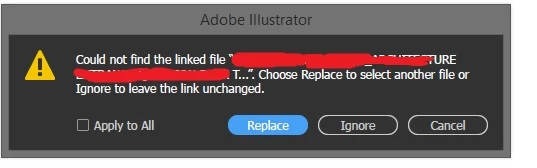
Whenever I create a pdf from illustrator and open it on another computer in Illustrator, it asks me for linked files (e.g. jpeg, png images) which I cannot provide it on the destination computer. How can I avoid such issues while creating pdfs?

Of course, I can embed a pdf in Illustrator and edit it, but isn't there a better way to "Open" way of editing files instead of "Place and embed" ? I am using CC 2018.
    This topic has been closed for replies.
    Correct answer Monika Gause

    When you save a PDF and select "Illustrator editing options" in the PDF dialog box, you create an embedded AI file in the PDF for editing purposes. When you open this PDF on another computer, it doesn't open the PDF, but the AI file.

    In case you just want to view the PDF on the other computer (and not edit it), use "Save a copy", save as PDF and uncheck the "Illustrator editing options". You will then get a PDF which has all the linked files embedded automatically.

    About Illustrator files: https://youtu.be/IpDh8Y7q8yE

    2 replies

    Monika Gause
    Monika GauseCorrect answer
    Adobe Expert
    January 30, 2018

    When you save a PDF and select "Illustrator editing options" in the PDF dialog box, you create an embedded AI file in the PDF for editing purposes. When you open this PDF on another computer, it doesn't open the PDF, but the AI file.

    In case you just want to view the PDF on the other computer (and not edit it), use "Save a copy", save as PDF and uncheck the "Illustrator editing options". You will then get a PDF which has all the linked files embedded automatically.

    About Illustrator files: https://youtu.be/IpDh8Y7q8yE

    cinziamarotta
    Participating Frequently
    January 30, 2018

    Hi,

    to avoid that request you should embed the images in the illustrator file before saving to PDF: