- Startseite
- Illustrator
- Diskussionen
- Re: Error while opening files in Ai 2020 on macOS ...
- Re: Error while opening files in Ai 2020 on macOS ...

Link in Zwischenablage kopieren
Kopiert
Hi,
I just purchased Adobe Creative Cloud and after saving a project on Adobe Illustrator CS6, I tried to open the program again and an error message is coming up, "Missing required plugins. PDF format.aip."
I checked the plugin folder and it is in there, yet I cannot open Illustrator. The other Adobe programs work, it is just Illustrator.
Does anyone know how to fix this so I can open Illustrator and get to work. Thanks so much!
Also, I have an iMac. Thanks.
-Phil


 3 richtige Antworten


The path to this plugin is at the following
/Applications/Adobe Illustrator 2021/Adobe Illustrator.app/Contents/Required/Plug-ins/Extensions
To show the Contents folder, right-click on Adobe Illustrator.app and choose "Show Package Content"
P.S.:- I have Illustrator 25.0.1 on a MAC 10.14.6 and it works just fine.
-Manan


Hi there,
We are sorry about the trouble. We have consolidated the most popular solutions that help in fixing this issue. I would request you to please try the steps mentioned in this help article (https://helpx.adobe.com/illustrator/kb/plugin-missing-issue.html) and let us know how it goes.
Please feel free to reach out if you still need assistance. We'd be happy to help.
Thanks & Regards,
Anshul Saini

Manan Joshi..... August 2022 and the BNPlugin.aip continues to be a problem. Thank you for this! I tried the other solutions recommended by the Adobe professional and they didn't work.
Your instructions worked. I wasn't able to "right-click" but I followed your path using the "Go > To Folder" menu, and changed Adobe Illustrator 2021 to 2022, and was able to find the BNPlugin.aip file. I don't know what that plug in does (other than to cause issues) but I deleted it and all seems to be working

Entdecken Sie verwandte Tutorials und Artikel
 116
Antworten
116
116
Antworten
116


Link in Zwischenablage kopieren
Kopiert
Restart Illustrator, then try moving your file to a different folder and reopen it. Does that work?

Link in Zwischenablage kopieren
Kopiert
Nop it doesn't work :'(

Link in Zwischenablage kopieren
Kopiert
Hi Clementine,
Sorry to hear about this. Looks like you were using some plugins with previous version, which are not compatible with the current one.
Please try installing version 2019 and check if that opens the file? If the file opens there, then please reach out to the plugin manufacturer for the version that is compatible with the latest release.
Regards,
Srishti
Link in Zwischenablage kopieren
Kopiert
I try it and it doesn't work too now with 2019
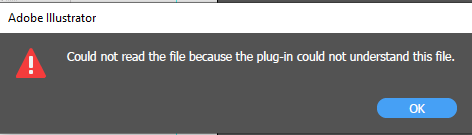
they said "Unable to read this file because an error occurred"
i really don't understand because yesterday i work on this with no problem since i have Catalina and updated Illustrator nothing work
Link in Zwischenablage kopieren
Kopiert
Oh no! Could you please share a sample file with us? We can try opening it at our end.
Regards!

Link in Zwischenablage kopieren
Kopiert
Hi, I'm having the same problem. I have an existing file that won't open in either 2020 or 2019.

Link in Zwischenablage kopieren
Kopiert
Link in Zwischenablage kopieren
Kopiert
Hi All,
Sorry to hear about this error. This has been reported by a few other users as well and we are still investigating this. Please try following these steps and let us know how it goes.
Go to System Preferences > Full Disk Access > Make sure the Checkbox in front of Illustrator is checked.
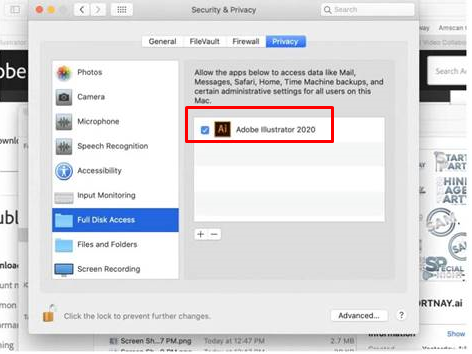
Once done, quit Illustrator and relaunch it again and you should be able to open the files.
Regards,
Srishti

Link in Zwischenablage kopieren
Kopiert
This worked for me! Tried a load of other solutions with no luck. Thanks

Link in Zwischenablage kopieren
Kopiert
Do you have the steps for Windows 10? I'm having the same issue
Link in Zwischenablage kopieren
Kopiert
Sorry I'm on a Mac and have no knowledge of Windows 😞
Link in Zwischenablage kopieren
Kopiert
This didn't work for me. Pls help.

Link in Zwischenablage kopieren
Kopiert
Hi Srishti! Thank you so much! This did the trick! I too upgraded to Catalina a few days ago and had some Ai files not open in Ai with the message "Could not read the file because an error has occurred.". Was a bit scary but after following your tip to enable full disk access all is back to normal. Thanks!

Link in Zwischenablage kopieren
Kopiert
This worked for me too! Many thanks!!!

Link in Zwischenablage kopieren
Kopiert
Hi,
I've been having this issue with the latest CC illustrator and OS Catalina when trying to place any file into an empty project. When I go to look in the full disk access folder, I see photoshop and indesign but no Illustrator on the list!!! Please help. I was on chat with adobe support for 5 hours the other day and they failed to solve any issue for me (there are multiple).

Link in Zwischenablage kopieren
Kopiert
this worked thanks
Link in Zwischenablage kopieren
Kopiert
I am also getting this error on Mac OS Mojave now. Everything was working fine until last night. What's going on?
Link in Zwischenablage kopieren
Kopiert
Solved. This turned out to be corrupted linked PNGs for me. Once I identified the PNGs and replaced them, I was able to open the AI files and resume work.
Link in Zwischenablage kopieren
Kopiert

Link in Zwischenablage kopieren
Kopiert
Same issue. I'm interested in the solution for PNGs that are saying unreadable by illustrator in Windows.

Link in Zwischenablage kopieren
Kopiert
Open them in Photoshop and Save again. You might need to covert them to 8bit/Channel or whatever is wrong with them.
There are many flavours of PNG and Illustrator is not able to handle them all.
Link in Zwischenablage kopieren
Kopiert
Hi @KansasVolunteerCommission,
Sorry about the trouble. Would it be possible for you to share those PNGs files that are unreadable in Illustrator? We are currently collecting such images to investigate and create a fix for it. Please share the download link here or via DM of those PNGs. That would be really helpful for us.
Thanks & Regards,
Anshul Saini

Link in Zwischenablage kopieren
Kopiert
After updating to the new Illustrator it opens with the following error:
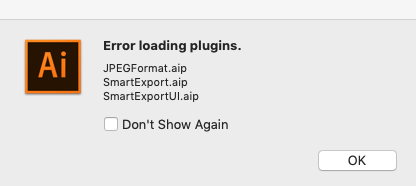
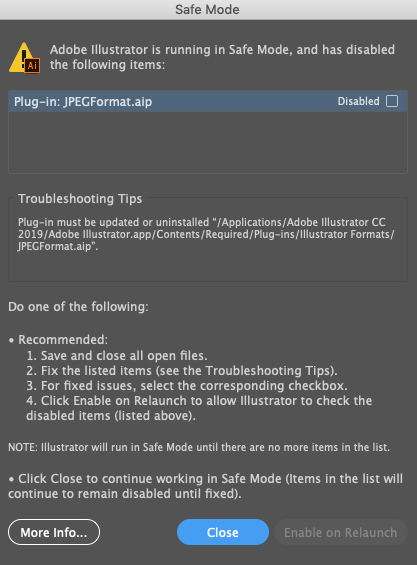
Once open I get an endless loading circle.
If I open a file it crashes and quits.
Mac Pro (late 2013), 3.7 ghz, 64 gb ram
OSX 10.14
any help appreciated!
Ive tried uninstalling and reinstalling. Ive tried disabling the plugin (which makes illustrator crash).
Link in Zwischenablage kopieren
Kopiert
did you migrate the preferences when updating?
Link in Zwischenablage kopieren
Kopiert
Not to my knowledge.


Weitere Inspirationen, Events und Ressourcen finden Sie in der neuen Adobe Community
Jetzt ansehen
 AdChoices