


- Home
- Illustrator
- Discussions
- Error: "The operation cannot complete because of a...
- Error: "The operation cannot complete because of a...

Copy link to clipboard
Copied
That is the message I get when I try to scale an object in Illustrator 25.3.1 when I try to scale an object.
Mac OS 11.4.
What is the fix for this? I use Illustrator professionally, and can't afford for it to simply refuse to perform straightforward tasks.
{Renamed by MOD}


 5 Correct answers

had problems! Both in photoshop and illustrator!


I selected the object I was having trouble with and hit the Object: Expand Appearance and it solved the problem. Might help.

I figured it out for my project. (Someone suggested it earlier in the discussion.)
I'm using: iMac-M1chip, macOS Monterey 12.3.1/illustrator 26.2.1
>Window>Transform> uncheck 'Scale Strokes & Effects'
Now I can Shift + drag to scale my grouped objects.

I found that only *some* objects / layers of illustrator art files were (no other word I can come up with other than "corrupted"). I ended up recreating thoses objects / layers from scratch and the entire art is now scalable with no issues.
FYI: I did not upgrade or downgrade software, just tested until I found the objects that would not scale dues to the noky error.

My solve was to rasterize the layer I needed to scale, I don't need to edit this art so this work around worked.

Explore related tutorials & articles
 52
Replies
52
52
Replies
52


Copy link to clipboard
Copied
Are you working off, or saving to, a network, or any of your links on a network?
What's the object you're trying to scale and is it linked?
Copy link to clipboard
Copied
No network at all and the object was created in Illustrator and is native to the document. (It's a path with multiple strokes.)


Copy link to clipboard
Copied
Hi there,
Sorry to hear about this trouble. In addition to the question asked above, could you please share some more information like:
- Is the issue related to a specific document? If yes, could you please share the document with us? You can upload it to the Creative Cloud (https://helpx.adobe.com/in/creative-cloud/help/share.html) and share the download link.
- Are there any recent changes made to your system? For example, any antivirus, system updates or web extensions installed recently.
Looking forward to your response.
Thanks & Regards,
Anshul Saini
Copy link to clipboard
Copied
Thanks.
It is happening across multiple documents.
My system hasn't been updated recently, and no extensions have been added.
I did some digging, and I think it may be related to a "Legacy Gaussian Blur" effect applied to the stroke. I won't be able to go through and alter hundreds of paths that use this effect — is there a way to update them globally?

Copy link to clipboard
Copied
Hi there,
I am sorry about this trouble. We tried but couldn't replicate this behavior. Could you please share a sample file with us? You can upload it to the Creative Cloud ( https://helpx.adobe.com/in/creative-cloud/help/share.html ) and share the download link.
Regards,
Srishti

Copy link to clipboard
Copied
Did you manage to find a solution to this? I am experiencing the same problem and cannot find a solution. It seems to stem from the "scale strokes and effects" in preferences. Without that selected it performs fine...but i'm a professional illustrator and cannot wotk without this preference enabled. Please help! Thank you.

Copy link to clipboard
Copied
não é uma solução permanente mas é um improviso .... expandir aparencia ... Menu>Objeto>Expandir Aparência
creio que esse erro só vai ser corrigido na atualização do AI .... desconfio que no meu computador foi por causa da ataulização sistema operacioinal 😕

Copy link to clipboard
Copied
Having the same problem such an irritaition, is because of a new update? never had this problem before, please give solution
Copy link to clipboard
Copied
Na versão beta 25.5 não tive problemas ... baixei o mesmo arquivo que enviei para analize, fiz os mesmos testes e funcionou normalmente.
pode ser que é erro no redimensionamento de brilhos, degrades e sombras.

Copy link to clipboard
Copied
same error!

Copy link to clipboard
Copied
MISMO ERROR

Copy link to clipboard
Copied
Same here. Happened first time today on a logo. I've used this logo multiple time before.
The work around for me was "expand appearance".
Copy link to clipboard
Copied
Mesmo erro aqui, trabalhando ontem com o arquivo e estava tranquilo, hoje não consigo redimensionar a logo, percebi que acontece só quando está o icone que tem efeitos de gradiente e blur. Segue arquivo para analise.
Tive atualizações no Windows ontem.
https://shared-assets.adobe.com/link/5a5e5570-3751-4e99-7149-3486e4b58643
Copy link to clipboard
Copied
Hi there,
Sorry for the delayed response. I checked your file on both Mac and Windows machines, and it worked perfectly fine. I have sent you a DM for more details, please check.
Regards!
Copy link to clipboard
Copied
Same error, so frustrating
Copy link to clipboard
Copied
Hi there,
Sorry to hear about this trouble. Could you please share the file with us? You can upload it to the Creative Cloud (https://helpx.adobe.com/in/creative-cloud/help/share.html) and share the download link.
Thanks and Regards,
Anshul Saini
Copy link to clipboard
Copied
Bom dia, quando adobe atualizar para o 25.5 se não me engano o erro é reparado .... fiz um teste no beta do 25.5 e foi tranquilo
Copy link to clipboard
Copied
Glad to hear that @luism16869532. Let us know if you come across this issue or any other issue. We'd be happy to help.
Regards,
Anshul Saini
Copy link to clipboard
Copied
Having the same problem such an irritaition, is because of a new update? never had this problem before, please give solution
Copy link to clipboard
Copied
Hi there,
Sorry to hear about this trouble. I would request you to please share your OS and the exact version of Illustrator. Also, could it be possible for you to share the file with us? You can upload it to the Creative Cloud (https://helpx.adobe.com/in/creative-cloud/help/share.html) and share the download link here or via DM.
Thanks and Regards,
Anshul Saini
Copy link to clipboard
Copied
I am having the same issue. This NOKY issue appears for me when I try to scale an object. In general the last 3 or so months I have had constant issues with Photoshop and Illustrator not working as it normally would. The bugs with the latest updates have interfered with my workflow and have caused delays in completing work. Hope there is a solution to this soon.

Copy link to clipboard
Copied
The issue is the newest version - 29.1 rollback to to a 28.__._ version and you should be good.
Copy link to clipboard
Copied
Hi All,
We are sorry to hear about this trouble you are facing, and thanks for raising this issue. I understand how important it is to you all to get this issue addressed. We'd be happy to look into this for you. Firstly, I would recommend you all to update Illustrator and the Operating system to the latest. If that doesn't help, I would request you all to share some more details which help us investigate the issue like:
- OS and Illustrtaor version
- System Specification
- GPU (Internal and external)
- Share a sample file in which you are facing the issue. Package the file, upload it to the Creative Cloud (https://helpx.adobe.com/in/creative-cloud/help/share.html) and share the download link here or via DM.
- Share Illustrator folders from the following location:
macOS:
~/Library/Caches
~/Library/Application Support/Adobe
~/Library/Preferences
For Windows:
C:\Users\your_username\AppData\Roaming\Adobe
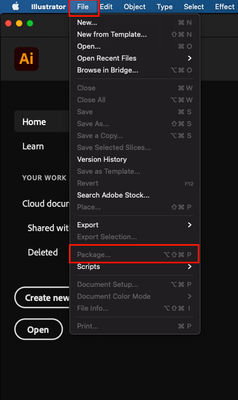
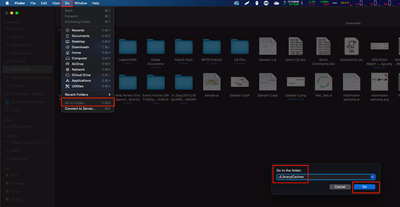
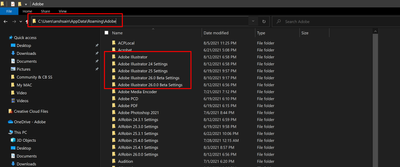
We will be looking forward to your response.
Thanks & Regards,
Anshul Saini

Copy link to clipboard
Copied
Same NOKY error when trying to scale artwork :0


Get ready! An upgraded Adobe Community experience is coming in January.
Learn more
 AdChoices
