Participant
February 17, 2023
Answered

errors when placing images "The file is in an unknown format and can't be opened" in Illustrator

  • February 17, 2023
  • 2 replies
  • 2194 views

In the last couple of months, errors show up when placing images, or dragging and dropping. "The file is in an unknown format and can't be opened". The files are .jpg images mostly, I have to open them in photoshop and save them as .png

This topic has been closed for replies.
Correct answer Anshul_Saini

Hi @Cristian23293754pq74,


Thank you for your time and patience while we investigated the issue you reported. After consulting with our product team, we have found that the behavior you experienced is expected due to the current file format read handler for JPEG and PNG being different, and our software decides the file format based on extension only for performance reasons.


As per our investigation, the image files you shared have a JPG extension, but its encoder is PNG, which is why you were encountering the error message. We have included a screenshot of the file you shared below to provide further clarity.
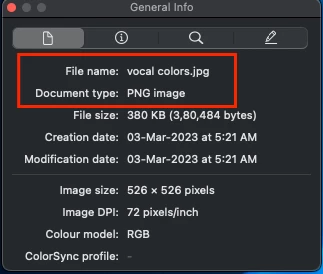


Also, we are pleased to inform you that our product team is working on implementing a new decoder that will be able to open both JPG and PNG files, regardless of the encoded format.

In the meantime, before importing images into Illustrator, you can try changing the JPG extension to PNG or vice-versa, depending on the encoded format.


Once again, we apologize for any inconvenience this may have caused and appreciate your cooperation in this matter.


If you have any further questions or concerns, please do not hesitate to reach out to us.


Best,

Anshul Saini

2 replies

Anshul_Saini
Community Manager
Community Manager
February 17, 2023

Hi @Cristian23293754pq74,


I'm sorry to hear that you've been experiencing errors when placing images in the last few months. It can be frustrating when something that used to work suddenly stops functioning properly.


To help resolve this issue, would you mind providing me with a screenshot of the error message that you're receiving? Additionally, it would be helpful if you could share some of the image files with me via direct message so that I can forward them to our product/engineering team for further investigation.


Thank you for bringing this to our attention, and I look forward to hearing back from you soon.


Best,
Anshul Saini

Participant
February 20, 2023

hello,

I've sent the screenshot via direct message, and a couple of files that can't be placed in illustrator, hope it helps and can get an answer

Anshul_Saini
Community Manager
Anshul_SainiCommunity ManagerCorrect answer
Community Manager
March 2, 2023

Hi @Cristian23293754pq74,


Thank you for your time and patience while we investigated the issue you reported. After consulting with our product team, we have found that the behavior you experienced is expected due to the current file format read handler for JPEG and PNG being different, and our software decides the file format based on extension only for performance reasons.


As per our investigation, the image files you shared have a JPG extension, but its encoder is PNG, which is why you were encountering the error message. We have included a screenshot of the file you shared below to provide further clarity.


Also, we are pleased to inform you that our product team is working on implementing a new decoder that will be able to open both JPG and PNG files, regardless of the encoded format.

In the meantime, before importing images into Illustrator, you can try changing the JPG extension to PNG or vice-versa, depending on the encoded format.


Once again, we apologize for any inconvenience this may have caused and appreciate your cooperation in this matter.


If you have any further questions or concerns, please do not hesitate to reach out to us.


Best,

Anshul Saini

Monika Gause
Community Expert
Community Expert
February 17, 2023

Which version and system is it?

Can you please tell us where those JPGs come from? And maybe some specifications? Bit depth, size, compression methods?

Participant
February 17, 2023

I work in a printing center, the images come from clients and are usually taken with phones

I tried placing images that worked in the past, and now I can't do that anymore, only if I change them to .png

I have the creative cloud annual license, so it is updated (vs. 27.2, 64b)

Specifications: 72 to 96 dpi, 24-bit depth, size ...depends from 1080px to 2048px, compression method...idk how to find out, it doesn't show in properties-> details in windows

Monika Gause
Community Expert
Community Expert
February 17, 2023

JPEG exists in a variety of flavours, so maybe those just don't fit what Illustrator can do. I suppose you could also save them as JPGs from Photoshop.


If you wish the developers to take a look at it, then I would suggest to make a bug report/feature request at https://illustrator.uservoice.com

The engineers would need some samples to analyze them.
