


Community Expert
May 23, 2022
Answered

[ ExtendScript ] How to rotate a text frame properly? Just like the GUI does it.

  • May 23, 2022
  • 1 reply
  • 2179 views

Hi together,

you might think it's the simplest thing to do using method rotate() on a selected text frame.

But somehow I cannot do this exactly like the GUI is doing this with the Transform panel.


Simple code:

app.activeDocument.selection[0].rotate( 20 );


Or if one likes to use a rotation matrix:

var rotationMatrix = app.getRotationMatrix( 20 );
app.activeDocument.selection[0].transform( rotationMatrix );


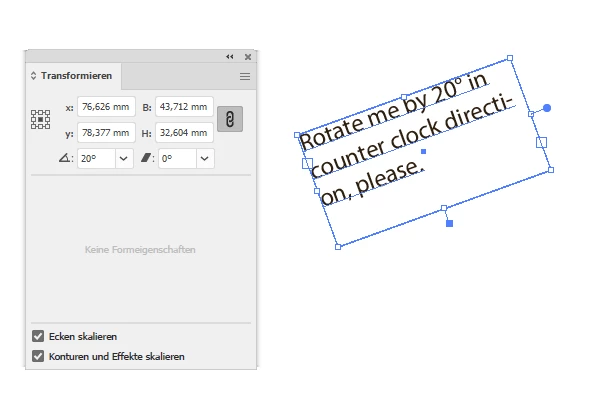
Here the result when doing this in the GUI, the new rotation angle is visible in the Transform panel of my German Illustrator 26.3.1 on Windows 10:


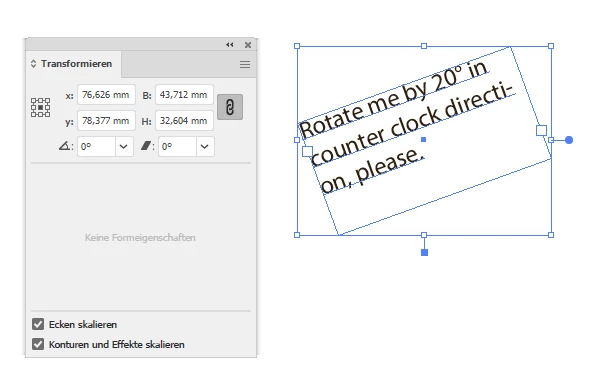
When I'm doing this with the code above, the "bounds" are not rotated, still there is value 0 in the rotation entry field of the Transform panel; the text contents is rotated like that:


What can I do to get the same result that I can get with the GUI?


Thanks,
Uwe Laubender
( Adobe Community Professional )

This topic has been closed for replies.
Correct answer sttk3

From what I have found, script does not seem to update the tag "BBAccumRotation" in the text frame.


When I updated it on my own, I got the same result as when I did it in the GUI.


rotateItem(app.activeDocument.selection[0], 20) ;

/**
  * rotate item and write rotation angle in tag
  * @9397041 {PageItem} targetItem pageItem
  * @9397041 {Number} angle rotation angle in degrees
  * @Return {}
*/
function rotateItem(targetItem, angle) {
  targetItem.rotate(angle) ;
  
  // writes rotation angle (in radians) to tags['BBAccumRotation']
  var tagName = 'BBAccumRotation' ;
  var rad = angle * (Math.PI / 180) ;
  try {
    var rotationInfo = targetItem.tags[tagName] ;
    rotationInfo.value = (Number(rotationInfo.value) + rad).toString() ;
  } catch(e) {
    var rotationTag = targetItem.tags.add() ;
    rotationTag.name = tagName ;
    rotationTag.value = rad.toString() ;
  }
}


1 reply

sttk3Correct answer
Brainiac
May 23, 2022

From what I have found, script does not seem to update the tag "BBAccumRotation" in the text frame.


When I updated it on my own, I got the same result as when I did it in the GUI.


rotateItem(app.activeDocument.selection[0], 20) ;

/**
  * rotate item and write rotation angle in tag
  * @9397041 {PageItem} targetItem pageItem
  * @9397041 {Number} angle rotation angle in degrees
  * @Return {}
*/
function rotateItem(targetItem, angle) {
  targetItem.rotate(angle) ;
  
  // writes rotation angle (in radians) to tags['BBAccumRotation']
  var tagName = 'BBAccumRotation' ;
  var rad = angle * (Math.PI / 180) ;
  try {
    var rotationInfo = targetItem.tags[tagName] ;
    rotationInfo.value = (Number(rotationInfo.value) + rad).toString() ;
  } catch(e) {
    var rotationTag = targetItem.tags.add() ;
    rotationTag.name = tagName ;
    rotationTag.value = rad.toString() ;
  }
}


LaubenderAuthor
Community Expert
May 23, 2022

sttk3 said: "From what I have found, script does not seem to update the tag "BBAccumRotation" in the text frame."


Would you categorize this behavior as a bug?


Regards,
Uwe Laubender
( Adobe Community Professional )

Brainiac
May 23, 2022

"BBAccumRotation" is an informal property that is often referenced to get the rotation angle of a TextFrame. Its lack of support does not amount to a bug. I am rather surprised that it affects the behavior in the GUI.


It might have been better to limit the target from PageItem to TextFrame. Normally one is rarely aware of tags when editing a PageItem.