


Participant
June 28, 2018
Answered

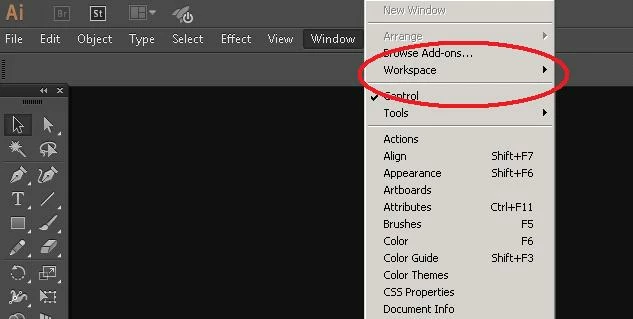
Extentions option is not shown under Window menu in Illustrator

  • June 28, 2018
  • 2 replies
  • 804 views

Hi,

I have Adobe Illustrator CC 2015 setup. I want to add some custom extensions to AI. But when I open the Illustrator application I cam not able to see any Extensions menu item under Window menu (Please see the screenshot below). Please help.

Thanks you.
    This topic has been closed for replies.
    Correct answer Myra Ferguson

    From the online help: "Starting with Creative Cloud 2015, the Extension Manager is no longer available to install add-ons and extensions for Adobe applications. Add-ons are now installed through the Creative Cloud desktop application. To install third-party extensions, you can use the Extension Manager (ExMan) command-line tool." Here's more info about add-ons post-CC 2015: Install add-ons and extensions for Adobe apps

    2 replies

    Myra Ferguson
    Community Expert
    Myra FergusonCommunity ExpertCorrect answer
    Community Expert
    June 28, 2018

    From the online help: "Starting with Creative Cloud 2015, the Extension Manager is no longer available to install add-ons and extensions for Adobe applications. Add-ons are now installed through the Creative Cloud desktop application. To install third-party extensions, you can use the Extension Manager (ExMan) command-line tool." Here's more info about add-ons post-CC 2015: Install add-ons and extensions for Adobe apps

    John Mensinger
    Community Expert
    Community Expert
    June 28, 2018

    mithunk30782625  wrote

    Hi,

    I have Adobe Illustrator CC 2015

    Is there a reason you haven't updated?

    Have you tried a preferences reset?