


Extract part of vector image
Hi,
I have two vector layers.
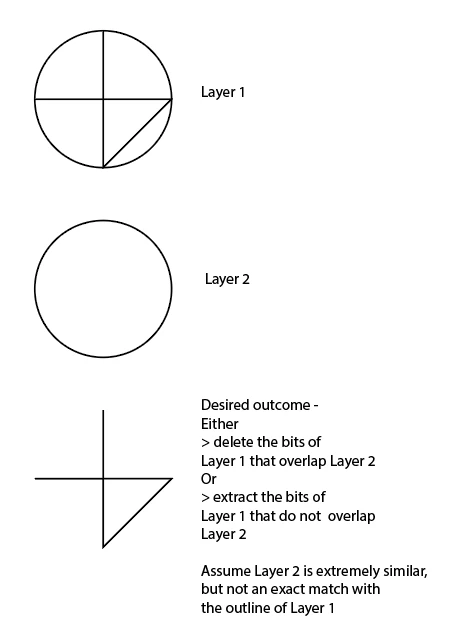
Layer 1 contains a shape and Layer 2 contains just the outline of the shape (but cleaned up slightly - so it looks like a silhouette to the human eye, but it is not a one-to-one pixel-perfect match).
>> Note, there are 36 such shapes and they are quite complex, so it's something I would like to semi-automate.
What I wish to do is extract just the middle vector paths from the shape on Layer 1 (or conversely delete the outer edge of Layer 1), so that I have one layer with the silhouette and the other layer with just the inside lines.
The middle lines in the shape are made up of different paths, some of which are on the border, so I would need to cut the path away wherever it was on the border.
If I do this and put them on top of each other, I will just see the original shape.
The purpose of this is to create a file for laser cutting in steel. The silhouette is a cut, the inside lines are etches. One workaround would be to etch first and then cut. But I still want to know if it is possible to extract the inside lines.
See simplified example below:

 AdChoices