Copy link to clipboard
Copied
Hey All.
I'm using Illustrator CC (version 26.3.1) and noticed Extrude & Bevel is not working properly.
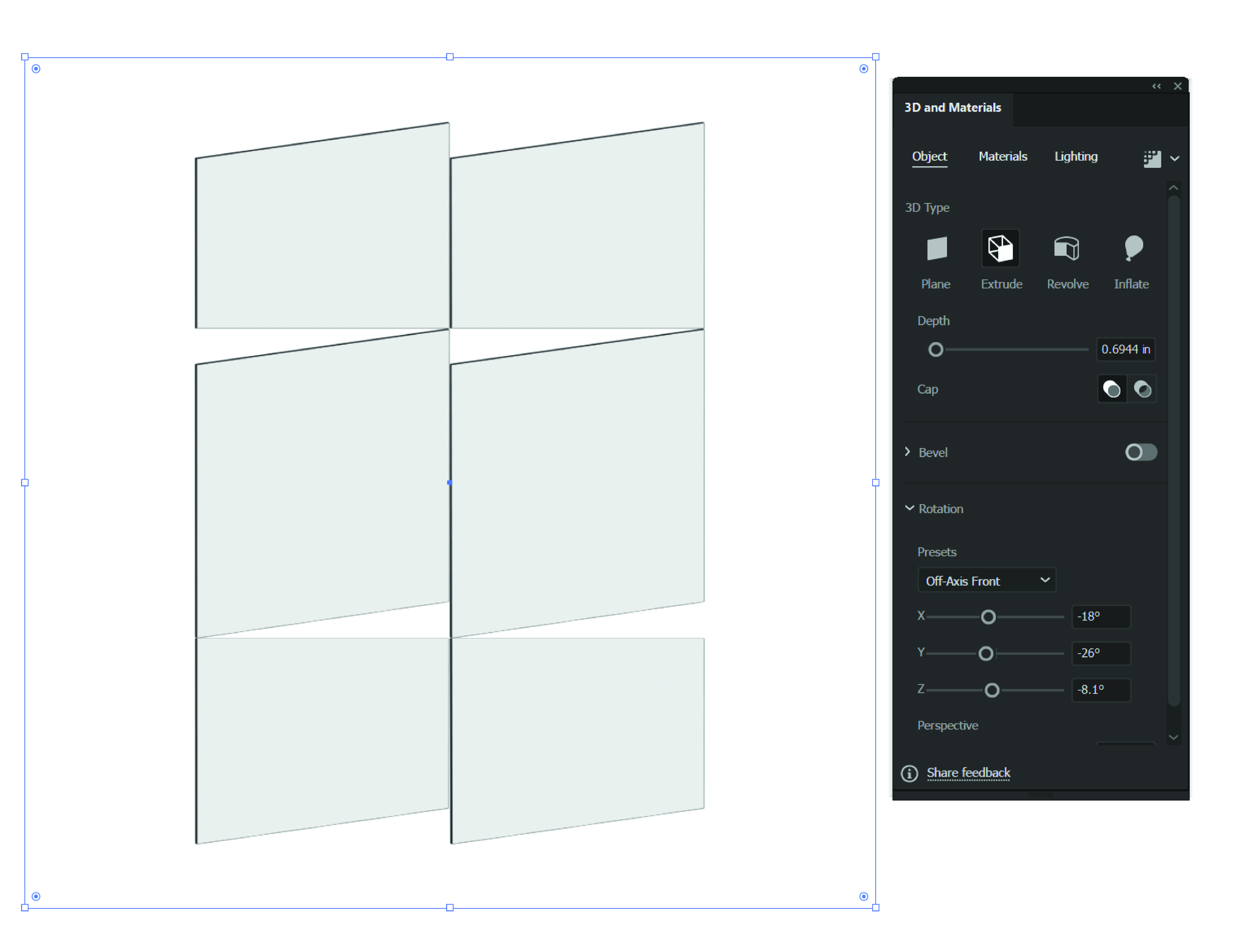
Let's say I draw a square and go to Extrude & Bevel. Once there, I apply my depth at say .6944" and the preview shows about 6 boxes - not the one box I drew. It also runs very slow! Is this an issue with the new update?
Image attached.


 1 Correct answer


Hi @Yeah No,
We're sorry for the trouble. We have already logged a bugged with the product team a couple of weeks ago, and they are currently investigating this issue.
Would you mind confirming if this is happening if you are doing it on a small size rectangle on a small artboard? On my end, this was happening if I applied to extrude and bevel on large size rectangle or scaled the small-sized rectangle.
I will be looking forward to your response.
Thanks & Regards,
Anshul Saini
#Marking
...

Explore related tutorials & articles
 7
Replies
7
7
Replies
7


Copy link to clipboard
Copied
Does it get better when you select View > Preview on CPU?
Copy link to clipboard
Copied
It does not.
Copy link to clipboard
Copied
Please upload the file to Dropbox or the like and post a link.
Copy link to clipboard
Copied
Hi @Yeah No,
We're sorry for the trouble. We have already logged a bugged with the product team a couple of weeks ago, and they are currently investigating this issue.
Would you mind confirming if this is happening if you are doing it on a small size rectangle on a small artboard? On my end, this was happening if I applied to extrude and bevel on large size rectangle or scaled the small-sized rectangle.
I will be looking forward to your response.
Thanks & Regards,
Anshul Saini
#Marking it correct to highlight only.
Copy link to clipboard
Copied
Small or large artboard/rectangle produces the same results. It is bugged and it really slows down Illustrator's performance to the point of it crashing.
Copy link to clipboard
Copied
Thanks for sharing your observations. For me, it only happens on large artboards or large-size objects.

I will forward your observation to the product team. It will surely help them with the investigation.
I would request you to please be patient and stay tuned for the updates.
Thanks & Regards,
Anshul Saini
Copy link to clipboard
Copied
Thank you!


Get ready! An upgraded Adobe Community experience is coming in January.
Learn more
 AdChoices