Inspiring
December 14, 2023
Answered

$.fileName will not work in script in OS X

  • December 14, 2023
  • 4 replies
  • 3768 views

I'm using a script which stores its Prefs in the script folder. But it does not work in my case, the file will not be created. It does not get a path where to build it, so no file is being stored.

I gave Illustrator full hard drive privileges already, but the script will not throw the script path.


var scriptPath = (new File($.fileName)).path 

will throw "",  with alert just an empty field


var scriptName = (new File($.fileName))

will throw /3 with alert (scriptName)


Any idea, why the script will not get it's path?

app.path will throw the rigth path to the app ...
 

This topic has been closed for replies.
Correct answer Someone75

@mb1 Starting your script with Extend Script debugger in Sublime I get these informations:

error,version,build,buildDate,global,stack,level,flags,strict,locale,localize,decimalPoint,memCache,appEncoding,screens,os,fileName,line,hiresTimer,dictionary,engineName,includePath,__proto__


starting it manually I get:


@GNDGN @m1b @Sergey Osokin Oh f*** I got the issue!

I use a plugin called "Scripts Panel" to organize my scripts, as Adobe offers such a freaky script menu (actually from two different developers) and each of these break exactly this one code!


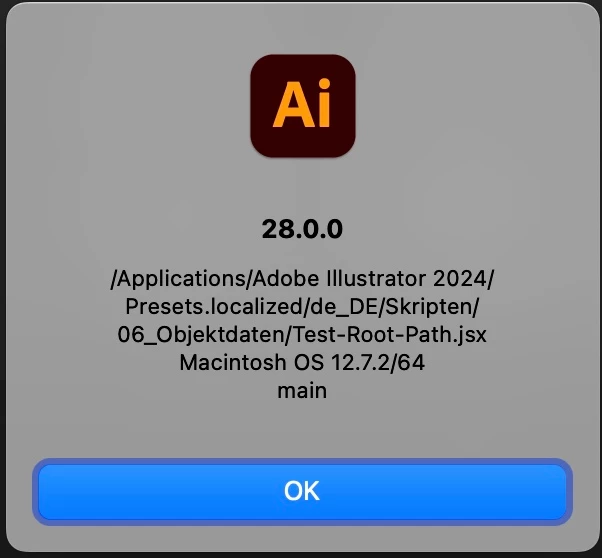
Starting the script with Illustrator menu it will make it run!

4 replies

m1b
Adobe Expert
December 19, 2023

@jduncan I wondered if this thread might be relevent to your AI Command Palette project?

- Mark

jduncan
Adobe Expert
December 19, 2023

I have run into this exact issue a few times with client projects and on the command palette project (especially when using script launchers). So I always use one of the built-in Folder Class Properties of the Folder Object to save any preference files (or anything I need to be able to access easily on multiple computers/computer types). If it is something I don't want the user messing with, I will typically put it in the `Folder.userData` folder. If it is something they need to be able to access then I'll use either `Folder.desktop` or `Folder.myDocuments`.


And a note on "Script Launchers". I have found they all have different methods of executing the scripts you load into them. Some simply execute the actual script file (which typically doesn't cause too many issues), but others do weird things like reading and executing your actual code or firing the code with BridgeTalk.


It is very hard to plan for all of these possibilities when creating scripts, so I try and show people how to load scripts in the main Ai Script menu. Then it can easily be fired via a hotkey with something like BetterTouchTool/Keyboard Maestro for Mac or AutoHotkey for Windows.

m1b
Adobe Expert
December 19, 2023

Thanks @jduncan. In hindsight it is an obvious possibility given that $.fileName is returning the name of the active script but the script launchers themselves are the active scripts. I didn't think of it because I don't use any script launchers. My setup is to sync my development scripts folder with Illustrator's script folder (I use Hazel to do the syncing automatically) and then I launch them from keyboard with Palletro.

- Mark

Sergey Osokin
Inspiring
December 15, 2023

We are testing English localizations. But in another thread I saw your de_DE/Skripten path. Maybe we should look at different localizations of Adobe Illustrator on macOS? Or maybe macOS itself is German and this is the problem with $.filename in ExtendScript. 


Because yesterday I had an update to macOS 12.7.2 without script path errors. English macOS, en_GB localization of Adobe Illustrator.

Someone75Author
Inspiring
December 15, 2023

@Sergey OsokinMeanwhile I think it's exacrly what you write:The German OS and German Illustrator. As all other terms work, this is the only reason I could think of at the moment.

Updatet to 12.7.2 but it did not change the results.

alert($.fileName) >> 3


alert(new File($.fileName)
>> /3

GNDGN
Inspiring
December 14, 2023

The read and write permissions of the script folder must be assigned to the user who is executing the script. (https://support.apple.com/guide/mac-help/mchlp1203/mac)


With the correct permissions, this test is running successfully for me:

var scriptPath = new File(File($.fileName).path + "/test.txt");

scriptPath.encoding = "utf-8";
scriptPath.open("w");
scriptPath.write("Hello world!");
scriptPath.close();


____________________Robotic Process Automation in Desktop Publishing (Book): https://doi.org/10.1007/978-3-658-39375-5
Someone75Author
Inspiring
December 15, 2023

I know that it works for most others. My question was actually, why it does not work in my case on two different machines.

Permissions are set right, as app.path will work quite well and I run the script from Desktop.

Your skript does not work in my case, too. The generated path is /test.txt


Anyway I do not know which other permissions I would have to set. Illustrator hast full hard disk access and I (the current user) have access like all admins. I can read and write to all non-system restricted folders.

m1b
Adobe Expert
December 14, 2023

Hi @Someone75, it works as expected for me on MacOS 14.2, Illustrator 28.0.


What do you get when you run the script file from your Desktop? If it works on Desktop, maybe look at the permissions on the "script folder" you mentioned. Could they be restrictive? It doesn't seem likely, because it wouldn't run at all if you didn't have read access, and you shouldn't need write access in your example script.


Hmm. Can you try this test code, just to rule out code issues:

(function () {

    alert($.fileName);

})();

- Mark

Someone75Author
Inspiring
December 14, 2023

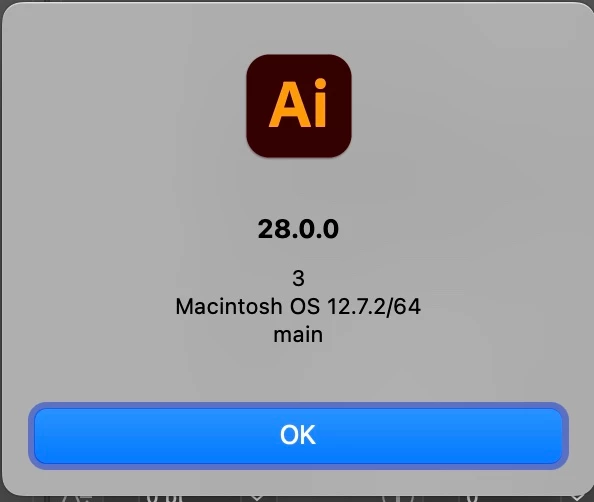
@m1bI ran your script from desktop and it throws "3" ...

Someone75Author
Inspiring
December 15, 2023

Very curious. Again, just to rule out possibilities, can you do this?


1. Restart computer.

2. Launch Illustrator

3. Run my script (do not run any other script first).

- Mark


P.S. Trivial point that affects nothing, so I hope you don't mind me saying,  just for learning: in many programming contexts (including ExtendScript) the term "throw" means throwing an exception (an error). In this case the alert function is showing "3", not throwing "3". You would say a function returns "3", not throws "3".


Sorry for the wrong term. As it does not work on two different machines, the restart did not address the issue ...

It's so wired. Even the "/3" alert. Where dos the 3 come from? It will always be three, no other number. ...