


Inspiring
November 14, 2025
Question

Fonts don't scale correctly

  • November 14, 2025
  • 3 replies
  • 238 views

i'm on the latest illustrator version on mac sequoia 


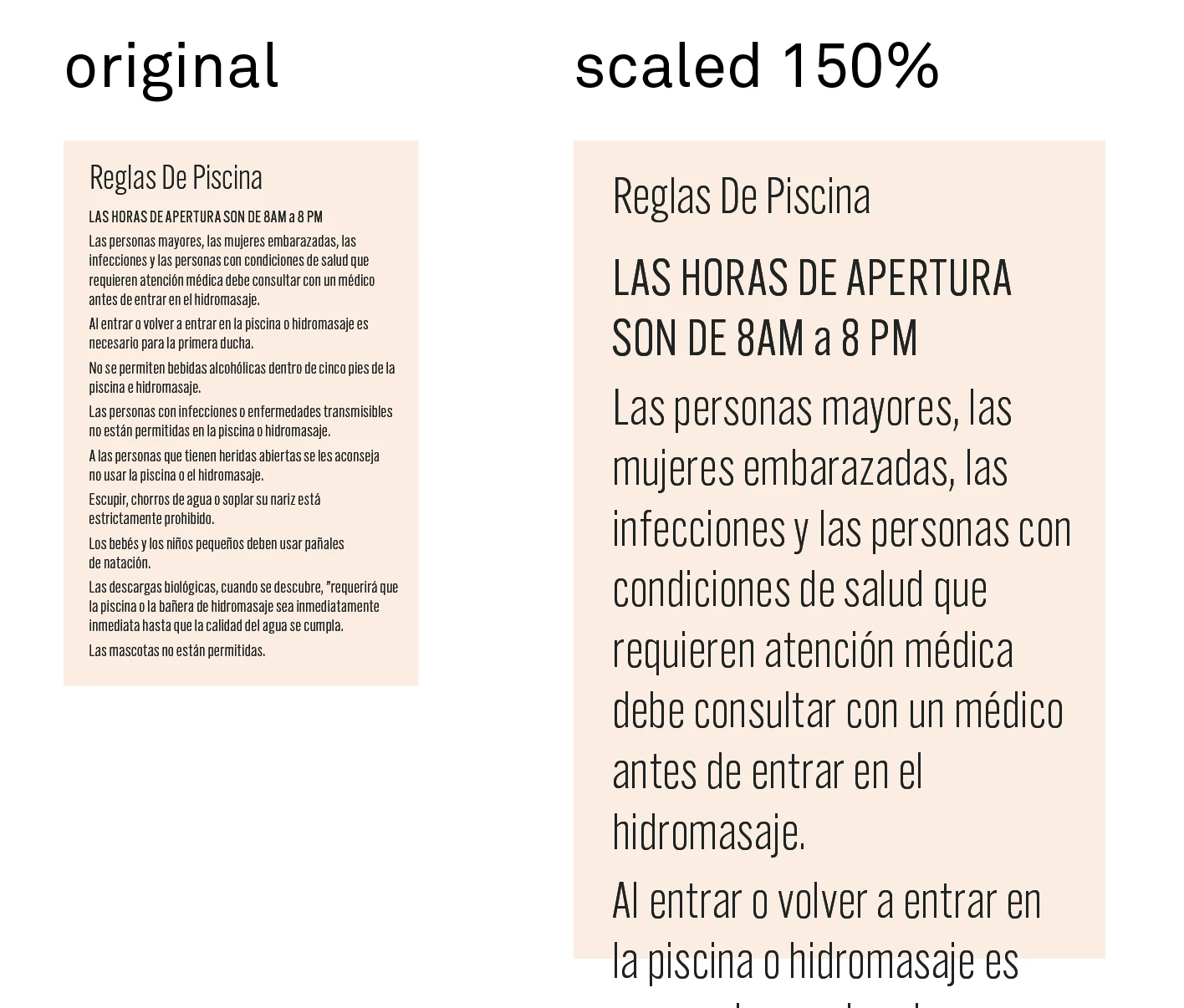
when scaling text, font sizes don't scale correctly. this is specially bad in mix type layouts. and it isn't even predictable. in the example i included it is very obvious, but in single line situations for example if i have type that is 10pts and i scale it 200 percent, the type will be something like 20.33pts


when scaling art by bounding box, the preview shows scaling correctly in real time, when you let go/complete the transform, the type just blows up

this is really messing me up since i have to work in scale with the same layout in different scales and the type is all over the place. 
 

3 replies

Kurt Gold
Community Expert
November 15, 2025

There were some complaints about (possibly) similar issues in conjunction with grouped threaded text objects.


Perhaps you can clarify and share a sample file for inspection.

Community Expert
November 15, 2025

I can't seem to re-create the problem on my end using the Transform>Scale command on either Point Text or Area Text objects, even if they contain a mix of different typefaces. The point values still correspond correctly to the scale percentage applied to the text object.

What fonts are you using that scale incorrectly? Have you tried other fonts to see if the same issue occurs?

Community Manager
November 14, 2025

Hello @11255440_co,

Thanks for reaching out. Could you try converting your text layers to Point Type to see if it helps with your workflow?

Looking forward to hearing from you.

Anubhav

mecdosAuthor
Inspiring
November 15, 2025

Point type is the same. It seems to be related to having paragraph styles applied. In which case this is not the behavior i would expect if it was trying to mainting the style ( type would remain the same not get way bigger). I would expect the style link to be broken, but also deleting the styles doesnt remove the issue from existing layouts. 


Kurt Gold
Community Expert
November 15, 2025

Using paragraph styles is an essential hint in this case.


I can then reproduce the issue when scaling with the Scale tool, the Free Transform tool or by scaling with the Transform panel.


Unless I'm overlooking something, I'd say it's a terrible bug.