

Known Participant
September 28, 2023
Question

Frustration Using Illustrator with My Laser Cutter

  • September 28, 2023
  • 5 replies
  • 5793 views

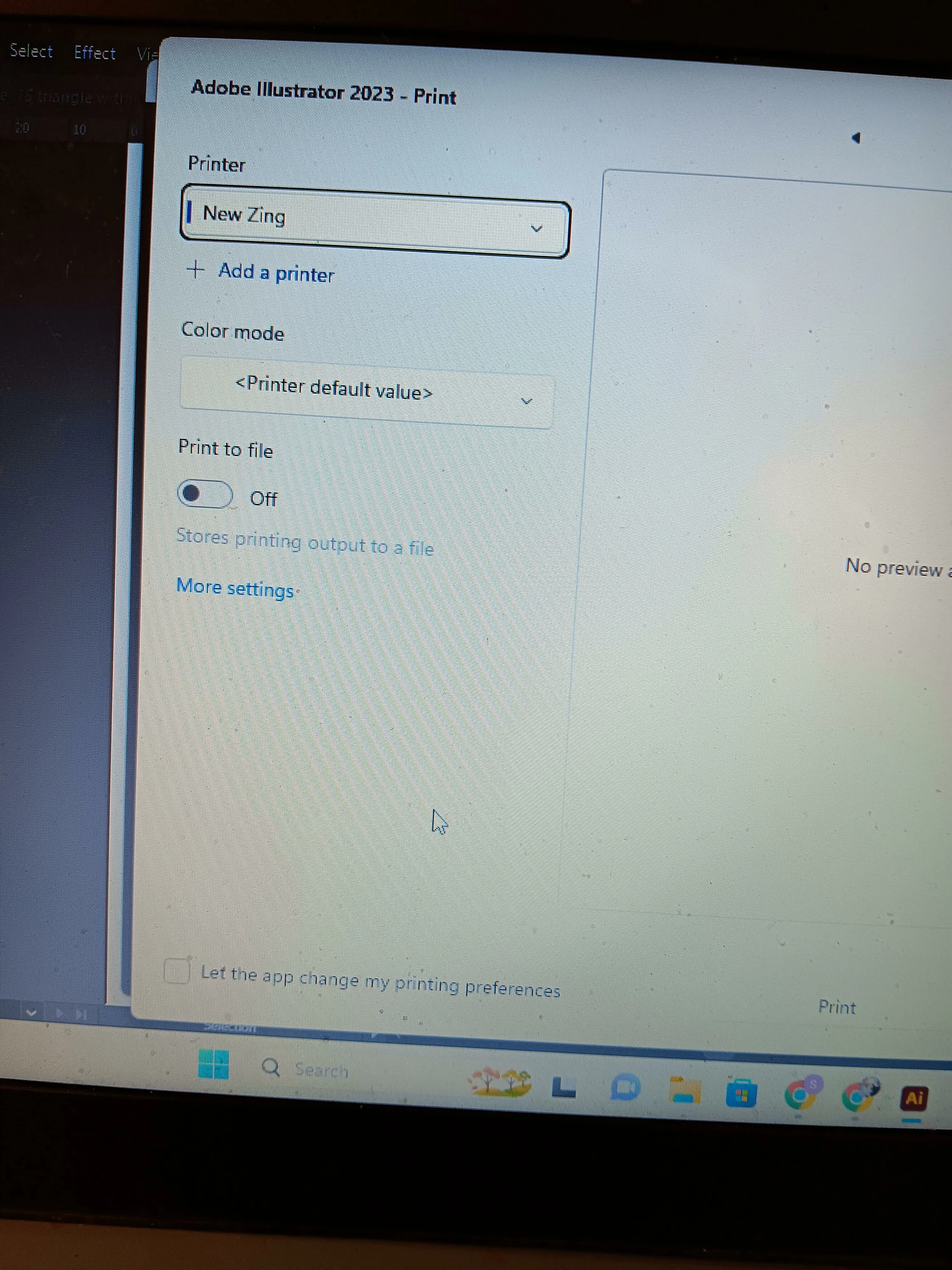
Hi, Everybody. Gee, I hope somebody can help me. 


5 replies

Participating Frequently
October 29, 2024

I am seeing the exact same issue. Windows 11, Illustrator 2024.

Setting the Epilog as the default printer helps with the switching printer issue. But the other problems remain; not retaining driver settings, switching to the incorrect orientation, etc.

As a workaround, loading the .ai file direct into Acrobat and using that to print seems to work better.

I suspect the issue is the legacy Epilog drivers. They are 10 years old now and not behaving as they should in Windows 11. The included help files are in a deprecated format and can't be opened.

Participant
March 12, 2025

We are having the same issue, and have been having it for awhile. We also find that running throught Acrobat helps, but is a hinderance for students as they have to make edits to the files in Illustrator and then open them in Acrobat; as they are just learning it is super frustration for them. Has anyone found a solution yet?

Participating Frequently
March 27, 2024

Scott can you tell me did you resolve this issue. I am a school teacher and they have just updated our laptops to W11 and I have now began to encounter the exact same problem as you and it is absolutely driving me nuts. Even the Width and Height settings of my media are reversed and appear so in the adobe print dialogue box. I cannot seem to get the corrrect setting no matter what I do and the resetting to default every time you open the Epilog pint manager is just rediculous. Any giudance would be greatly appreciated. Regards Shane

Community Manager
March 27, 2024

Hello @Shane33893353nd0p,

We understand that encountering technical issues can be frustrating. Would you mind sharing some more details, like the exact version of the OS/Illustrator and the exact details of your workflow, including screenshots/screen recording of the problem (https://adobe.ly/3PDQJND), so we can better assist you?

Looking forward to hearing from you.


Thanks,

Anubhav

Participating Frequently
April 5, 2024

Hi Anubhav, thanks for getting back to me so quickly,sorry my response has been slow. See the attached video I have taken which may explain the issue. Thanks, regards Shane

Jacob Bugge
Community Expert
Community Expert
September 29, 2023

Scott,


This is only about your inability to edit posts.


There has been a serious issue with spammers creating new accounts just for spamming, and when their posts were moderated they edited the spam back in.


This led to a restriction where only posters with a certain level of participation are trusted with the ability to edit posts. Which level has never been expressly mentioned, but undoubtedly many know it.


Scott5F8FAuthor
Known Participant
October 2, 2023

Jacob, thanks for clarifying. I totally understand and appreciate that. I'm always amazed at how many people in this world try to scam other human beings. If they worked as hard at a legit profession, they'd probably be very successful. But there's something about the thrill of the chase, the adreline rush one gets from doing something naughty, that motivates them. I'll never understand it. 

Thank You,

Scott

Jacob Bugge
Community Expert
Community Expert
October 2, 2023

You are welcome, Scott.


I wonder how much skill scamming takes; and that is just one in a wide range of fascinations I fail to fathom.

Community Expert
September 29, 2023

I'm kind of surprised you can use a laser cutter directly in Adobe Illustrator via an ordinary print dialog box. Usually these specialty devices require their own stand-alone software to drive them, such as the software RIP applications I use with large format printers at my workplace.


I think the first trouble-shooting step to check is to see if there are any print driver updates for your laser cutter. Does the laser cutter have its own bundled stand-alone application. Or is it just intended to use via Adobe Illustrator?

Scott5F8FAuthor
Known Participant
September 29, 2023

Bobby, thanks for your post. I probably wasn't as clear as I might have been in my OP. The Epilog does have its own propriety software that meshes very nicely with AI. I've been using it for years without a hitch. However, in the process of troubleshooting this issue, I discovered that the glitch is 100% caused by AI, not the Epilog software.


The way this is simple. If I run the file and print directly from the Epilog print dialogue box, the image prints perfectly. The problem? That box does not give me control over the controls of the laser cutter, which are speed, power and resolution. In the past, 


Scott5F8FAuthor
Known Participant
September 29, 2023

My friends, I cannot find any way to edit any of my previous posts. What's the secret? I belong to dozens of discussions forums and have never seen where I could not go in and spruce up a post.


Suffice it to say for now, I was able to isolate the glitch definitively. It is the Illustrator program causing the problem, not the Epilog software. 


Thank You. 

Scott5F8FAuthor
Known Participant
September 28, 2023

Can somebody show me the button to edit my OP? For the life of me, I can't find it.


Anyway, here's my situation. I have an Epilog laser cutter, the best in the business. For years I've used AI without incident as the software interface with my laser cutter. All the sudden, about a week ago, AI began showing the screen I posted in the previous post. I've never seen it before. This appears when I click on the Setup button in the Print Dialogue box. The screen used to go directly to the Epilog settings page. Now, when I print through this AI box, the measurements are widely inaccurate -- and I'm talking six inches, not three millimeters.


My analysis is I must have hit a button in AI to do this. Can anyone tell me where to go in AI to tell it to stop doing this?


Thanks Very Much,
Scott

Monika Gause
Community Expert
Community Expert
September 28, 2023

Did you perhaps update Illustrator?

And now it's no longer compatible with your printer driver?

Scott5F8FAuthor
Known Participant
September 29, 2023

Monika, thanks for your response. That makes a lot of sense. Yes, I always update the AI software. That could be the problem here. But I think the root cause is likely another culprit. The tech people at Epilog (the laser company) had me update their software to their newest version. That's when the problem started. However, I've gone in and deleted that version and reinstalled my original program, but that box still keeps popping up. 


I had no choice earlier today than to get CorelDraw on a trial basis. It's working very well. I'm just too late to sit tight with my customers and risk refunds for lack of delivery.


Monika, shouldn't there be a way for me to go into AI and tell the program to stop popping up this dialogue box every time I go to print something? So frustrating.


Thank You.
