Exit
  • Global community
    • Language:
      • Deutsch
      • English
      • Español
      • Français
      • Português
  • 日本語コミュニティ
  • 한국 커뮤니티
0

Gaussian Blur

Contributor ,
Sep 25, 2022 Sep 25, 2022

Hi,


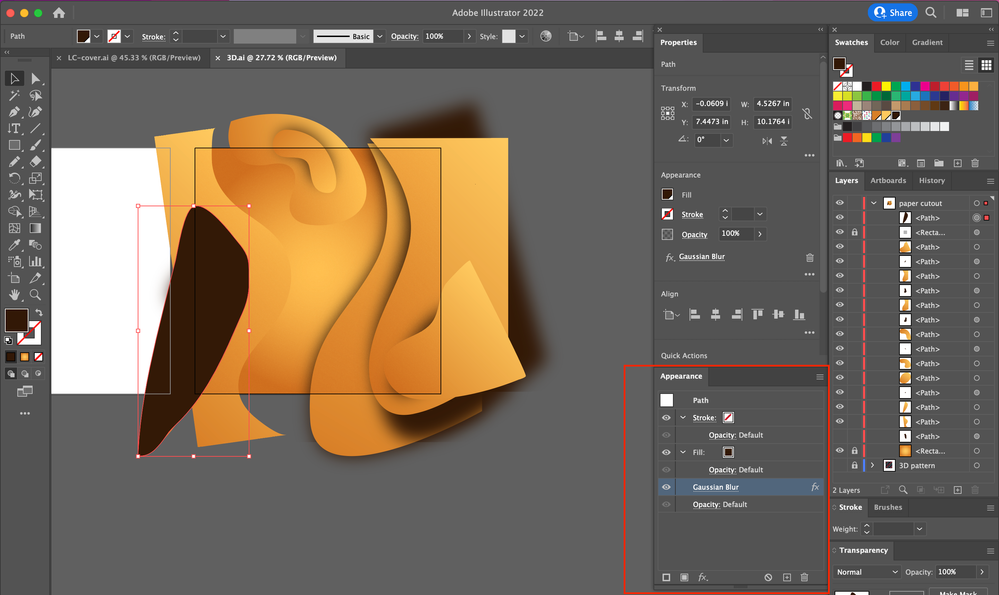
Sometimes, Gaussian Blur is applied.

Othertimes, not.


What's going on?


Hosun
 

Screen Shot 2022-09-26 at 6.26.04 AM.png

TOPICS
Feature request
895
Translate
Report
Community guidelines
Be kind and respectful, give credit to the original source of content, and search for duplicates before posting. Learn more
community guidelines

correct answers 1 Correct answer

Community Expert , Sep 25, 2022 Sep 25, 2022

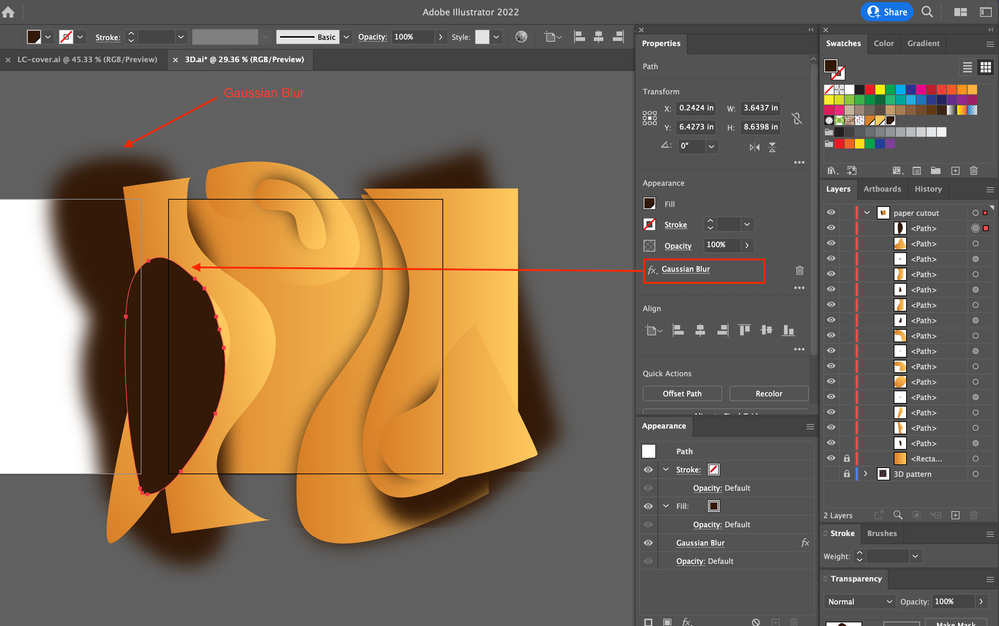
Thanks, clicking the Gaussian Blur in your file changes what you showed and seems to work fine.

I combined 2 screenshots that show your very large blur and an additional 10 inch around the object.

Screenshot 2022-09-26 at 01.40.35.png

Translate
Adobe
Community Expert ,
Sep 25, 2022 Sep 25, 2022

Please tell us what you are doing step by step.

Please select each of the affected objects and open the Appearance panel (not just the Properties panel) to check it. The blur might be applied to just the stroke and then is invisible.

Translate
Report
Community guidelines
Be kind and respectful, give credit to the original source of content, and search for duplicates before posting. Learn more
community guidelines
Contributor ,
Sep 25, 2022 Sep 25, 2022

1. I drew a figure with Pencil Tool.

Screen Shot 2022-09-26 at 7.21.29 AM.png


2. Filled the figure with a color and applied Gaussian Blur to it.

Screen Shot 2022-09-26 at 7.22.10 AM.png


3. Result

Screen Shot 2022-09-26 at 7.24.40 AM.png

Translate
Report
Community guidelines
Be kind and respectful, give credit to the original source of content, and search for duplicates before posting. Learn more
community guidelines
Community Expert ,
Sep 25, 2022 Sep 25, 2022

Please check out the Appearance panel.

Translate
Report
Community guidelines
Be kind and respectful, give credit to the original source of content, and search for duplicates before posting. Learn more
community guidelines
Contributor ,
Sep 25, 2022 Sep 25, 2022

What do you mean by that?

Screen Shot 2022-09-26 at 7.49.49 AM.png

Translate
Report
Community guidelines
Be kind and respectful, give credit to the original source of content, and search for duplicates before posting. Learn more
community guidelines
Community Expert ,
Sep 25, 2022 Sep 25, 2022

Can you copy that object to a new file and share it?

Dropbox, CC filesharing, Google, WeTransfer...

Translate
Report
Community guidelines
Be kind and respectful, give credit to the original source of content, and search for duplicates before posting. Learn more
community guidelines
Contributor ,
Sep 25, 2022 Sep 25, 2022

I just sent you a file link via Message of Adobe Community.


Hosun

Translate
Report
Community guidelines
Be kind and respectful, give credit to the original source of content, and search for duplicates before posting. Learn more
community guidelines
Community Expert ,
Sep 25, 2022 Sep 25, 2022

Thanks, clicking the Gaussian Blur in your file changes what you showed and seems to work fine.

I combined 2 screenshots that show your very large blur and an additional 10 inch around the object.

Screenshot 2022-09-26 at 01.40.35.png

Translate
Report
Community guidelines
Be kind and respectful, give credit to the original source of content, and search for duplicates before posting. Learn more
community guidelines
Contributor ,
Sep 26, 2022 Sep 26, 2022

Thank you very much for your help.


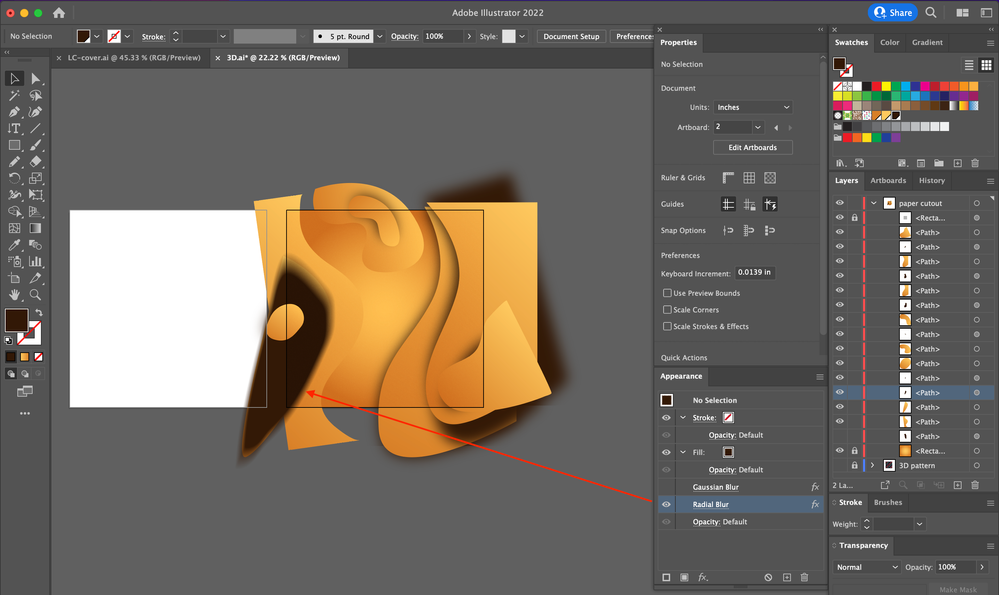
Gaussian Blur is still not seen on my side.

So, I switched to Radial Blur.


I have another question.

In your screenshot, if I change the value in Add: Around Object in Document Raster Effects Settings, does it apply to all the effects in the document?


Hosun
 

Screen Shot 2022-09-27 at 3.34.26 AM.png


Translate
Report
Community guidelines
Be kind and respectful, give credit to the original source of content, and search for duplicates before posting. Learn more
community guidelines
Community Expert ,
Sep 26, 2022 Sep 26, 2022
LATEST

It is strange that you still cannot see it, maybe it is document related (but then I should not be able to see it). Maybe a reset of Preferences will help:

https://helpx.adobe.com/illustrator/using/setting-preferences.html

And yes, the setting in Effect > Document Raster Effects Settings will have an effect on all raster effects in your document.

There is also an effect Rasterize which has similar settings but can be applied to specific items in the Appearance panel. 


Translate
Report
Community guidelines
Be kind and respectful, give credit to the original source of content, and search for duplicates before posting. Learn more
community guidelines
Community Expert ,
Sep 25, 2022 Sep 25, 2022

How much Blur is applied to the path?

Translate
Report
Community guidelines
Be kind and respectful, give credit to the original source of content, and search for duplicates before posting. Learn more
community guidelines