Srishti Bali
Community Manager
Community Manager
June 13, 2023
Question

Generate stunning color themes using text prompts with Generative Recolor

  • June 13, 2023
  • 6 replies
  • 7653 views

Introducing Generative Recolor: Effortlessly Transform Artwork with AI Magic
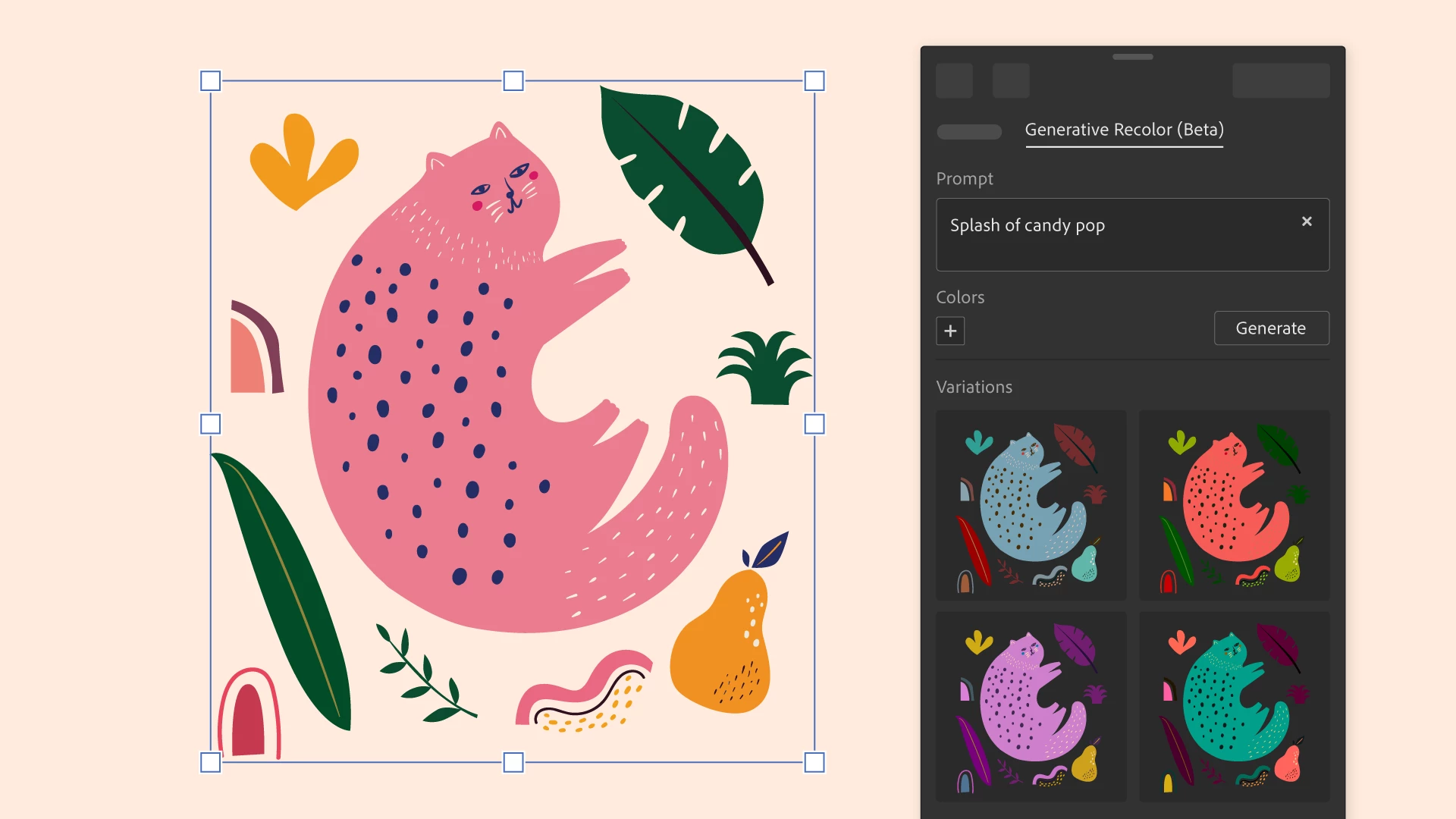


Unlock the power of Generative Recolor in Illustrator on the desktop!

With the advanced capabilities of Adobe Firefly, the new family of creative, generative AI models, you can now create captivating color themes and palettes for your artwork in a flash.


Simply describe your desired color theme or palette using plain text, and watch as Illustrator generates multiple variations within seconds. Preview the options in real-time and choose the perfect fit for your artwork.


How to Use Generative Recolor in Illustrator?


  1. Select your artwork and navigate to the Properties panel, then select Recolor in the Quick Actions section.
  2. Switch to the Generative Recolor tab.
  3. In the Prompt field, describe your desired color theme or palette such as "Midnight Blue", "Yellow, Red, Green," "Rustic Autumn Harvest," "Tropical Paradise Escape," or "Bold and Vibrant Fiesta," and so on.
  4. Select Generate to get different variations.
  5. Hover over the variations to preview them on the artboard, and choose the ideal one.

    To preserve the colors, simply choose "New color group," located at the bottom of the Generative Recolor tab.


Refine and Personalize


You have the option to refine the output by adding up to five base colors along with the text prompt. You can further fine-tune the colors by switching to the Recolor tab.


Unleash your creativity and explore the endless possibilities with Generative Recolor.

Try it now and let your artwork shine with stunning color transformations!


Note: Some features are available in Illustrator on the desktop for development, testing, and feedback.


Before you begin...


Before you start exploring the possibilities of transforming your artwork, it's important to understand the following limitations of Generative Recolor:

  • An internet connection is required for the feature to function.
  • A colored artwork is necessary to initiate the recoloring process.
  • Generative Recolor can only be applied to vector artwork.


We value your input and invite you to actively participate in shaping the future of Generative Recolor. Join the conversation to provide feedback, report bugs, and share your suggestions for new features. Your valuable insights will help us create a more focused and impactful experience. Engage with us in this thread, and let your voice be heard!


Thanks,
Srishti

This topic has been closed for replies.

6 replies

Srishti Bali
Community Manager
Community Manager
August 13, 2024

Hi Everyone,


Are you still figuring out how to use the Generative recolor feature in your daily tasks? Don’t worry, we’ve got you covered!

Join Anika Aggarwal, tomorrow, August 14th, at 10 AM PST for a hands-on session where you'll learn how to create an eye-catching invite and master the use of Generative Recolor for color palettes and gradients. Get your questions answered, see what the community is working on, and receive feedback on your projects!


Let's level up your Illustrator skills together! 💪


Srishti Bali
Community Manager
Community Manager
August 13, 2024

Hi Everyone,


Are you still figuring out how to use the Generative recolor feature in your daily tasks? Don’t worry, we’ve got you covered!

Join Anika Aggarwal, tomorrow, August 14th, at 10 AM PST for a hands-on session where you'll learn how to create an eye-catching invite and master the use of Generative Recolor for color palettes and gradients. Get your questions answered, see what the community is working on, and receive feedback on your projects!


Let's level up your Illustrator skills together! 💪✨


Anshul_Saini
Community Manager
Community Manager
September 13, 2023

Hello everyone,


We're excited to announce that Generative Recolor in Illustrator has officially transitioned from beta to General Availability (GA). This means it's now a fully supported and stable feature for all users.


With the release of Illustrator version 27.9, we've introduced several exciting updates. To make the most of these enhancements and harness the full potential of Generative Recolor, we highly recommend updating to v27.9.


New Updates:


Don't miss out on the latest and significant improvements in Illustrator – upgrade today to unlock a world of creative possibilities!


Best,

Anshul

Participant
July 19, 2023

Hello,

I have the latest Illustrator Beta version and have access to AI Generative Recolor but whenever I type in a prompt (in English) it starts loading variations but they never actually load. I am connected to the internet and have all my apps are up to date. What could be preventing the recolor variations from loading once I type in a prompt? I have also tried using differnet prompts to no avail.  

Monika Gause
Community Expert
Community Expert
July 19, 2023

Those should show a small preview of your artwork.


Can you please try this with some simple shapes? Colored rectangles? Does that work?

Participant
July 19, 2023

Hi,

Thank you for responding. I'm still facing the same issue. I don't know if it is because I have other programs open or something but it's disappointing because I'd really like to try it out. I am able to use the text to image feature on Adobe Express but for some reason this fails to load for me. 

Participant
June 14, 2023

I see that the recolor is not supposed to be used for Commercial work. Does this restriction apply only to the particular recolored image, or does it mean I can not even use  a color group made from image recolored by AI?  

Participant
July 17, 2023

I would also like further clarification on what is ment by not intended for commercial use?

Participating Frequently
June 13, 2023

I downloaded the beta version to my desktop but it doesnt seem to show the generative recolor anywhere? 

Monika Gause
Community Expert
Community Expert
June 13, 2023

It's in the current released version.

Participating Frequently
June 13, 2023

I just downloaded it about 2 hours ago