BOT10
Participant
April 4, 2018
Answered

GPU preview greyed out.

  • April 4, 2018
  • 22 replies
  • 63722 views

Hi,

I am having a problem with my gpu preview. It's greyed out and I can't enabled it. On the performance tab, it says gpu is compatible and available. I can check the box in gpu performance and animated zoom, but somehow I can't enabled it. This is not the 1st time that it happened. It happens every now and then and it happened again today. I decided to ask it here in the forum cause I'm really pissed that I can't use it again. My gpu drivers and illustrator are both updated.

I am using a dual screen. 1 is a monitor-tablet Huion gt-191 and the other 1 is just a normal 23" Samsung monitor.

Here's the specs of my pc:

CPU: Intel I5-6600

RAM: 8GB

GPU: Nvidia Gtx 1060 6gb

I hope you guys can help me. I really need to use my illustrator as I have work to do. I can't work without the GPU preview

Thanks!

PS. sorry for the bad english. Not my 1st language

Correct answer MegaTorque-01

Hi @sevenK @MegaTorque-01,


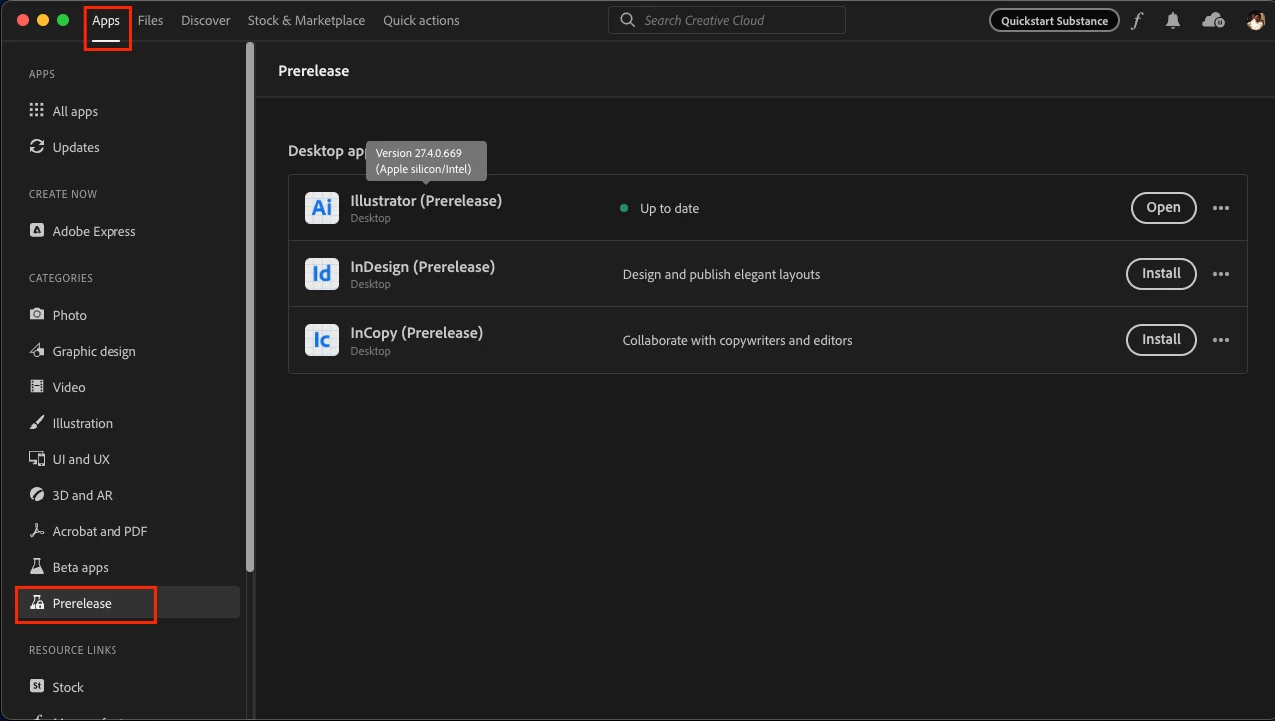
I am glad to inform you that we have tried addressing the issue in a pre-release build, v27.4-669, which is now available on Creative Cloud Desktop under the Prerelease Section.


I also wanted to let you know that I have tried the files shared by jschmed and Sevenk, and I could not replicate the same behavior on this build on both Windows & Mac machines.


Would you all mind giving it a try and letting us know if the issue has been resolved for you as well? Your feedback will help us ensure that the final release is as stable and reliable as possible.


Steps to enroll in the Prerelease program and install the prerelease build on your machine are as follows:
Please click this link (www.adobeprerelease.com/) and go to the “Available Program” section to join the Illustrator prerelease.
Then accept the Prerelease agreement and do the following steps to install the Prerelease v27.4-669:
- Close Illustrator
- Go to the Creative Cloud Desktop app > Prerelease section under apps.
- Click on install. (This will not replace the existing installation of the Release build of Illustrator).


Thank you for bringing this issue to our attention, and we appreciate your patience & cooperation in helping us resolve this issue.


Best,

Anshul Saini


Anshul, I noticed that Illustrator 27.4 was available to me download this morning and GREAT NEWS!! The GPU problem appears to be resolved! I opened up 2 files that I know definitely did not work, and today I have both files open on my PC at the same time and they appear to be very solid - GPU acceleration all the way. The scrolling speed of the screen appears to be improved as well, very smooth! I'm not sure what you guys did in the background but this looks absolutely great now!!

22 replies

bongofernie
Inspiring
April 22, 2025

Try going to Edit, Preferences, Performance, and make sure GPU Performance is checked.

Then open your file and if it still lookks bad hit Control E. This toggles between views.

Participating Frequently
February 9, 2024

This problem is STILL happening in 2024! With strictly Illustrator-created vector files, no embedded or linked images, no color profile weirdness. Just randomly happens while working with a file. I notice the outlines for the selected object get rough looking and certain display features stop working, and wonder what the heck happened. Sure enough, GPU is grayed out suddenly. GPU Performance is turned on in the Preferences. I've had it happen multiple times for no apparent reason, even with pretty basic files on a very capable computer. Closing Illustrator and opening it again seems to solve the issue, but it shouldn't be happening in the first place.

Community Manager
February 12, 2024

Hello @Jennifer5EEE,

We understand that encountering technical issues can be frustrating. Would you mind checking if Illustrator behaves this way with all files? If yes, kindly try manually resetting Illustrator's preferences and checking if it helps:


For macOS

• Close all Adobe applications.

• Go to the following locations

• ~/Library/Caches

• ~/Library/Application Support/Adobe

• ~/Library/Preferences

• Rename Adobe Illustrator, com.adobe.illustrator and Adobe Illustrator 28 Settings folders to Adobe Illustrator.old, com.adobe.illustrator.old and Adobe Illustrator 28 Settings.old

• Launch Illustrator from the Creative Cloud.


Note: Location starting with this "~" sign indicates the User Library, which is hidden. So, you need to copy & paste the exact path in spotlight search or from Finder Menu > Go > Go to Folder > Paste the location in the dialog box like this:


For Windows

- Close all Adobe applications.

- Go to Location C:\Users\%USERPROFILE%\AppData\Roaming\Adobe

- Rename Adobe Illustrator and Adobe Illustrator 28 Settings folders to Adobe Illustrator.old and Adobe Illustrator - 28 Settings.old

- Relaunch Illustrator from Creative Cloud


Disclaimer: Please note that renaming preferences folders will remove all the custom settings, and Illustrator will launch with default settings. You can also save a backup of the folders in case you want to. The location is mentioned above.


Looking forward to hearing from you.


Thanks,

Anubhav

Participant
March 6, 2023

I know this is an old question but if you have a high performance graphics card this is what you do. FYI this is for windows and I don't know MacOS but you can use this as a reference.


go to settings, graphics settings, type 'adobe illustrator' in the search box, options, change your graphics preference to your high performance GPU. 

Participant
March 6, 2023

wow thanks man your suggestions does work for me😆

Participant
October 20, 2022

Looks like this problem is back with the v 27.0 update. I've tried a few things to fix it, but no luck. I hope this gets patched out in a future update 🤞

MegaTorque-01
Inspiring
October 21, 2022

Yes, I see the exact same problem in Illustrator 27 as well. Previous documents that were in CMYK mode all of a sudden now are CPU preview only, even I try and make the document from scratch again at some point when the GPU load goes up from scrolling around on the screen it just gives up and loses GPU functionality. I found that converting your document to RGB fixes the problem but leaves you in the wrong color space.

sevenK
Inspiring
October 21, 2022

Have you tried keeping all of the pictures you use within the artwork in the same color profile? I noticed that if I place a picture that has a different color profile embedded that the one used in the document color settings, the GPU preview right away stops working. Converting the color profile of the picture to the same one as the document profile and just reopen the AI file fixes the issue. 

Participant
October 13, 2022

re-install InDesign, worked for me. I'm on a macbook pro

Community Manager
October 13, 2022

Hello @Tycho26540364lqmx,


Glad to hear that you were able to resolve the problem. Feel free to reach out if you need further assistance in the future. We'd be happy to help.


Thanks,

Anubhav

Participant
July 27, 2022

Late to the party here, but one thing that seems to have worked for me on an M1Max Macbook Pro is to convert images (linked or embedded) to a different color profile. After converting images to sRGB in Photoshop, I am now able to switch to GPU preview.

Known Participant
July 27, 2022

Its not the colour profile Stephen - it is the hardware; my M1 Max laptop has 4 or 5x the performance of the other machine and as you say, allows full GPU preview. The big issue here is that Adobe are not supporting the same hardware across their product line. For PS / LR there is one standard (hence purchase on expensive GPU upgrade at PS team suggestion), for Illustrator another, despite all applications being GPU intensive.


A 'supported' / 'recommended' hardware list across all CC products would solve this issue, but currently it is anarchy and customers lose out.

Photographer & Film-makerAdobe Trainer and Influencer
sevenK
Inspiring
July 27, 2022

Not quite the case, it does have something to do with the color profiles embeded in the pictures, cause when you change the profile in the pictures the GPU preview works fine again. The question here is not about the GPU preview not working at all but failing to work in some cases.

Inspiring
June 6, 2022

If you have GPU Tuning Software like RivaTuner/ Afterburner / GpuTweak, you must shut it down first and then restart Illustrator.

Participant
December 9, 2021

Here we are in Dec 2021- it's still not fixed, but I discovered another workaround after trying all these ideas. Open a brand new, empty document, notice the "View Using GPU" is no longer greyed out. Now copy and paste all your artwork into the new empty canvas, and it should work. When will they fix this stupid bug?

Known Participant
January 19, 2022

January 2022. This thread started 4 years ago and this is still an acute issue - this is a maxed iMac (no excuses about compatibility here) - working on Illustrator 26.0.2 is like wading very painfully through treacle.


Sadly the documents I'm working on are too complex, too mission critical to copy and paste as a workaround for broken software.

Zoom into a document - 200% 400% and next is 28,000%

Move a layer and it keeps on moving. Ghost in the machine? 

From memory the explanation for moving to CC subscriptions was that it would bring instant fixes, and regular new features. 

Photographer & Film-makerAdobe Trainer and Influencer
Monika Gause
Community Expert
Community Expert
January 19, 2022
quote

this is a maxed iMac (no excuses about compatibility here)


By @Nick Wilcox-Brown


Compatibility is not about being "maxed", it's about one thing fitting into another one.


That said: the requirements are here https://helpx.adobe.com/illustrator/system-requirements.html


In order to have Adobe Tech staff take a look at the issue, please contact them at https://helpx.adobe.com/contact.html

Participant
September 28, 2021

FOR GAMERS with MSI afterburner
Had same problem and comments down below did not work. I am also a gamer and i have afterburner, after completly closing it the problem was fixed.

Participant
August 13, 2021

I had the same issue. The GPU preview option is greyed out in Illustrator for me.  I tried everything and didn't work untill I found this youtube video: https://www.youtube.com/watch?v=EUic90N5c1M

I didn't follow the whole thing, I only added the illustrator.exe and AIsniffer binder and from the options, select high performance. And my GPU option is back!

Hope this will work for you.