

Inspiring
December 21, 2022
Question

Group Shapes by Row

  • December 21, 2022
  • 3 replies
  • 1932 views

Hello,


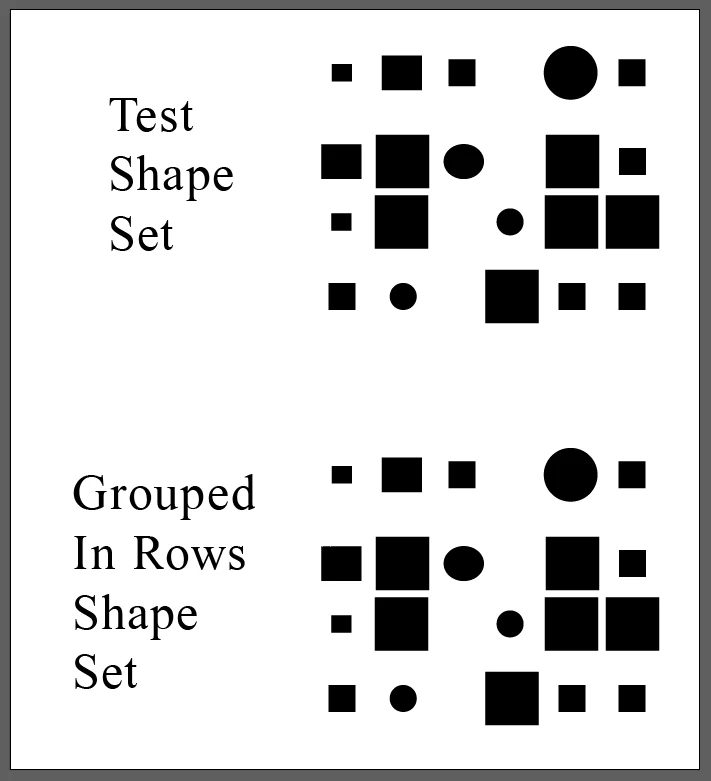
Help with Script that will Group the shapes by row.  If you look at the sample file I'm hoping to get a script that will take what is there and result in 4 groups.

Thank you!


This topic has been closed for replies.

3 replies

Kurt Gold
Community Expert
Community Expert
December 31, 2022

Femke, I saved Bryan's second sample as an Illustrator CS5 file, so you can download and open it in your Illustrator version.


Download Bryan's Line Grouping Example (CS5 format)


Meanwhile I tried jduncan's approach and as far as I can see it works fine.


femkeblanco
Legend
December 31, 2022

Thanks @Kurt Gold.  I tried the file you attached, and the script worked as expected. 


jduncan
Community Expert
Community Expert
January 2, 2023

@femkeblanco, your script does work. Bryan sent me a version of the script in a direct message and linked to this post so I just assumed they were the same but that was not the case. The script you pasted above does work as advertised. I just wanted to set the record straight. Cheers!

Kurt Gold
Community Expert
Community Expert
December 29, 2022

Bryan, I tried Femkes approach with a bunch of plain path objects, similar to what you showed in your initial post. The script worked fine.


You may want to provide another sample Illustrator file, so she can take a look and perhaps see what is the reason why it didn't work for you.


Inspiring
December 29, 2022

Here is a better example

femkeblanco
Legend
December 30, 2022

I can't explain why the script would fail silently.  Unfortunately, I can't open your file because I use an old version of AI.  


(1) Do you get an error message?

(2) Is at least one new group item added to your layers panel? 

(3) You could try adding alert(array.length) before the prompt(); if the alert reads 0, then the problem is in the first half of the script. 


femkeblanco
Legend
December 21, 2022

This was done on the hoof.  It requires the number of rows to be entered. 


var items = app.activeDocument.pageItems;
var array = [];
for (var i = 0; i < items.length; i++) {
    if (items[i].parent.parent == app.activeDocument && 
        items[i].typename != "TextFrame") {
            array.push(items[i]);
    }
}
array.sort(function(a, b) {
    return a.left == b.left ? a.top - b.top : a.left - b.left;
});
var n = prompt("Number of rows:");
for (var i = 0; i < n; i++) {
    var group = app.activeDocument.groupItems.add();
    array[i].moveToEnd(group);
    for (var j = array.length - 1; j > -1; j--) {
        if (array[j] != array[i]) {
            var b1 = array[i].geometricBounds;
            var b2 = array[j].geometricBounds;
            if (b2[1] >= b1[1] && b2[3] < b1[1] || 
                b2[1] <= b1[1] && b2[1] > b1[3]) {
                    array[j].moveToEnd(group);
            }
        }
    }
}


Inspiring
December 29, 2022

I'm not sure if I am doing something wrong with your script but I cannot get it to work.  I enter the number of lines but nothing gets grouped.
