


Help requested converting RGB to CYMK
Why would only One element of an EPS file when converted to CYMK change color but the rest of the document doesn't?
I purchased a EPS from Shutterstock. It is in RGB. I needed to remove a shadow layer that was not transparent. After doing so, I wanted to convert it to CYMK so that I can insert it into a CYMK project.
The EPS file itself would not convert when I went into File- document color mode. I would get a red explanation mark pop up just saying it couldn't be done.
I tried creating a new document and Place the EPS
But this method changes all the grouping of the file and it's very hard to isolate the shadowing That leaves some white which won't work with this project.
Next I tried creating a new document and placing the converted EPS to AI file after I removed the shadow.
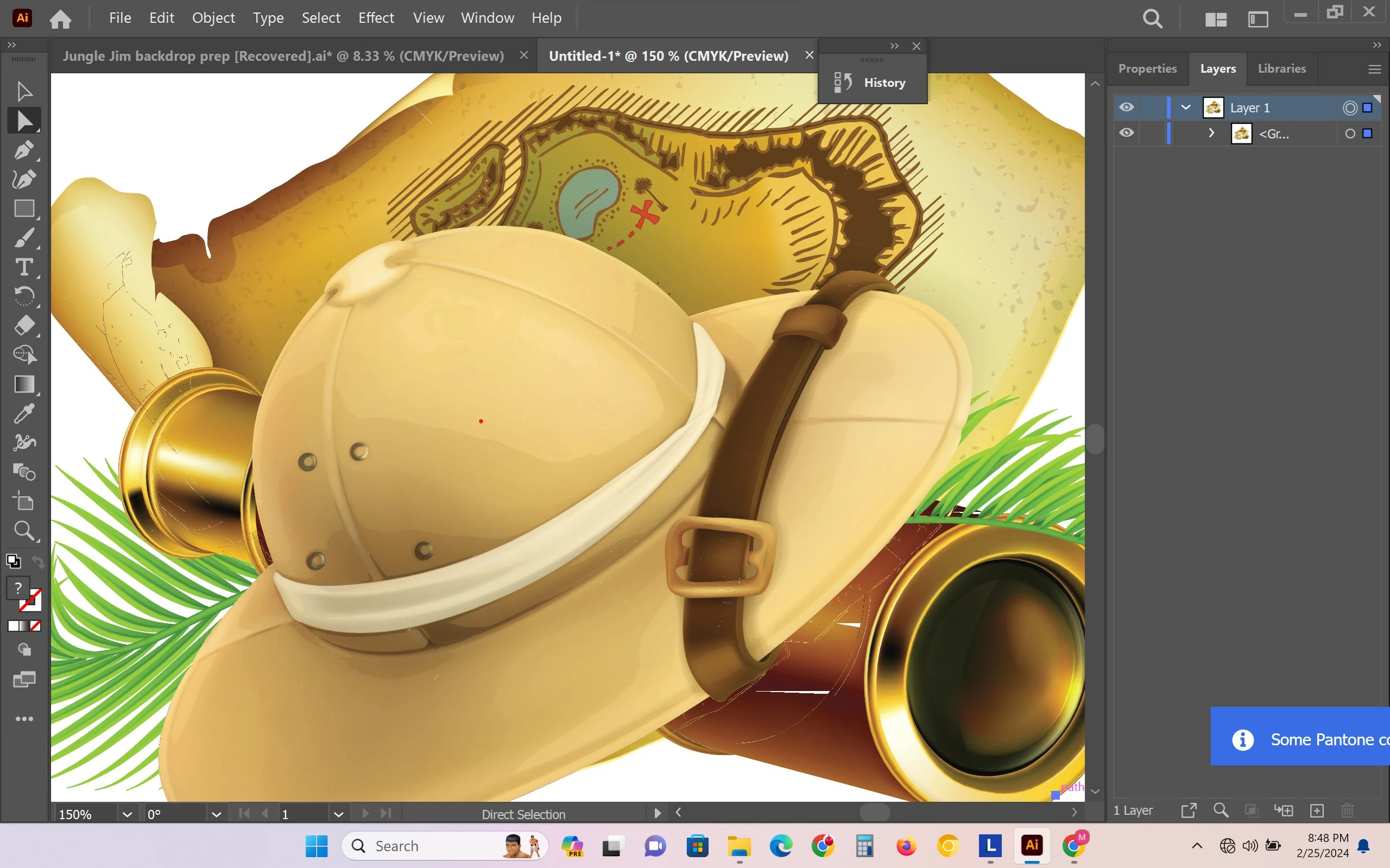
I was able to convert to cymk. But as you can see in picture two, the image of the hat gets washed out and is a cream color. At first I assumed this was because it wasn't CYMK colors, but yet none of the other colors changed.
Picture three shows that if I flatten the transparency and then try to convert to CYMK. It works in the colors are fine but now I have new artifacts and outlines. Interestingly, I am showing you a screenshot because when I try to save it as a JPEG to show you these defects in the telescope and parchment as well as on the hat is white dots or not present in the saved JPEG.
There is a color change at the front of the telescope but minor that it doesn't bother me whereas the hat is just not attractive color. But obviously I can't have the white outlines showing and I'm not sure what to look for that will either eliminate those lines or what to look for on the original document that I can remove that could be causing the issue?
That is if I'm able to switch to CYMK and not lose the colors of the hat.
What should I be looking for in the file that would cause the hat to turn cream color if I don't flatten transparency, but if I do flatten transparency, the color of the hat is fine? I'd rather try to fix that or we have a just to know how I could flatten the transparency and not have those lines showing up?
This was trans flatten with 100 % vector. I had tried different levels of raster to vector and it didn't seem to make a difference. I tried a couple of those check mark boxes to preserve alpha and then tried the other one. I tried them both unchecked as well.
I did notice that those lines changed when I rebooted the system and tried again. There are less this time than the first time I tried.
So I'm wondering if some of the defects is caused because of processing power?
My laptop is lenovo legion 5 pro 16arh7h and Ryzen 7 6800h, 3201 Mhz, 8 cores, 16 logical processors, , 3070ti GPU ,16 GB ram , 28.2 GB Ttl Virtual memory. Page file space 13 GB ,1 GB SSD with 701 GB Free
So picture 1 is of the RGB EPS with the shadow that when you move it to a different color, the shadow has white on the edges.
Picture 2 is the RGB converted to AI without the shadow.
Picture 3 is converted to CYMK and then picture 4 is screenshot is of the outlines that are showing up/through in white on the telescope flecks of white in the hat and lines on the parchment map.
Thanks for the help. I'm not an artist and have limited knowledge. I pretty much composite images a couple times a year for backdrops for my show. So please understand that I'm not as proficient with lingo and techniques and need a little guidance with suggestions.



 AdChoices