Inspiring
January 20, 2023
Answered

Hide Layer preview (Cause of abysmal performance)

  • January 20, 2023
  • 2 replies
  • 315 views

Is there a possibility to hide the previews in the layer tabs?
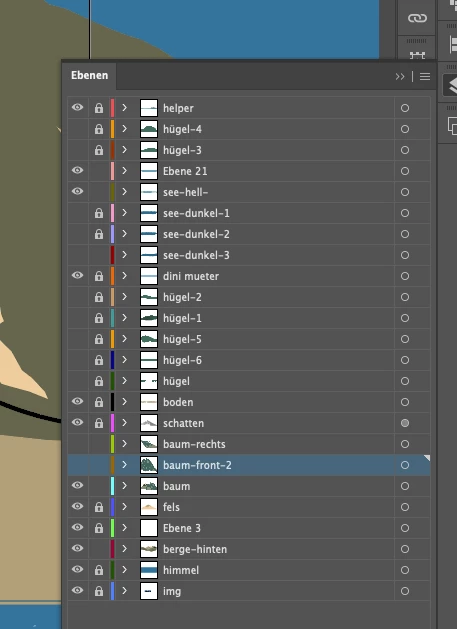
 

The Highlighted layer has quite a few brush lines.
If I open the layer pane every click takes around 5 seconds.


As soon as I close the layer pane again, the performance drops to oblivion.

The reason are those tiny layer preview squares.


Within these previews, the entire document is rendered in an incredible wasteful fashion, performance wise.


Is their a possibility to hide the previews in the document?
 

This topic has been closed for replies.
Correct answer Anubhav M

Hello @DingsZüg,


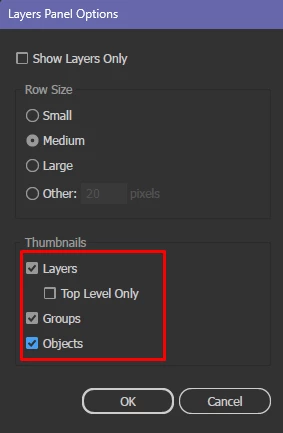
Thanks for reaching out. Would you mind trying to hide the Layer, Object, and Group Thumbnails under Panel Options for the Layers panel and checking if it helps?


Looking forward to your response.


Thanks,

Anubhav

2 replies

Anubhav MCommunity ManagerCorrect answer
Community Manager
January 20, 2023

Hello @DingsZüg,


Thanks for reaching out. Would you mind trying to hide the Layer, Object, and Group Thumbnails under Panel Options for the Layers panel and checking if it helps?


Looking forward to your response.


Thanks,

Anubhav

DingsZügAuthor
Inspiring
January 20, 2023

fantastic. thank you

Kurt Gold
Community Expert
January 20, 2023

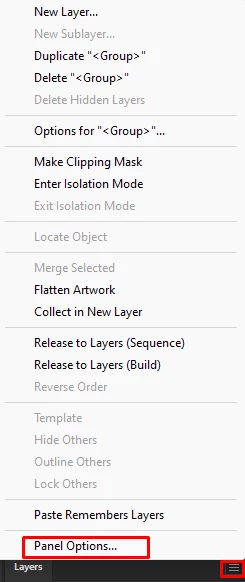
In the Layers palette flyout menu there is a command that opens the palette options (Bedienfeldoptionen).


There you can hide the thumbnails.


DingsZügAuthor
Inspiring
January 20, 2023

great. Thank you