


New Participant
January 17, 2021
Answered

how can I change save option?

  • January 17, 2021
  • 1 reply
  • 438 views

I selected the save on computer between computer and cloud. and also selected do not show again.


but, I want to change the save option to save on the cloud when  I save(ctrl + s) the illustrator.


how can I change it?? I cannot find the setting.
This topic has been closed for replies.
Correct answer c.pfaffenbichler

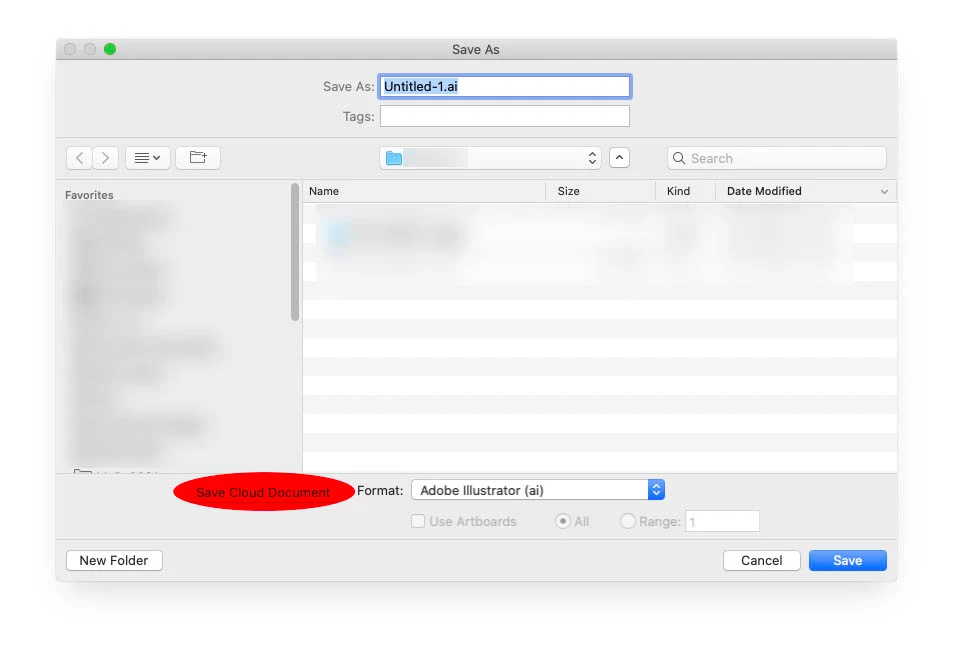
Have you tried clicking the »Save Cloud Document«-button? 

1 reply

c.pfaffenbichler
c.pfaffenbichlerCorrect answer
Community Expert
January 17, 2021

Have you tried clicking the »Save Cloud Document«-button? 

New Participant
December 20, 2021

i installed my adobe tools on a new computer recently and as i was configuring my illustrator i explicitly chose the "save to computer" option and "do not show again". unfortunatelly for some reason illustrator always propts the "save to cloud" window first and i have to switch to "save to computer" every time i have to save a new file. it's very frustrating and it messes with my workflow. how do i change the settings so that doesn't happen again?

Ton Frederiks
Community Expert
December 20, 2021

Try in Preferences to Reset all Warning Dialogs to revert the "do not show again".