Inspiring
June 27, 2023
Answered

How can I create an action or script that toggles the "Align art to pixel grid on creation" button?

  • June 27, 2023
  • 5 replies
  • 1421 views

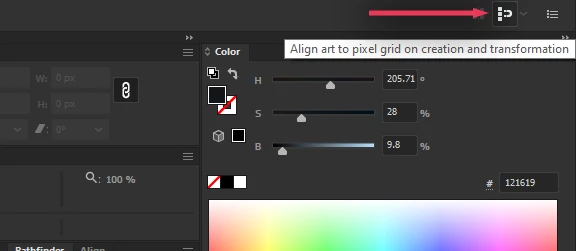
I'm talking about this option:


Ideally I want to create either an action or script that toggles this so I can assign it to a hotkey. I switch back and forth between this option all the time and having a keyboard shortcut would be a HUGE quality of life boost when working.

Anyone know how to do this?

This topic has been closed for replies.
Correct answer Sergey Osokin

Custom hotkey in Keyboard Shortcuts > Menu Commands > Snap To Pixel toggles the top right button. Tested on Windows 10 AI CC 27.1.1, 27.6.1, Mac OS. 

5 replies

Egor Chistyakov
Inspiring
July 3, 2023

Glad you got it solved, but it should just worked with an assigned hotkey directly in Illustrator.
Also the command is availbleat the bottom of the View menu, just 'Snap to Pixel' (surely without sub-options).

Can you please check if it gets toggled through the menu?


If either of both does not, I encourage you to log a bug at illustrator.uservoice.com and shre full details on your OS and the build used — even though it is solved for you with an AHK script... perhaps somebody else has this problem as well, and instead or reporting it and force the team to fix it, everyone hacks. No wonder we got broken Ai at our hands...

Inspiring
July 3, 2023

It was my fault. The keyboard shortcut I entered for some reason was the problem. When I changed the shortcut it started working perfectly. Sergey was spot on with this one. I am glad this works now, even if it renders my AHK script useless.

Sergey Osokin
Inspiring
July 3, 2023

I don't see why AHK is needed here when you can assign a hotkey by default: Snap to Pixel.

Legend
July 3, 2023

"Snap to Pixel" was that it. I did not know that. Thanks.

Legend
June 29, 2023

This is supposed to be handled by the "snapToPixelOnUserAction" preference.


// turn on
app.preferences.setBooleanPreference('snapToPixelOnUserAction', true) ;


However, it is difficult to use in practice for the following reasons.

  • You have to reopen the document for it to be applied
  • It can be enabled but not disabled


It would be more realistic to use applications such as Keyboard Maestro or Power Automate Desktop to automatically detect the icon image of "Align art to pixel grid on creation" from the screen and click on it.

Inspiring
July 1, 2023

Got it working in AutoHotKey. Here's the script:


#Requires AutoHotkey v2.0

; Illustrator SHIFT + 3 Toggle Pixel Snapping
#HotIf WinActive("ahk_class illustrator")
+3::
{

    WinGetClientPos &X, &Y, &ilW, &ILH, "ahk_class illustrator"

    ilC := "x" (ilW - 72) " y50"

    SetControlDelay -1
    ControlClick ilC, "ahk_class illustrator",,,, "NA"
}


This script binds SHIFT + 3 to toggle snapping. You can change the hotkey to your tastes. If you are using a HDPI screen, or the UI is modified in any way that affects the position of the snap toggle button, you might need to adjust the script.

This will not work on Mac.

Legend
July 1, 2023

You solved on your own. Congratulations!


AutoHotkey does not work on macOS, but clicking on specific coordinates is possible with Keyboard Maestro, AppleScriptObjC, JXA+ObjC, etc.

Mike_Gondek10189183
Community Expert
Community Expert
June 28, 2023

You may have been able to do this in an older version when align to pixel grid was under the align flyout. This guy that looks alot like me posted screenshot what that used to look like.

Mike_Gondek10189183
Community Expert
Community Expert
June 28, 2023

Quite often you can use the actions flyout menu to add a menu item, that do not record. In this case unfortunately there is no menu item so sincerely doubt you can record or add that.


I am finding that once you turn that setting on, it stays on if you are creating a new document using a web preset. Once you create a print preset it takes the setting off. As you switch often, thought i would explain, as I often forget to check, so did some exploration into this.

Inspiring
June 28, 2023
quote

Quite often you can use the actions flyout menu to add a menu item, that do not record. In this case unfortunately there is no menu item so sincerely doubt you can record or add that.


By @Mike_Gondek10189183


Yup, tried that. I wonder if there is a way in ExtendScript.