


New Participant
July 12, 2022
Answered

How can i extract the logo from this?

  • July 12, 2022
  • 2 replies
  • 331 views

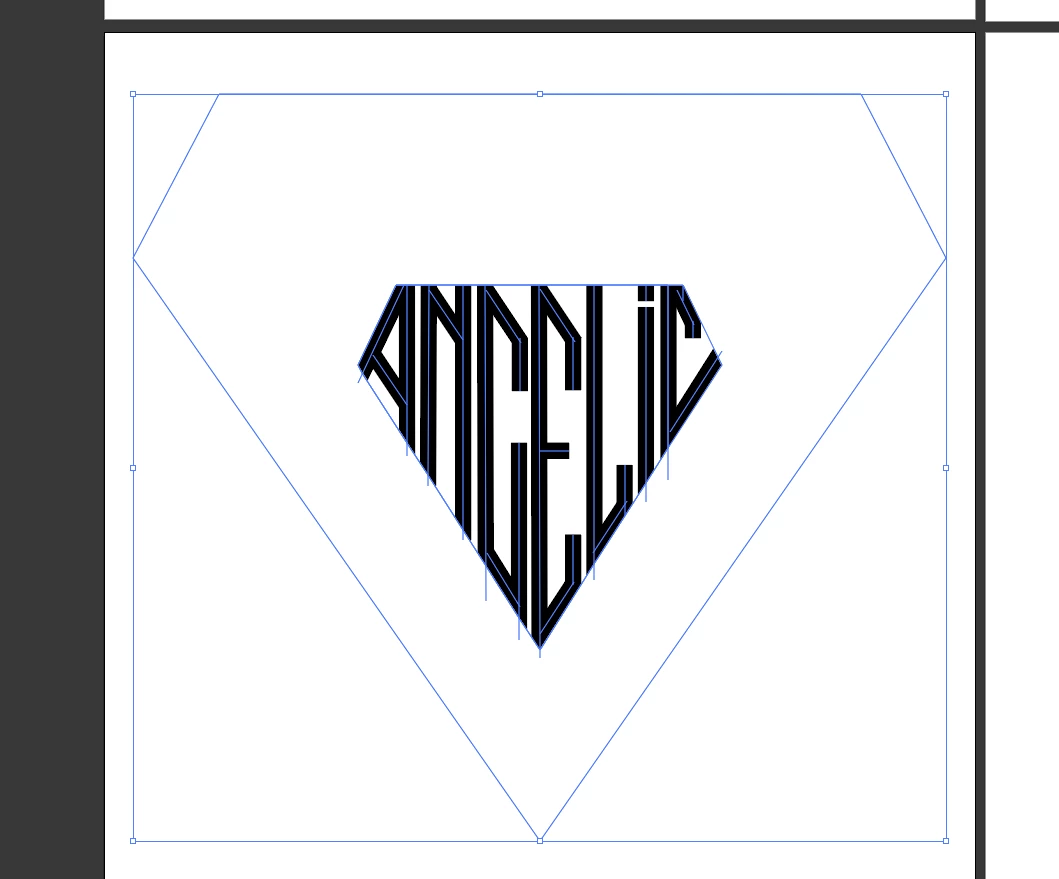
I drew this logo inside a diamond shape in illustrator. And to cover up the extra lines that go out of the diamond shape, i drew another diamond, moved it to top and filled it with white. Now i want to extract just the logo (Black letters) and have it be clean. I tried selecting all and using the shape builder tool, but i think i can't do that here because i used lines to draw the logo here. 

(I'm learning. I started using illustrator yesterday, so sorry if i'm missing something)
This topic has been closed for replies.
Correct answer SJRiegel

use Expand to turn the strokes into paths; then you will be able to use shapebuilder to complete the cleanup.

2 replies

SJRiegelCorrect answer
Community Expert
July 12, 2022

use Expand to turn the strokes into paths; then you will be able to use shapebuilder to complete the cleanup.

Monika Gause
Community Expert
July 12, 2022

You need to outline the strokes of that logo.

After that select all and use "Merge" from the pathfinder panel.

Ungroup

Then delete all the shapes that are not black (but either white or invisible). You can select them with Select > Same after having clicked on one of them.