


Participant
January 21, 2020
Question

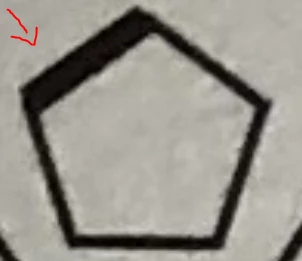
How can I increase the stroke weight more than the other sides of a polygone in illustrator?

  • January 21, 2020
  • 5 replies
  • 658 views

How can I increase the stroke weight more than the other sides of a polygone or any other shapes in illustrator? Just like in the picture. Please guide me Thanks. I know about the width tool but it disarranges the corners. I need exactly the stoke like in the image below.
This topic has been closed for replies.

5 replies

kphotopage
Legend
January 22, 2020

Here is yet another suggestion.

Transform and Live Paint will get you where you want to be.


Effects>Transform

3 lines centered, inside a circle-Fill/Stroke color None.

(Circle shown in green so you can see here)


Expand Transform.

Live Paint, Fills


Expand Live Paint.

Pathfinders>Unite.


K

Jacob Bugge
Community Expert
Community Expert
January 21, 2020

adnankhans,


If you actually prefer, or if you can use, a stroke that is increased inwards (as Ton has also presumed), rather than both inwards and outwards, thus giving a regular pentagon on the outside rather than a pentagon that is irregular both on the outside and the inside, you can create it as a single stroked path, as follows:


1) Create the pentagon as desired with the general Stroke Weight, and with Align Stroke to Center ticked (the default);

2) In the Appearance palette, Add New Stroke and continue with the new stroke selected in the Appearance palette;

3) Copy the path length from the Document Info with the unit, then in the Stroke palette tick Dashed Line and insert the length as the first gap, then insert the length followed by /5 (to divide it by 5) as the first dash, then Tick Align Stroke to Inside;

4) Increase the Stroke Weight to obtain the desired appearance.


This should give you the desired increase in stroke weight of the upper left side as in the image.


In any case you can rotate the pentagon to get it oriented as you wish; rotate by +/- 72 degrees per side.


Ton Frederiks
Community Expert
Community Expert
January 21, 2020

That seems like the most flexible solution, Jacob.

Ton Frederiks
Community Expert
Community Expert
January 21, 2020

Or create some guides, outline the stroke and move the inner part to get the desired result.

Monika Gause
Community Expert
Community Expert
January 21, 2020

Then you need an additional object.

Mylenium
Legend
January 21, 2020

Simply split up the object path into separate segments and assign different strokes.


Mylenium