
Participant
June 21, 2017
Beantwortet

How can I reverse the order of text front to back and keep the text editable?

  • June 21, 2017
  • 3 Antworten
  • 3618 Ansichten

Hi,

I have my text on a path because I want the text to overlap while keeping the stroke on each character. Now I want to reverse the order from front to back of the characters while keeping it editable.

So here is an example of what it looks like now. I want the P at the back and the Z at the front without having to convert to outlines and reverse the order
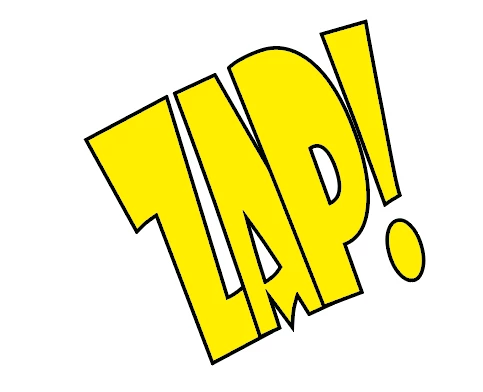
Thanks!

Dieses Thema wurde für Antworten geschlossen.
Beste Antwort von Monika Gause

Type everything backwards.

Apply the rotation 180° in the character panel to the letters

Rotate the complete text object by 180°

Possibly you will need to adjust your text path.

3 Antworten

Myra Ferguson
Community Expert
Community Expert
June 21, 2017

Monika's idea got me thinking. Enter the letters in reverse order (ZAP would be PAZ), then set your tracking to a huge negative number (it'll depend on what size your font is--I used -1000 on 100 pt text on a 3.4" circle.

Monika Gause
Community Expert
Community Expert
June 21, 2017

Type everything backwards.

Apply the rotation 180° in the character panel to the letters

Rotate the complete text object by 180°

Possibly you will need to adjust your text path.

Bill Silbert
Community Expert
Community Expert
June 21, 2017

I tried Monika's solution which works very well up to a point. On its own it doesn't allow you to maintain the way the baseline of the text aligns to the object. I did find though that if you set your type on a path options dialog like the screen shot below then the proper alignment can be created:

Bill Silbert
Community Expert
Community Expert
June 21, 2017

The only way that I could think to do it is to make three copies of the type and the path and place each on a different layer. Then with two of the layers locked delete two of the characters from that layer and rotate the path so that the remaining letter is in the correct position. If I'm interpreting your question correctly then the result should look something like the screen shot below:

With this method the text is still editable.

Participant
June 21, 2017

Your interpreting my question right but Im looking for a for a way to change it so every time I type a new word it comes out stacked front to back