This topic has been closed for replies.
Correct answer RH24404860z68m

Hi @RH24404860z68m,


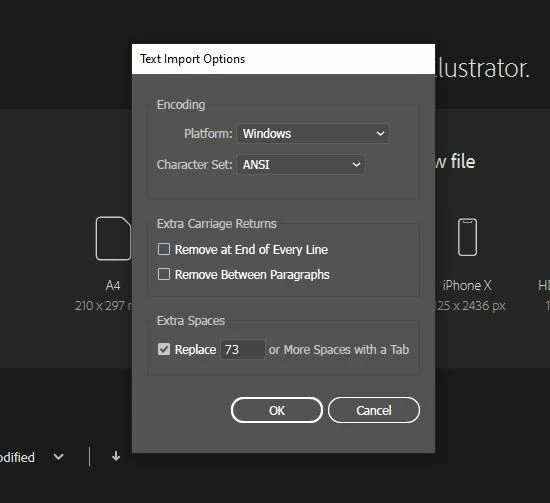
I am really sorry to hear about that. Generally, when the "text import option" dialog box pops up after launching a file, it means the file has gotten corrupted. I agree with @Monika Gause. When a file is getting saved, it is in a most vulnerable state, and the computer crashing at that time will cause corruption.


However, you may share the download link to the file with me here or via DM, and I will check on my end. But I must inform you that file recovery can't be guaranteed with a 100% success. We'll surely try our best.


Also, In addition to Monika's suggestion to have multiple backups & save files regularly, I would recommend you the next best alternative that would be to save the file as Cloud Documents as soon you create a new document. By doing this, your file gets saved after every 5 minutes by default, and they automatically get versioned. You will be able to retrieve previous document versions as your work goes through multiple review iterations with the clients or your computer gets crashed.

I will be looking forward to the downlink link.


Regards,

Anshul Saini


Thank you, But I recreated this file. and I lose so much time.

3 replies

Met1
Brainiac
May 12, 2022

This is telling you that there is nothing in the file that AI recognizes as helpful in building your ai doc. It's toast.

What is happening when the file crashes?

Are all files crashing consistently when you're doing this, or is it a specific file?

Make sure you are saving to a local drive, not a network, while you're troubleshooting this.

Michael Bullo
Community Expert
May 11, 2022

Can you provide some more detail/context?

Inspiring
May 11, 2022
what you want tell me
Michael Bullo
Community Expert
May 11, 2022

Are you trying to...

  • Open a file
  • Create a new file
  • Import text
  • etc...
Monika Gause
Community Expert
May 11, 2022

You saved your file and now you can't open it? Easiest solution would be: use your backup.


Which version and system is it?

Where did you save the file? If on a server, move to local harddisk first, then open. Does that work?

Is the file size reasonable (and not like 0 KB)?

What's in the file?

Does the file still open in Acrobat? In that case something could perhaps be recovered from it.

Did the computer crash while saving that file?


Why don't you have a backup?

Inspiring
May 11, 2022
Which version and system is it?
(2020)

Where did you save the file? If on a server, move to local hard disk first,
then open. Does that work?
( no, that is not working )

Is the file size reasonable (and not like 0 KB)?
( this file 1.44 MB )

What's in the file?
( Ai )

Does the file still open in Acrobat? In that case, something could perhaps
be recovered from it.
( what is the process )

Did the computer crash while saving that file?
( yes )

Why don't you have a backup?
( no )

Please help me
Inspiring
May 11, 2022

The computer crashed while saving the file.

This is almost a guarantee for the file being lost.


If that happens regularly, you should try and resolve the underlying issue for the crashes.

On top of that: make backups. Save your file regularly and make copies of it on different harddisks


For the corrupt file, maybe @Anshul_Saini can help you, but I wouldn't hope for too much, because of the crash while saving.


oh no,
But Thanks a lot