



Inventsable
Legend
May 16, 2018
Answered

How do I access the values inside the Color panel or know whether it's currently set to stroke or fill?

  • May 16, 2018
  • 2 replies
  • 2146 views

Hello, very new to scripting. I know that I can assign a color to selected objects:

app.documents.add(DocumentColorSpace.RGB)

// get the active document

var doc = app.activeDocument;

// verify there is a document and at least one shape,

  // enumerate through each pathItem and assign a given color to fill

if ( app.documents.length > 0 && app.activeDocument.pathItems.length > 0) {

  var newColor = new RGBColor;

  newColor.red = 255;

  newColor.green = 0;

  newColor.blue = 0;

    for (var a=0; a<app.selection.length; a++) {

        try {

                var currentSelection = app.selection;

                // But how would I know whether Stroke or Fill is active here?

                currentSelection.fillColor = newColor;

        }

        catch (e){alert(e)

        }

    }

}
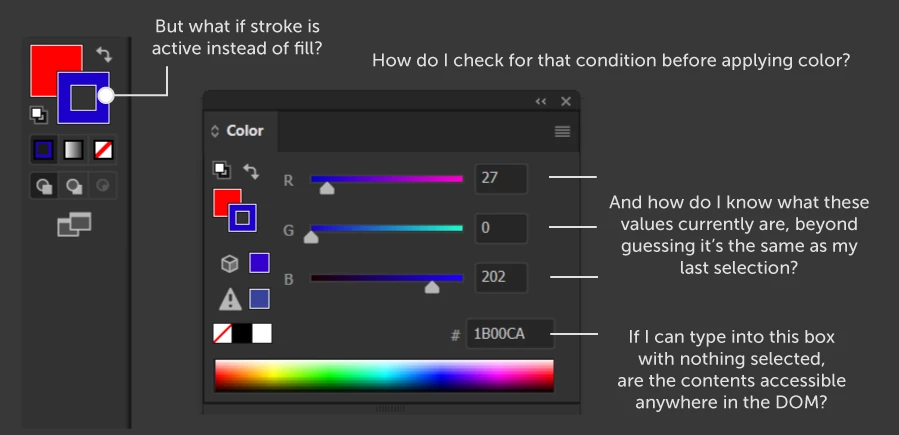
With AutoHotKey, I can use ControlGetText on the input element of the Color Panel ("Edit 15") to directly interact and easily apply colors by submitting a new value within it, which accurately sends it as a stroke or fill depending on which is currently toggled. Is there any way to replicate this and have access to the current/active value within this panel?

This topic has been closed for replies.
Correct answer Silly-V

Thanks Alexander! That solves half my problem.

Also Loic, I do given how I plan to use it. This isn't for a standalone script but for a panel that will assign a new color dynamically. I should've explained more clearly: I don't want to assign both a stroke and a fill or to check if a specific color is/isn't used, I only want to assign a color as a fill if fill is active and only stroke if stroke is active -- but never both at the same time, never assign the color to a fill if stroke is active and vice versa. Since this is for a panel it's passive and meant to be used organically multiple times throughout a natural workflow, just like the current Colors panel. I've yet to see any examples of this or any kind of conditional that determines it in any of my searching, but it does concern me.


You probably need the Application.isFillActive() method.

2 replies

Inventsable
Legend
May 16, 2018

Works, thanks for the pointers guys.

var isFill = app.isFillActive();

if (isFill) {

  alert("Fill is active");

} else {

  alert("Stroke is active");

}

Admittedly I think it's strange that, despite earnestly trying to read a lot of the documentation on SDK, CEP and JavaScript (because it's not too clear what I should be aiming for? There isn't an outline saying "If you want this, then pursue this route, etc., it's all bundled together) extensions for the last two months in preparation of all this, I don't remember a single mention of the Help > Object Model Viewer from Extendscript that SillyV pointed out. Am I wrong in saying that? Also that even inside this OMV, there aren't any samples and the description snippets are given in pseudo-code abstractions like "Application.isFillActive" instead of "app.isFillActive" directly despite the fact this isn't under a cross-platform specification and is explicitly a class for Illustrator 22 Type So why isn't it "app.isFillActive()", to avoid confusion, or a simple example of it in use? Maybe it's just me, but some of the documentation seems very obtuse -- like how in the JavaScript Scripting Reference, it explicitly says something to the effect of "There aren't many samples and what samples there are won't necessarily be the best way to do them in JS so if you want to find out something you'll have to extrapolate the info needed over the entirety of samples given (for all hundreds of pages, of which what seems like 90% I would never need to touch because I'm not in the printing business). It's the reason I've felt the need to edge towards this over the course of months rather than just jump into it and learn from direct engagement, even though I've been using Illustrator, After Effects and Photoshop for years and am really familiar with the programs.

Silly-V
Legend
May 17, 2018

Hmm, what can we say, the specialized field of this kind of tools development is affected by the version history of the applications - it's indeed years of experience with both the regular usage of the software as well as automating it which enable one to solve their extensibility challenges. The key will be to train oneself to retrieve the answers for the correct questions about the work, which is the greatness of this very forum. By finding yourself here, you can tap into the 'true' documentation of Illustrator scripting.

It is apparent from your initial approach that you model your process by directly translating the user actions into your logic, since you were talking about UI scripting. The UI scripting will inevitably fail due to possible updates in the UI of any program.

Therefore it becomes necessary to create practice scripts to learn the scripting commands for the application in order to know what can be automated by their provided abilities. Some features that users can easily change in the UI are actually no manipulable by scripting and we sometimes do have to rely on bits of UI scripting as a last resort.

So unfortunately what you've found yourself in is a barrier of learning curve which slows your stride. However, with the help of this forum and snippets posted here and there, you can achieve this mind-set and leverage the scripting api to be a vital component within your automation capabilities.

Also compare this to the Photoshop scripting world where the OMV for PS has to be hunted down and manually added to the OMV folder, and how many of the Photoshop commands aren't available through the scripting api but rather a javascript programmatically-generated action-descriptor code which is recorded by a special script-listener plugin. Quite different than Illustrator and takes much getting used-to, but after initial grumbles and complaints, it's all about getting the work done, and after a while you're over it.

Alexander Ladygin
Inspiring
May 16, 2018

If I understood correctly, then try:

if ( app.documents.length > 0 && app.activeDocument.pathItems.length > 0) { 

  var newColor = new RGBColor; 

  newColor.red = 255; 

  newColor.green = 0; 

  newColor.blue = 0; 

// set fillColor for selection

  activeDocument.defaultFillColor = newColor;

// set StrokeColor for selection

  activeDocument.defaultStrokeColor = newColor;


}

Loic.Aigon
Legend
May 16, 2018

Hi,

Not sure you have to be concerned by either the stroke or fill is active inside the tool/color panels prior to apply either a stroke or a fill.

If you want to ensure a specific fill/stroke color isn't used, then grab it and see its value…

if ( someItem.fillColor.[some attributes] != …)

Inventsable
Legend
May 16, 2018

Thanks Alexander! That solves half my problem.

Also Loic, I do given how I plan to use it. This isn't for a standalone script but for a panel that will assign a new color dynamically. I should've explained more clearly: I don't want to assign both a stroke and a fill or to check if a specific color is/isn't used, I only want to assign a color as a fill if fill is active and only stroke if stroke is active -- but never both at the same time, never assign the color to a fill if stroke is active and vice versa. Since this is for a panel it's passive and meant to be used organically multiple times throughout a natural workflow, just like the current Colors panel. I've yet to see any examples of this or any kind of conditional that determines it in any of my searching, but it does concern me.