

New Participant
August 28, 2013
Answered

How do I change the default font in Illustrator CC?

  • August 28, 2013
  • 11 replies
  • 53047 views

How do I change the default font in Illustrator CC?

    Correct answer Larry G. Schneider

    I have tried opening my custom document profile and changing in the Character Styles, and in the Character palette and

    have been able to do it in previous versions but neither of these seem to work in CC. I've used Illustrator for 15+ years and

    cannot tell you how frustrating it is - I'm sure its, obviously, the one thing I haven't tried (and I've tried alot today) …
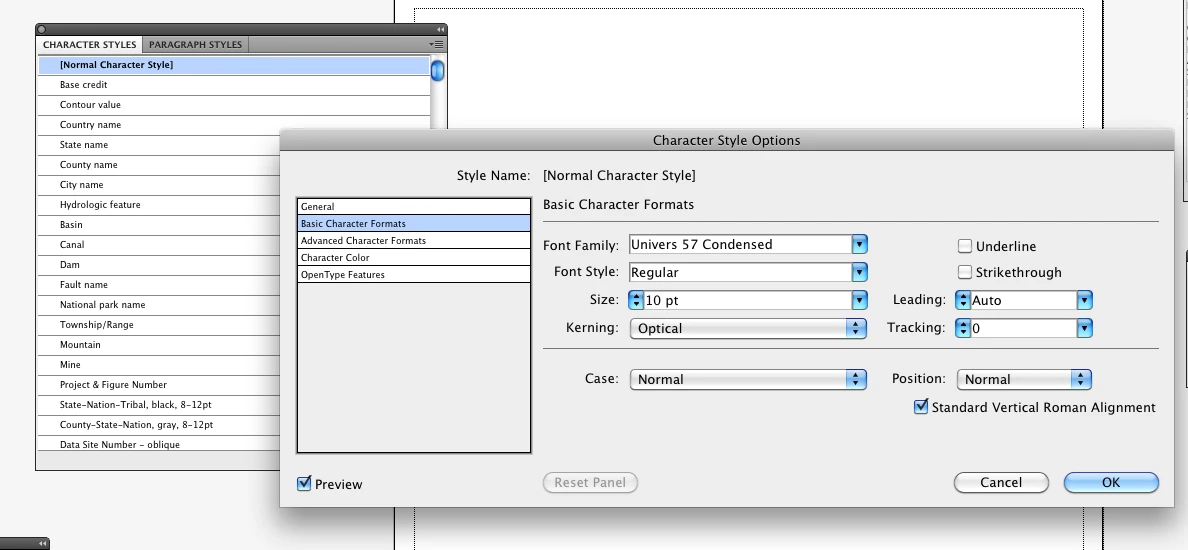

    You double-clicked on the Normal Character Style to open it and then went to the Basic Character Formats line in the box on the left, made the changes you wanted and then said OK. You then Saved the file (actually doing a SaveAs to overwrite the original). Have you tried  restarting AI after doing the above and then trying your revised custom document profile?

    11 replies

    New Participant
    December 13, 2023

    Watch this video and it explains it much more easily. https://youtu.be/iu3yWk0azkk

    Ton Frederiks
    Community Expert
    December 13, 2023

    That changes only the default character style for that document only. That does not answer the question.

    anthonyc78776180
    New Participant
    November 29, 2023

    I don't think it's supported.

    Monika Gause
    Community Expert
    November 29, 2023
    quote

    I don't think it's supported.


    By @anthonyc78776180


    Do you have that same problem? What is not working for you. Please elaborate.

    anthonyc78776180
    New Participant
    November 29, 2023

    I found the answer, but it took forever to find it. This works: https://www.youtube.com/watch?v=i1jaOzqEvfQ

    "Illustrator CC: Change Default Font - How to do it to work 100% of the time" by Helen Bradley. So I guess it is supported, my bad.

    Known Participant
    January 12, 2023

    I see that I can update the default font by changing the character style in each new document. Easy. AI 27 does not have new document preferences in the Library folder, so is it possible to change the default font universally, or do I still have to do it locally for each new AI document opened? 

    Ton Frederiks
    Community Expert
    January 12, 2023

    Your library folder may be hidden. Google : Library folder Mac

    and change the Print or other preset from User > Library > Application Support > Adobe > Adobe Illustrator 23 (or your version number) > en_GB (or your language folder) > new document profiles

    Known Participant
    January 12, 2023

    Yay, worked perfectly! Thank you!

    trashcaneron
    Inspiring
    July 23, 2019

    Well that's good news and works just fine, thanks a ton, Ton!

    Participating Frequently
    February 6, 2020

    I changed all the permissions for the folders, which takes a lot of time. Then I saved the files with a one after them, then deleted the original files, and changed their names back. However, this method didn't stick, meaning I need to change the default manually in the character default document window. Since I know where this is, it is easier to do than changing it all the time, but still frustrating. I am also frustrated that in using Illustrator 2019, one cannot do this in a preference box. This whole experience of using Illustrator 2019 has been a mess, since switching over from CS6. I know I had to do it because of system software issues with the Mac OS, but the lack of documentation has been quite embarassing to say the least. I don't know how you can charge a monthly fee, but only give videos for documentation. Who has the time to devote to watching videos when you are trying to complete projects? This is madness...

    Known Participant
    March 25, 2019

    I've been through this thread and about a dozen others going back to like 1999, and I still haven't got the faintest clue how to change the default font.  I'm on a Mac (OS 10.14.3) using the latest (as of March 2019) version of CC (23.0.2). 

    This really shouldn't be this difficult.  Can anyone help me here?

    Monika Gause
    Community Expert
    March 25, 2019

    You need to change the default character style in the New document profile you use:

    Work with files and templates in Illustrator

    Ton Frederiks
    Community Expert
    March 26, 2019

    https://forums.adobe.com/people/Monika+Gause  wrote

    You need to change the default character style in the New document profile you use:

    Work with files and templates in Illustrator

    That does not tell you how to change that New Document Profile.

    This one does, but it is outdated and incomplete:

    Create a custom new document profile (Illustrator CS3)

    b3achouse
    Inspiring
    October 17, 2017

    I would like to mention some missing steps on a MAC.

    The New Document Profiles folder in the Applications folder is irrelevant (as far as I can see).  You need to adjust the profiles in this folder on a MAC:

    /Users/username/Library/Application Support/Adobe/Adobe Illustrator XX/en_US/New Document Profiles

    Please add your username and illustrator version in the path (My version was 21)

    I went Finder>Go>Home to browse to my library and then continued the path above

    You will also need to change the permissions (mentioned previously) on the profile you wish to adjust otherwise you can't save over it.

    I clicked on Print.ai >Get info > change Sharing and permissions to Read & Write at the bottom of the window.

    Larry G. Schneider
    Community Expert
    October 17, 2017

    The folder of profiles in the Applications/Adobe Illustrator are the ones used to repopulate your user preferences files if you Replace Preferences. You actually need to replace the New Document Profiles in both places for it to be permanent.

    New Participant
    November 10, 2017

    why cant adobe just allow for a simple "stock font" option under preferences?

    would make things a whole lot easier for us folk who hate myriad and dont feel like messing around with all these steps.

    New Participant
    February 17, 2017

    Is there any way to change the default when opening any existing file or is this just for new files

    Larry G. Schneider
    Community Expert
    February 17, 2017

    You would change it in an existing file the same way including the Save As to overwrite the existing file. In an existing file go to Window>Type>Character Styles. Make the changes as above and the use Save As.

    New Participant
    April 6, 2016

    Hi, I opened a new document and follow the steps mentioned above.

    I went to save the document in:

    /Applications/Adobe Illustrator CC 2015/Support Files/New Document Profiles/en_GB/Print.ai

    I received an error in the window pop up saying:

    "Cant save the illustration. The file is locked or in use."

    What do I change the default font in Illustrator CC 2015???

    Thank you

    tommysw
    New Participant
    March 17, 2017

    Hi

    Did you work this out? I just had the same problem, you need to change the permissions for the file in Finder (if you're on a Mac) so that you can read and write. Shouyld do the trick.

    New Participant
    March 17, 2017

    Haven’t had it happen for a while seems to have corrected itself

    Larry G. Schneider
    Community Expert
    January 18, 2014

    The path you are looking for is Window>Type>Character Style in the New Dcoument Profile you wish to change. When AI opens a rester image, no document profile is applied as evidenced by the lack of swatches in the Swatch panel. If you want to add things to a raster image, you would do better to call a new document from the New Document profile you want or have modified to your liking and Place the raster file (embedding it). Doing this ill make all the thing you want available, especially the font.

    Inspiring
    January 19, 2014

    LGS:

    Thanks for your fast, on-target response:

    The path you are looking for is Window>Type>Character Style in the New Dcoument Profile you wish to change.

    Thanks  for your patience on this point.   I spend a lot of time away from AI, and it is easy to forget such basics.   OK, got it, whenever I need a panel, look in Window> ... at the lowest levels.  That's written in neon letters in my brain now.  

    When AI opens a rester image, no document profile is applied as evidenced by the lack of swatches in the Swatch panel.

    That's definitely good to know, though a bit indirect.   Why not have a status window display the current profile, or "none" in the case of raster images? 

    That said:  From a s/w engineering point of view, it doesn't make intuitive sense that there would be this exception case, apparently the only one, in which you can arrive at a new document, ready-to-edit, without a profile established.   When I drag-and-drop a JPG on AI, I get some kind of consistent, if not complete-with-swatches, environment.   Why not allow some user control over that?  More about this below.

    If you want to add things to a raster image, you would do better to call a new document from the New Document profile you want or have modified to your liking and Place the raster file (embedding it). Doing this ill make all the thing you want available, especially the font.

    Yes, I understand that fully.  For this particular workflow, multiple JPGs that need a bit of text added at the bottom,   I seem to have a choice between a) using drag-and-drop, requiring for each image the tedious restablishment of the text environment I want.  Or b) using Place,  as you suggest, which requires a different set of tedious overhead clicks, and does not have the advantage of being able to drag-and-drop to AI an entire group of the JPGs at once. 

    (I'm guessing AI is scriptable, so I could probably work out a way of doing this more automatically using Applescript, but ... I'm pressed to get the JPGs annotated NOW and it seems a significant detour to arrange the scripting.)

    To return to the point above:   When I arrive in AI after dragging-and-dropping a JPG,  at least some partial work environment is set.  My main issue is this:  I've standardized on Helvetica, I want to use Helvetica, and it would be sufficient if I could replace the default Myriad Pro Regular 12 with, say Helvetica Regular 14.  Permanently.   I'm guessing that Myriad Pro isn't hard-coded into AI CC, so there should be a way to do this.  

    (In DreamWeaver, I'd look for a JavaScript code that's run just after a new edit window is opened and see if I could change the current font at that point. But... I'm completely ignorant of AI scripting, it isn't immediately obvious that it is parallel to DW, and that's another detour, when someone is banging on me to get the @$$%Q$*#$ JPGs annotated.)

    So... any chance of permanently replace Myriad with Helvetica?

    Thanks!

    New Participant
    August 28, 2013

    I am not finding this? Can you show me a little more background steps?

    New Participant
    August 28, 2013
    New Participant
    August 28, 2013

    I have tried opening my custom document profile and changing in the Character Styles, and in the Character palette and

    have been able to do it in previous versions but neither of these seem to work in CC. I've used Illustrator for 15+ years and

    cannot tell you how frustrating it is - I'm sure its, obviously, the one thing I haven't tried (and I've tried alot today) …