

Participant
September 28, 2024
Answered

How do I draw a thick curved line?

  • September 28, 2024
  • 1 reply
  • 933 views

I keep getting a filled-in half moon.

I am drawing gnomes and I need "emphasis" lines like defined round cheeks and lines within pointed ears.

This topic has been closed for replies.
Correct answer Ton Frederiks

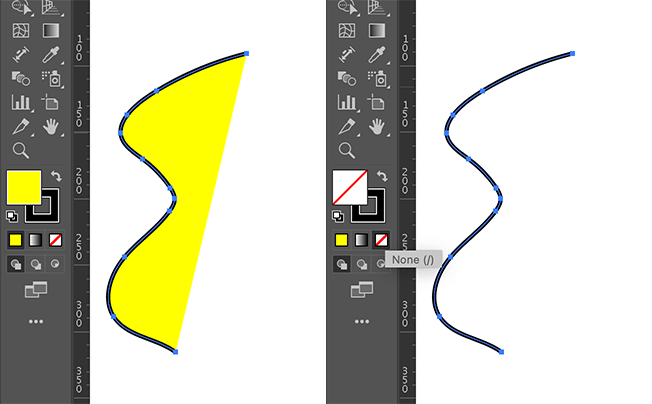
You have a fill and a stroke. When your object is selected (or before you start drawing), click the none button in the toolbar with the Fill as target.
1 reply

Monika Gause
Community Expert
Community Expert
September 28, 2024

You are using the brush tool and they keep getting filled in?


First of all: do you need a calligraphy brush on your stroke?

If so, then what you could do is apply the zigzag effect with a size of 0 and a high value for the ridges, such as 50 or even higher.

Participant
September 28, 2024

I apologize.  This is only my fourth day of using Illustrator and your answer is a little more sophisticated than I can respond to.  I am using the curvature tool.  I do not know what settings to use to remove the fill and just make it a line.  This is what it looks like.

Ton Frederiks
Community Expert
Ton FrederiksCommunity ExpertCorrect answer
Community Expert
September 28, 2024

You have a fill and a stroke. When your object is selected (or before you start drawing), click the none button in the toolbar with the Fill as target.